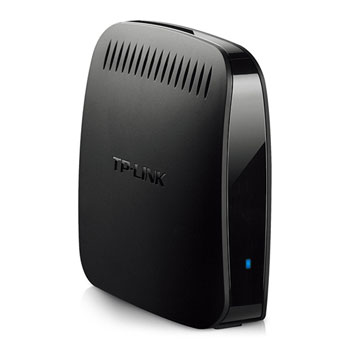
TP-Link WA890EA Wireless Ethernet Adapter Convert Wired Devices to Wireless
Scan code: LN66193
Manufacturer code: TL-WA890EA
End Of Life

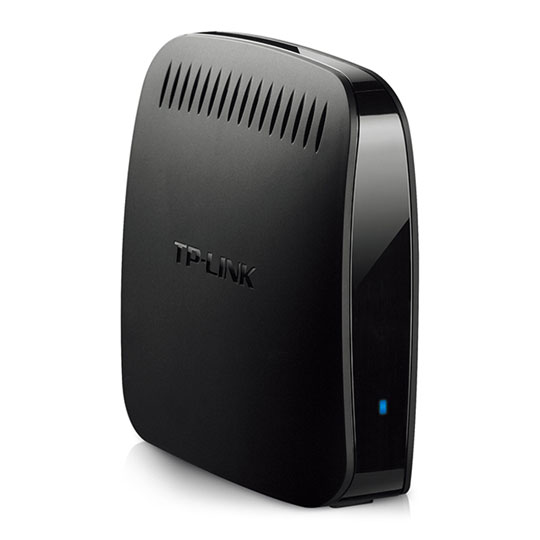


TP-Link WA890EA Wireless Ethernet Adapter Convert Wired Devices to Wireless
TP-Link TL-WA890EA, N600 WiFi Entertainment Device Adapter, 300Mbps, Dual Band, 802.11a/b/g/n, 4x 10/100 LAN
Scan code:
LN66193
Manufacturer code:
TL-WA890EA
This product is no longer available to purchase.
Email me when the availability or price changes
Product Overview
Imagine bringing all of your home or office’s Internet-enabled devices into the world of wireless. By connecting them to this entertainment adapter, the devices in your home that previously required running Ethernet cables around furniture, through walls and doorways can now be connected to your network wirelessly, without the risk of degrading performance. With N600 dual band wireless speeds and four LAN ports, TL-WA890EA provides your devices with ample bandwidth for smooth HD video and music streaming and online gaming.
Wireless Connectivity for Game Consoles, Smart TV and So On
The Entertainment Adapter can function as a wireless adapter to connect wired devices far away from a Router where running an Ethernet cable would be messy and troublesome. With 4 ports, you can instantly connect up to 4 Ethernet-enabled devices like Blu-ray® players, gaming consoles, DVRs, IPTV Set-top-box, printers and Smart TVs.
Universal Compatibility
Works with any device with an Ethernet port, and seamlessly with all 802.11 a/b/g/n wireless devices. It is also compatible with the latest Windows 8 operating system. You no longer need to buy an individual proprietary Wi-Fi Adapter for each device that you want to enable with wireless.
N600 Wireless Speeds
With 300Mbps at 5GHz for clear wireless transmission or 300 Mbps at 2.4GHz, those devices in your home that previously required Ethernet cables to connect to the network can now be connected to your network wirelessly, without the risk of degrading performance.
WPS - One Touch Connection
Within range of the existing wireless network, just push the paired "WPS" button on the router followed by the Entertainment Adapter or vice versa, and the device will automatically establish a WPA-PSK/WPA2-PSK secure connection with the router.
What's more, the device can remember previously paired wireless networks, meaning there is no need to reconfigure the device when transferring outlets within wireless range.
More information can be found in the PDF below:
 Features
• Gives wired-only devices (Eg. Smart TVs and Blu-ray players) access to an existing Wi-Fi network
Features
• Gives wired-only devices (Eg. Smart TVs and Blu-ray players) access to an existing Wi-Fi network
• Dual band performance, 300Mbps wireless speed over 5GHz or 2.4GHz
• Easy wireless connection at a push of the WPS button
• Works with any device with an Ethernet port, and seamlessly with all 802.11 a/b/g/n wireless devices
• Supports WEP, WPA/WPA2, WPA-PSK/WPA2-PSK encryption
• CD-less installation, Easy to use
Includes:
• Dual Band Entertainment Adapter TL-WA890EA
• Power supply unit
• Micro USB Cable
• RJ-45 Ethernet Cable
• Resource CD
• Quick Installation Guide
Compatible Operating Systems:
• Microsoft Windows 98SE, NT, 2000, XP, Vista™, 7, 8, MAC OS, NetWare, UNIX or Linux.
Wireless Connectivity for Game Consoles, Smart TV and So On
The Entertainment Adapter can function as a wireless adapter to connect wired devices far away from a Router where running an Ethernet cable would be messy and troublesome. With 4 ports, you can instantly connect up to 4 Ethernet-enabled devices like Blu-ray® players, gaming consoles, DVRs, IPTV Set-top-box, printers and Smart TVs.
Universal Compatibility
Works with any device with an Ethernet port, and seamlessly with all 802.11 a/b/g/n wireless devices. It is also compatible with the latest Windows 8 operating system. You no longer need to buy an individual proprietary Wi-Fi Adapter for each device that you want to enable with wireless.
N600 Wireless Speeds
With 300Mbps at 5GHz for clear wireless transmission or 300 Mbps at 2.4GHz, those devices in your home that previously required Ethernet cables to connect to the network can now be connected to your network wirelessly, without the risk of degrading performance.
WPS - One Touch Connection
Within range of the existing wireless network, just push the paired "WPS" button on the router followed by the Entertainment Adapter or vice versa, and the device will automatically establish a WPA-PSK/WPA2-PSK secure connection with the router.
What's more, the device can remember previously paired wireless networks, meaning there is no need to reconfigure the device when transferring outlets within wireless range.
More information can be found in the PDF below:
Features
• Gives wired-only devices (Eg. Smart TVs and Blu-ray players) access to an existing Wi-Fi network• Dual band performance, 300Mbps wireless speed over 5GHz or 2.4GHz
• Easy wireless connection at a push of the WPS button
• Works with any device with an Ethernet port, and seamlessly with all 802.11 a/b/g/n wireless devices
• Supports WEP, WPA/WPA2, WPA-PSK/WPA2-PSK encryption
• CD-less installation, Easy to use
Includes:
• Dual Band Entertainment Adapter TL-WA890EA
• Power supply unit
• Micro USB Cable
• RJ-45 Ethernet Cable
• Resource CD
• Quick Installation Guide
Compatible Operating Systems:
• Microsoft Windows 98SE, NT, 2000, XP, Vista™, 7, 8, MAC OS, NetWare, UNIX or Linux.


TP-Link WA890EA Wireless Ethernet Adapter Convert Wired Devices to Wireless
![TP-Link WA890EA Wireless Ethernet Adapter Convert Wired Devices to Wireless]()