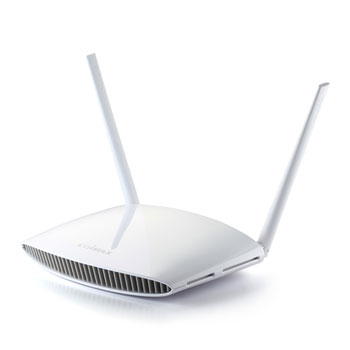
Edimax 300Mbps BR-6428nS V3 5in1 WiFi Broadband Router
Scan code: LN64298
Manufacturer code: BR-6428nSV3
End Of Life

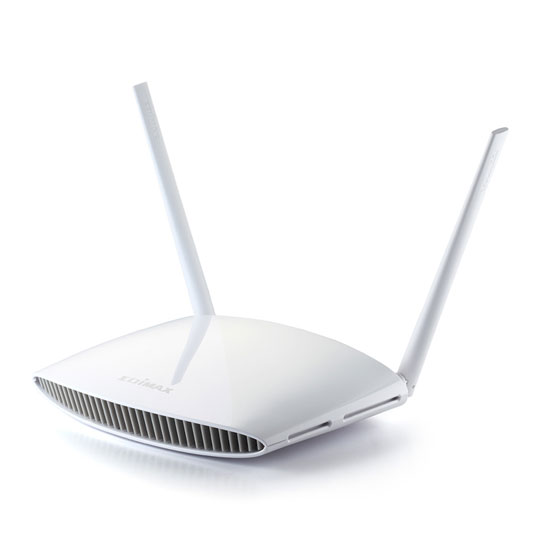

Edimax 300Mbps BR-6428nS V3 5in1 WiFi Broadband Router
Edimax BR-6428nS V3, N300, Single Band, 802.11 b/g/n, 4x LAN, Wireless Cable Router/AP/Range Extender/Bridge/WISP
Scan code:
LN64298
Manufacturer code:
BR-6428nSV3
This product is no longer available to purchase.
Email me when the availability or price changes
- SCANPROTECT Protect against installation damage for 28 days.
Product Overview
The BR-6428nS V3 is a 300Mbps high-speed 5-in1 multi-function Wi-Fi solution which supports IEEE 802.11b/g/n standards and provides significantly improved coverage with the High-gain antenna. Operating as a router, access point, range extender, Wi-Fi Bridge or WISP, the BR-6428nS V3’s flexibility meets the demands of any networking applications. The smart iQ Setup wizard makes setup and installation as easy as a few clicks. Impressive performance and a competitive price make the BR-6428nS V3 a cost-effective solution for home or small office environments.
5-in-1 Wi-Fi Router, Access Point, Range Extender, Wi-Fi Bridge and WISP
The BR-6428nS V3 can work as router, access point, range extender, Wi-Fi Bridge or WISP. Just configure the mode you need for your network environment using the smart iQ Setup wizard.
Switch mode using the smart iQ setup wizard on any device with a web browser, no CD required.
*Mobile device setup requires iOS 4.0 or Android 4.0 and above.
Smart iQ Setup
Features iQ Setup for smart, automatic and quick installation with no CD required.
Edimax’s Revolutionary iQoS
iQoS is Edimax’s solution for a quicker, easier, and more effective way to manage Internet bandwidth. While Quality of Service (QoS) functionality is a common feature in routers across the market, typically only advanced users have the knowledge required to set up the complex parameters. Edimax though has redesigned QoS with user-friendliness and accessibility in mind. A simple and intuitive user interface allows users to arrange bandwidth priority settings in just a few clicks. With iQoS, you can enjoy gaming, video streaming, VoIP applications and BT clients at the same time without the usual nightmare of lag and interruptions. An original, efficient and effective means of managing your Internet bandwidth.
Multi-SSID & VLAN Support*
Multi-SSID enables users to configure up to five separate SSIDs (2.4GHz x 5) in order to group and manage users according to your requirements.
*Access point mode only.
Guest Network*
Supports a guest network to provide connectivity while isolating guests from your primary network.
*Router mode only. Features • 5-in-1: Router, Access Point, Range Extender, Wi-Fi Bridge & WISP.
• Smart iQ Setup: For smart, automatic and quick installation with no CD required.
• High Gain Antenna: Enhances wireless range and coverage.
• Guest network: Provides connectivity while isolating guests from your primary network.
• Wi-Fi Protected Setup (WPS) Button: For easy one-click setup.
5-in-1 Wi-Fi Router, Access Point, Range Extender, Wi-Fi Bridge and WISP
The BR-6428nS V3 can work as router, access point, range extender, Wi-Fi Bridge or WISP. Just configure the mode you need for your network environment using the smart iQ Setup wizard.
Switch mode using the smart iQ setup wizard on any device with a web browser, no CD required.
*Mobile device setup requires iOS 4.0 or Android 4.0 and above.
Smart iQ Setup
Features iQ Setup for smart, automatic and quick installation with no CD required.
Edimax’s Revolutionary iQoS
iQoS is Edimax’s solution for a quicker, easier, and more effective way to manage Internet bandwidth. While Quality of Service (QoS) functionality is a common feature in routers across the market, typically only advanced users have the knowledge required to set up the complex parameters. Edimax though has redesigned QoS with user-friendliness and accessibility in mind. A simple and intuitive user interface allows users to arrange bandwidth priority settings in just a few clicks. With iQoS, you can enjoy gaming, video streaming, VoIP applications and BT clients at the same time without the usual nightmare of lag and interruptions. An original, efficient and effective means of managing your Internet bandwidth.
Multi-SSID & VLAN Support*
Multi-SSID enables users to configure up to five separate SSIDs (2.4GHz x 5) in order to group and manage users according to your requirements.
*Access point mode only.
Guest Network*
Supports a guest network to provide connectivity while isolating guests from your primary network.
*Router mode only. Features • 5-in-1: Router, Access Point, Range Extender, Wi-Fi Bridge & WISP.
• Smart iQ Setup: For smart, automatic and quick installation with no CD required.
• High Gain Antenna: Enhances wireless range and coverage.
• Guest network: Provides connectivity while isolating guests from your primary network.
• Wi-Fi Protected Setup (WPS) Button: For easy one-click setup.


Edimax 300Mbps BR-6428nS V3 5in1 WiFi Broadband Router
![Edimax 300Mbps BR-6428nS V3 5in1 WiFi Broadband Router]()