
Acer 27" Full HD VA Monitor Blue Light Filter Pro Flicker Free
End Of Life
Acer 27" Full HD VA Monitor Blue Light Filter Pro Flicker Free
Scan code: LN104651 Manufacturer code: UM.HX0EE.A09
End Of Life
End Of Life

Acer 27" Full HD VA Monitor Blue Light Filter Pro Flicker Free

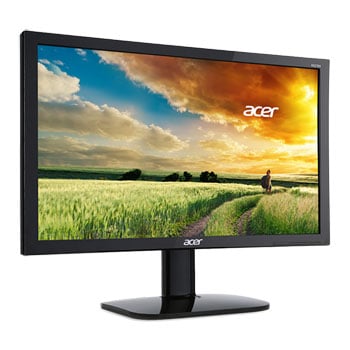
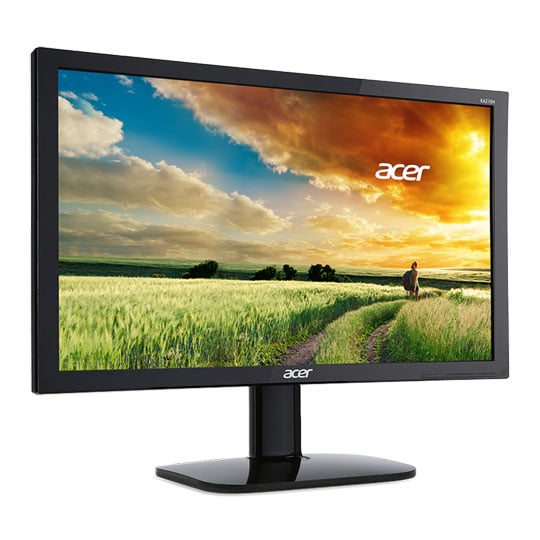
27" Acer KA270HA Monitor, VA, 1920x1080, 60Hz, 4ms, 100M:1, 300cd/m², HDMI/VGA/DVI

Scan code: LN104651 Manufacturer code: UM.HX0EE.A09
End of life
This product is no longer available to purchase.

Email me when the availability or price changes

  • SCANPROTECT Protect against installation damage for 28 days.

27" KA270HA Full HD VA Monitor from Acer

Acer KA270HA monitor

THE IDEAL DISPLAY FOR ANY WORKSPACE The 27" Acer KA270HA is an ideal monitor for any working desk setup. It offers beautiful visuals on its full HD display, a 4ms response time to reduce ghosting when working or watching media, and a 178° view angle so you can share ideas with everyone. This stunning display also offers Acer's ComfyView technology, which works by reducing blue light without sacrificing the image. There's also on-screen display buttons to make adjusting settings easier, and you can even mount the display to a wall. This monitor is also completely eco-friendly, with mercury-free backlighting, arsenic-free display glass, and recyclable packaging. It truly couldn't be better for your office space.

27"Screen Size

1920 x 1080Full HD Resolution

60HzRefresh Rate

VAPanel Type

Discover Stunning Visuals

back

FULL HD DISPLAYSee clearly with a beautiful Full HD display. Opt for a vivid IPS 2 panel with a 178° wide viewing angle or lightning-quick TN1 panel to suit your needs. A 4ms response time reduces ghosting and takes action-packed entertainment to a new level.

Work with Ease

back

ACER COMFYVIEWSit back and get comfortable with Acer ComfyView technology to reduce reflective glare and Blue Light Filter Pro1 to remove harmful blue light without sacrificing colour or brightness. Get a good view with convenient -5° to 15° tilt adjustment.

Change Settings with a Simple Press

back

SMART DESIGNOn-screen display buttons are conveniently located on the front of the device for easy access. The KA0 series is wall-mountable and has space for a Kensington® lock for added security.

Warranty

Please note your statutory rights are not affected.

For further information regarding Scan's warranty procedure please see our terms and conditions

Details
Duration:
24 months
Type:
Direct
DOA Period:
5 days
Manufacturer Contact Details
Manufacturer:
Acer
Telephone:
0371 760 1000
Buying Guide
Need help? Read our Monitors Buying Guide
HDR Monitors
HDR Monitors
Date Issued: 11th May 2020

PC monitor manufacturers tend to focus on a particular buzzword or acronym almost every year. In the past, we have been treated to HD (high definition), denoting the screen is capable of running a minimum 720p resolution.

Read More

Display Panel Types
Display Panel Types
Date Issued: 15th May 2015

Choosing a monitor is not an easy decision to make, and not just because of the large number of variations in resolution, refresh rates, sizes and connectivity options. There are also varying panel technologies used to form each display that need to be considered. These panel technologies can be grouped into three broad categories which cover the vast majority of monitors sold in the consumer market.

Read More

Graphics Card Outputs
Date Issued: 8th Oct 2010

Modern desktop computers and notebooks comprise of a CPU, motherboard, graphics, storage, and, usually an optical drive. Computers have a number of ports and sockets that enable the user to plug-in various peripherals such as a printer, USB mouse, or, perhaps most importantly of all, an Internet connection.

Read More

HDMI
HDMI
Date Issued: 3rd Dec 2008

Keeping in tandem with technological developments, audio/video connectors continue to evolve at a steady pace. Today, the most common digital connector comes in the form of HDMI and we're here to tell you what it is, what it does, and why you might need it.

Read More

DVI
DVI
Date Issued: 20th Oct 2008

As you’ll all likely know by now, DVI is the current standard for connection of a PC or other display generator to a digital display output. You’ll recognise the multi-pin connector and know that almost all modern LCD displays have the corresponding input connector, for feeding from your PC. But do you know how DVI works? This TekSpek seeks to teach you how.

Read More

HDTV 720/1080
HDTV 720/1080
Date Issued: 14th Jun 2008

Whether the broadcasters are going HD or not, TV sets and projectors are arriving thick and fast which claim to support higher resolutions than regular telly. But HDTV is far from just one standard – it incorporates a couple of different resolutions, two different scanning modes, and a number of different frame rates. In this article, we present a guide to what all the terms actually mean.

Read More

DVI/HDMI/HDCP
DVI/HDMI/HDCP
Date Issued: 14th Jun 2008

There’s a lot more to High Definition than just having the ability to run your screen at the right resolution. With more than one type of connection available, and the thorny subject of signal encryption to contend with, just because your monitor and graphics are capable of 1,920 x 1,080 or better does not necessarily mean they will be able to display HDTV in all its glory.

Read More

Acer 27" Full HD VA Monitor Blue Light Filter Pro Flicker Free