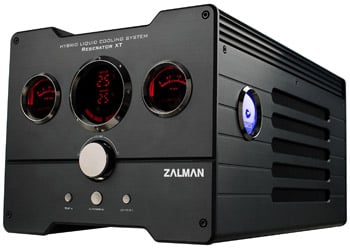
Zalman Reserator XT Black Hybrid Water Cooling System
Scan code: LN19834
Manufacturer code: RESERATOR-XT-BLACK
End Of Life

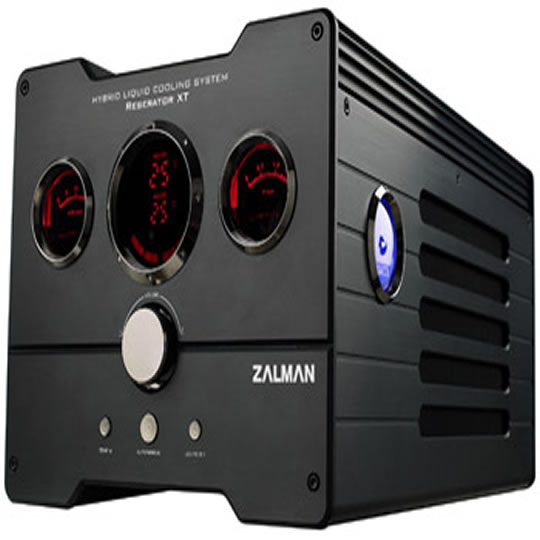

Zalman Reserator XT Black Hybrid Water Cooling System
Scan code:
LN19834
Manufacturer code:
RESERATOR-XT-BLACK
This product is no longer available to purchase.
Email me when the availability or price changes
Product Overview
Reserator (Reservoir+Radiator+Water Pump)
1. High Performance Ultra Quiet Water Cooling System
2. Active/Passive Hybrid Cooling Design
- Active Cooling: 140mm Fan (Forced Convection Cooling)
- Passive Cooling: Anodized Aluminum Heatsink Chassis(Natural Convection Cooling)
3. Automatic/Manual Control Modes
- Automatic Mode: Coolant Temperature is monitored for Automatic Control of Fan Speed and Coolant Flow Rate.
- Manual Mode: Front Panel Control Knob allows the user to manually optimize performance and minimize noise
4. Warning & Alarm System
- Coolant Flow Monitoring: Warns the user when coolant flow is problematic.
- Coolant Level Monitoring: Warns the user when the coolant level is low.
5. Comprehensive Visual Monitoring Display
- Coolant Temperature (viewable in °C or °F)
- Ambient Temperature (viewable in °C or °F)
- Coolant Level Warning Icon (Lights Up When Coolant Level Is Low)
6. Coolant Flow Rate
- Coolant Flow Indicator
- Light Switch
7. Automatic Power ON/OFF In Sync with the Computer
8. Quick Couplings for Fast, Convenient, and Leak-Free Installation & Maintenance
- Weight : 7kg
- Dimensions : 350(L) x 210(W) x 180(H) mm
- Materials : Anodized Pure Aluminum
- Maximum Coolant Capacity : Max. 1.25l
- Integrated Water Pump : 6W, DC 12V, 300L/Hr
- Maximum Lift : 1.8m
- Color Options : Titanium / Black
Features • Active/passive hybrid cooling design.
• Automatic/manual fan speed control modes.
• Coolant flow & low-level warning alarms.
• Automatic on/off when PC is switched on/off.
1. High Performance Ultra Quiet Water Cooling System
2. Active/Passive Hybrid Cooling Design
- Active Cooling: 140mm Fan (Forced Convection Cooling)
- Passive Cooling: Anodized Aluminum Heatsink Chassis(Natural Convection Cooling)
3. Automatic/Manual Control Modes
- Automatic Mode: Coolant Temperature is monitored for Automatic Control of Fan Speed and Coolant Flow Rate.
- Manual Mode: Front Panel Control Knob allows the user to manually optimize performance and minimize noise
4. Warning & Alarm System
- Coolant Flow Monitoring: Warns the user when coolant flow is problematic.
- Coolant Level Monitoring: Warns the user when the coolant level is low.
5. Comprehensive Visual Monitoring Display
- Coolant Temperature (viewable in °C or °F)
- Ambient Temperature (viewable in °C or °F)
- Coolant Level Warning Icon (Lights Up When Coolant Level Is Low)
6. Coolant Flow Rate
- Coolant Flow Indicator
- Light Switch
7. Automatic Power ON/OFF In Sync with the Computer
8. Quick Couplings for Fast, Convenient, and Leak-Free Installation & Maintenance
- Weight : 7kg
- Dimensions : 350(L) x 210(W) x 180(H) mm
- Materials : Anodized Pure Aluminum
- Maximum Coolant Capacity : Max. 1.25l
- Integrated Water Pump : 6W, DC 12V, 300L/Hr
- Maximum Lift : 1.8m
- Color Options : Titanium / Black
Features • Active/passive hybrid cooling design.
• Automatic/manual fan speed control modes.
• Coolant flow & low-level warning alarms.
• Automatic on/off when PC is switched on/off.


