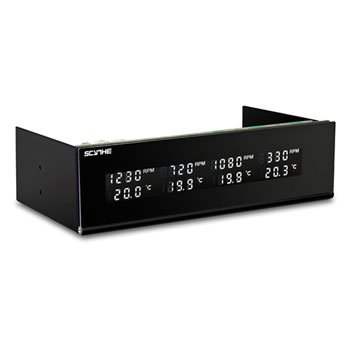
Scythe Kama Master Flat Four Channel Fan Controller
Scan code: LN49217
Manufacturer code: kaze-master-flat
End Of Life


Product Overview
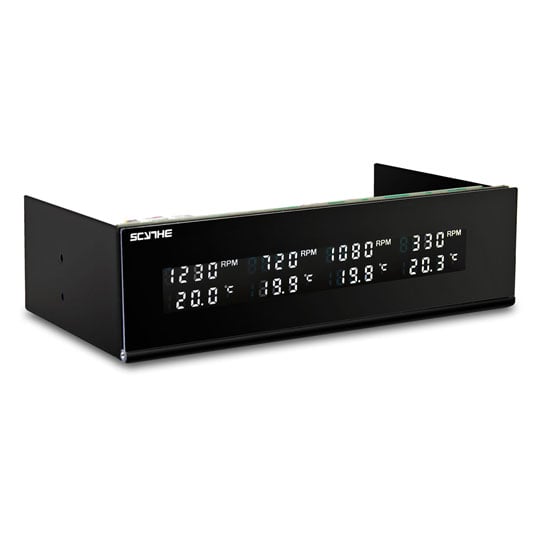
Introducing the Kaze Master Flat, the new four channel fan controller from Scythe. Its sleek control-free front panel makes this ideal for use in cases that uses a door to hide the 5.25 inch drive bays.
The Kaze Master Flat is designed to be installed into a 5.25" bay. As protruding control knobs would interfere with front doors of computer cases (preventing their closure), the Kaze Master Flat does not suffer from this problem making it ideal for use in a case that uses a door to hide the 5.25" drive bays such as the Nanoxia Deep Silence 1.
• Control up to 4 fans and monitor 4 temperatures
• Hinged front cover protects the display
• Fan voltages adjustable between 3.7 - 12v
• Can control 3 or 4-pin PWM fans
• Display temperatures in Celsius or Fahrenheit
• Temperature alarm
Features Control 3 or 4-pin PWM fans
As with most Scythe fan controllers, the Kaze Master Flat can control either standard 3-pin fans or 4-pin PWM fans making it easy to control all the fans in the PC case, including the CPU fan.
Liquid Crystal Display
The Kaze Master Flat's discreet LCD-display provides the user with information about the temperature and the rpm's for each of the four fans. The display is neatly arranged and can be switched off at the user's convenience.
Protective Display Cover
The front panel of the Kaze Master Flat protects its display with a hinged cover which also prevents unintentionally touching the switches.
Spin Up Voltage
The adjustable voltage range is between 3.7 to 12 volts. Some fans have problems starting up at lower voltages so to get around this in the lower ranges, the unit will start all fans at 12v to ensure that they start correctly. Once spinning, the voltage is lowered to the user-defined setting.
Temperature Warning Function
By setting the dip-switch at the back of the unit, the user is able to set the desired temperature for the alarm to go off. The values can be set between 55 °C and 90 °C in 5-degree steps.
Jumper Switch for Personal Settings
For personal settings, the Kaze Master Flat comes with two jumper switches, one for turning the alarm sound on/off, the other one for choosing between Celsius and Fahrenheit.
The Kaze Master Flat is designed to be installed into a 5.25" bay. As protruding control knobs would interfere with front doors of computer cases (preventing their closure), the Kaze Master Flat does not suffer from this problem making it ideal for use in a case that uses a door to hide the 5.25" drive bays such as the Nanoxia Deep Silence 1.
• Control up to 4 fans and monitor 4 temperatures
• Hinged front cover protects the display
• Fan voltages adjustable between 3.7 - 12v
• Can control 3 or 4-pin PWM fans
• Display temperatures in Celsius or Fahrenheit
• Temperature alarm
Features Control 3 or 4-pin PWM fans
As with most Scythe fan controllers, the Kaze Master Flat can control either standard 3-pin fans or 4-pin PWM fans making it easy to control all the fans in the PC case, including the CPU fan.
Liquid Crystal Display
The Kaze Master Flat's discreet LCD-display provides the user with information about the temperature and the rpm's for each of the four fans. The display is neatly arranged and can be switched off at the user's convenience.
Protective Display Cover
The front panel of the Kaze Master Flat protects its display with a hinged cover which also prevents unintentionally touching the switches.
Spin Up Voltage
The adjustable voltage range is between 3.7 to 12 volts. Some fans have problems starting up at lower voltages so to get around this in the lower ranges, the unit will start all fans at 12v to ensure that they start correctly. Once spinning, the voltage is lowered to the user-defined setting.
Temperature Warning Function
By setting the dip-switch at the back of the unit, the user is able to set the desired temperature for the alarm to go off. The values can be set between 55 °C and 90 °C in 5-degree steps.
Jumper Switch for Personal Settings
For personal settings, the Kaze Master Flat comes with two jumper switches, one for turning the alarm sound on/off, the other one for choosing between Celsius and Fahrenheit.

Scythe Kama Master Flat Four Channel Fan Controller
![Scythe Kama Master Flat Four Channel Fan Controller]()