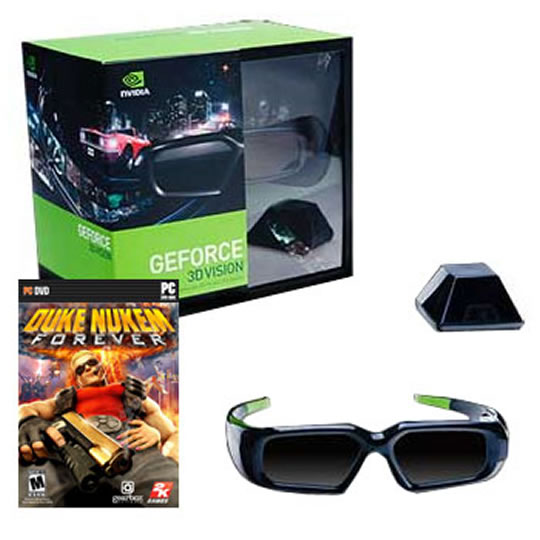
Nvidia GeForce 3D Vision Kit Glasses , IR Emitter and Duke Nukem Forever
End Of LifeSale
Nvidia GeForce 3D Vision Kit Glasses , IR Emitter and Duke Nukem Forever
Scan code: LN39906 Manufacturer code: 942-10701-0007-104
End Of Life

End Of LifeSale

Nvidia GeForce 3D Vision Kit Glasses , IR Emitter and Duke Nukem Forever

Nvidia GeForce 3D Vision Kit Glasses IR Emitter & Duke Nukem Forever Game Needs 120Hz Monitor

Scan code: LN39906 Manufacturer code: 942-10701-0007-104
End of life
This product is no longer available to purchase.

Email me when the availability or price changes

Product Overview Tired of living in a 2D world?


http://www.nvidia.com/object/3d-vision-requirements.html

Upgrade your PC to a fully immersive stereoscopic 3D experience with NVIDIA® GeForce® 3D Vision™. A combination of high-tech wireless glasses and advanced software, GeForce 3D Vision automatically transforms hundreds of PC games into full stereoscopic 3D.

Just slip on the stylish glasses and pair them with an NVIDIA® GeForce® GPU and a "GeForce 3D Vision-Ready" display to experience characters and environments come to life on the screen.

In addition, you can watch 3D movies and 3D digital photographs in eye popping, crystal-clear quality. Give your eyes something to talk about with GeForce 3D Vision. See what everyone is saying about GeForce 3D Vision or find a location to test drive for yourself.

** Important **
• The Nvidia GeForce 3D glasses require a compatible 120Hz LCD Monitor or DLP projector to function.
• Requires Nvidia GeForce 8800 GTX or above Graphics Card Features GeForce 3D Vision Specifications

Glasses


• Wireless
-Infrared receiver: Receive signal between 1.5 and 15 feet

• Power
-Battery Life: 40 hours of stereoscopic 3D
-Power button: On button
-Rechargeable battery connector: USB 2.0 mini-B power connector

• Indicator Lights
-Battery Level: Green and red indicator lights
-Charging: Amber light

• Dimensions
-Product Dimensions: 20.3’’x 16.6’’x 8.2’’
-Weight: 50 grams

IR Emitter

• Wireless
-Infrared transmitter: Transmit signal between 1.5 and 15 feet

• Buttons
-NVIDIA backlit button: GeForce 3D Vision on/off
-Depth Adjustment: Thumbwheel on the back of IR emitter

• Connectors
-USB 2.0 mini-B Connect to the PC for enabling GeForce 3D Vision
-VESA Stereo Cable Port - For use with DLP HDTV only

• Dimensions
-Product Dimensions: 2.5” X 2.5” X 1.5” tall
-Product Weight: 47 grams

Minimum requirements
• Microsoft® Windows® Vista 32/64-bit or Windows 7 32/64-bit
• Intel® Core™2 Duo or AMD Athlon™ X2 CPU or higher
• Graphics card supporting 3D Vision
• 1GB of system memory. (2GB is recommended)
• 100 MB free disk space
• Compatible 120Hz LCD Monitor or DLP projector
Warranty

Please note your statutory rights are not affected.

For further information regarding Scan's warranty procedure please see our terms and conditions

Details
Duration:
24 months
Type:
Return to base
DOA Period:
7 days
RTB Period:
24 months
Manufacturer Contact Details
Manufacturer:
Scan
Buying Guide
Display Panel Types
Display Panel Types
Date Issued: 15th May 2015

Choosing a monitor is not an easy decision to make, and not just because of the large number of variations in resolution, refresh rates, sizes and connectivity options. There are also varying panel technologies used to form each display that need to be considered. These panel technologies can be grouped into three broad categories which cover the vast majority of monitors sold in the consumer market.

Read More

NVIDIA G-Sync
NVIDIA G-Sync
Date Issued: 17th Dec 2013

G-SYNC works in a surprisingly simple way - it calculates how long the present frame takes to compute and then, crucially, varies the refresh rate of the monitor to match. It works between a minimum of 33.3ms (30fps) and the maximum supported refresh of the display. The key takeaway here is that the graphics card and monitor are both synced up to one another - the monitor doesn't have the limitations imposed by a rigid, fixed-rate scanning routine.

Read More

NVIDIA GeForce GTX 560 Ti
Date Issued: 27th Jan 2011

When it comes to GPUs, NVIDIA has been hitting all the right notes of late. In recent months, the high-end GeForce GTX 580 and GTX 570 have been well received, and the excellent last-generation GTX 460 continues to prove popular in the mid-range. But there's clearly a gap between the GTX 570 and GTX 460, and NVIDIA is plugging that hole with the launch of the mid-to-high-end GeForce GTX 560 Ti.

Read More

Graphics Card Outputs
Date Issued: 8th Oct 2010

Modern desktop computers and notebooks comprise of a CPU, motherboard, graphics, storage, and, usually an optical drive. Computers have a number of ports and sockets that enable the user to plug-in various peripherals such as a printer, USB mouse, or, perhaps most importantly of all, an Internet connection.

Read More

NVIDIA GeForce GTX 460
Date Issued: 19th Jul 2010

Graphics-chip manufacturer NVIDIA released its GeForce GTX 400-series video cards in March of this year, based on what it called the 'Fermi' architecture. Named the GTX 470 and GTX 480, these cards supported all of the latest technologies and remain the most-powerful GPUs available. However, they were very expensive, used a lot of power and generated a significant amount of heat.

Read More

NVIDIA 3D Vision
NVIDIA 3D Vision
Date Issued: 4th Jun 2010

One of the most interesting technologies in 2010 promises to be 3D TV. Pushed by the likes of Samsung, Sony and Panasonic on their high-end sets, 3D TV will gain traction once broadcasters - such as Sky and the BBC - and movie studios increase 3D content.

Read More

NVIDIA GeForce GTX 480 / 470 architecture
Date Issued: 26th Mar 2010

NVIDIA and its retail partners will be launching a slew of new graphics cards on March 26. Based on the brand-new GF100 architecture, this TekSpek evaluates the technology behind NVIDIA most ambitious GPU design.

Read More

OLED displays
OLED displays
Date Issued: 2nd Mar 2010

Organic light-emitting diode (OLED) technology is touted as the successor to LCD/Plasma displays. We explain what it is and where you'll find it.

Read More

HDMI
HDMI
Date Issued: 3rd Dec 2008

Keeping in tandem with technological developments, audio/video connectors continue to evolve at a steady pace. Today, the most common digital connector comes in the form of HDMI and we're here to tell you what it is, what it does, and why you might need it.

Read More

Blu-ray
Blu-ray
Date Issued: 3rd Dec 2008

Blu-ray Disc is now widely regarded as the physical successor to DVD, we take a closer look at what it is, what advantages it brings, and what it could mean to you.

Read More

CUDA Technology
CUDA Technology
Date Issued: 22nd Oct 2008

CUDA technology is the world’s only C language environment that enables programmers and developers to write software to solve complex computational problems in a fraction of the time by tapping into the many-core parallel processing power of GPUs.

Read More

Graphics
Graphics
Date Issued: 21st Oct 2008

Explaining how a modern GPU works in completeness would take a book. Or two. Per class of chip. Per vendor. They're extraordinarily complex pieces of engineering and production, and the end result contains more transistors than multiple modern x86 processors.

Read More

DVI
DVI
Date Issued: 20th Oct 2008

As you’ll all likely know by now, DVI is the current standard for connection of a PC or other display generator to a digital display output. You’ll recognise the multi-pin connector and know that almost all modern LCD displays have the corresponding input connector, for feeding from your PC. But do you know how DVI works? This TekSpek seeks to teach you how.

Read More

PCI Express
PCI Express
Date Issued: 20th Oct 2008

A motherboard’s main job is to act as a conduit between the various hardware elements that make up a PC. It needs to be able to link the desired CPU(s), system memory, graphics card, hard drive(s), and add-in cards and enable them to work in harmony.

Read More

Multi-GPUs
Multi-GPUs
Date Issued: 20th Oct 2008

If you’re the least bit interested in graphics cards, we’re sure that you’ve heard the terms SLI and CrossFire bandied about recently. Touted as a means of achieving maximum 3D performance by, effectively, using two or more graphics cards in tandem, multi-GPU technology is here to stay. With that in mind, let’s take a closer look SLI and CrossFire; the two competing multi-GPU solutions from NVIDIA and ATI Technologies, respectively.

Read More

HDTV 720/1080
HDTV 720/1080
Date Issued: 14th Jun 2008

Whether the broadcasters are going HD or not, TV sets and projectors are arriving thick and fast which claim to support higher resolutions than regular telly. But HDTV is far from just one standard – it incorporates a couple of different resolutions, two different scanning modes, and a number of different frame rates. In this article, we present a guide to what all the terms actually mean.

Read More

DVI/HDMI/HDCP
DVI/HDMI/HDCP
Date Issued: 14th Jun 2008

There’s a lot more to High Definition than just having the ability to run your screen at the right resolution. With more than one type of connection available, and the thorny subject of signal encryption to contend with, just because your monitor and graphics are capable of 1,920 x 1,080 or better does not necessarily mean they will be able to display HDTV in all its glory.

Read More