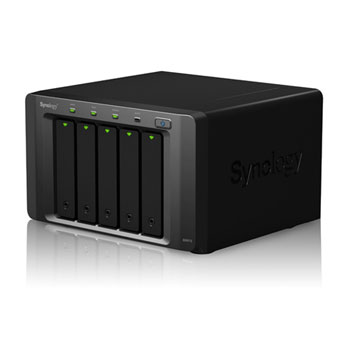
Synology DX513 5 Bay Desktop Expansion Unit
Scan code: LN47563
Manufacturer code: dx513
End Of Life

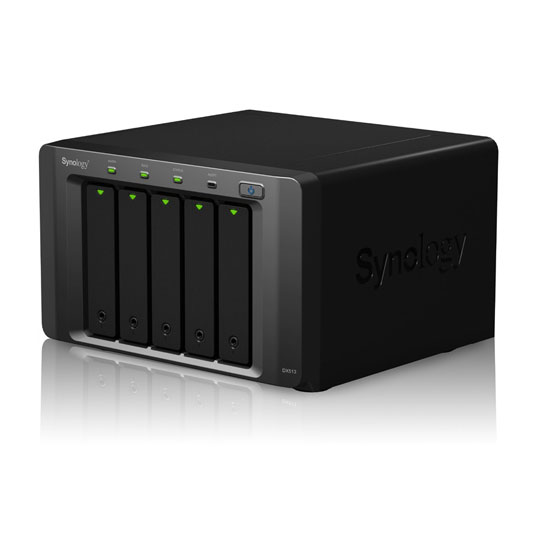

Synology DX513 5 Bay Desktop Expansion Unit
5 Bay Synology DX513 Desktop Expansion Unit Expansion Unit for Increasing Capacity of the Synology DiskStation
Scan code:
LN47563
Manufacturer code:
dx513
This product is no longer available to purchase.
Email me when the availability or price changes
- SCANPROTECT Protect against installation damage for 28 days.
Product Overview
Synology® DX513 delivers an effortless solution for volume expansion and data backup for selected Synology DiskStation models. The DX513 seamlessly scales up the storage capacity of the DiskStation by an additional 5 hard drives on-the-fly when connected directly by an expansion cable.
• Online Volume Expansion
• Dedicated Local Backup Solution
• Reliable Plug-n-use Design
• Hot-swappable HDD Design
• Auto power on/off with DiskStation Models
Supported Models : DS710+, DS712+, DS1010+, DS1511+, DS1512+, DS1812+; Use as independent volume: DS112, DS112+, DS212+, DS213+, DS412+, DS413

Features Volume Expansion & Backup
When running out of hard drive capacity on the Synology DiskStation, Synology DX513 provides an easy way to immediately scale capacity by additional 5 hard drives. The RAID volume on the Synology DiskStation can be expanded directly without having to reformat the existing hard drives, ensuring the Synology DiskStation continues its service during the capacity expansion.
Synology DX513 can be used as a dedicated local backup solution for the Synology DiskStation. When created as a separate volume, the Synology DX513 provides a great backup solution to its local hard disks in case of system failure.
Reliable Plug-n-use Design
The Synology DX513 is connected to the Synology DiskStation using an expansion cable with custom-designed connectors on both ends, ensuring a reliable connection and maximum throughput. The 3.0 Gb/sec connection speed allows the hard drives in the connected Synology DX513 to operate as the internal ones of Synology DiskStation.
Green & Easy to Manage
The HDD hibernation and system hibernation can be manually configured to take effect automatically when the system has been inactive for a period of time. This not only saves energy but also extends the lifespan of the hard disk. The DX513 will also smartly power on/off with the attached DiskStation, so no user intervention is needed to keep this system running smartly and efficiently.
• Online Volume Expansion
• Dedicated Local Backup Solution
• Reliable Plug-n-use Design
• Hot-swappable HDD Design
• Auto power on/off with DiskStation Models
Supported Models : DS710+, DS712+, DS1010+, DS1511+, DS1512+, DS1812+; Use as independent volume: DS112, DS112+, DS212+, DS213+, DS412+, DS413
Features Volume Expansion & Backup
When running out of hard drive capacity on the Synology DiskStation, Synology DX513 provides an easy way to immediately scale capacity by additional 5 hard drives. The RAID volume on the Synology DiskStation can be expanded directly without having to reformat the existing hard drives, ensuring the Synology DiskStation continues its service during the capacity expansion.
Synology DX513 can be used as a dedicated local backup solution for the Synology DiskStation. When created as a separate volume, the Synology DX513 provides a great backup solution to its local hard disks in case of system failure.
Reliable Plug-n-use Design
The Synology DX513 is connected to the Synology DiskStation using an expansion cable with custom-designed connectors on both ends, ensuring a reliable connection and maximum throughput. The 3.0 Gb/sec connection speed allows the hard drives in the connected Synology DX513 to operate as the internal ones of Synology DiskStation.
Green & Easy to Manage
The HDD hibernation and system hibernation can be manually configured to take effect automatically when the system has been inactive for a period of time. This not only saves energy but also extends the lifespan of the hard disk. The DX513 will also smartly power on/off with the attached DiskStation, so no user intervention is needed to keep this system running smartly and efficiently.
Synology DX513 5 Bay Desktop Expansion Unit
![Synology DX513 5 Bay Desktop Expansion Unit]()