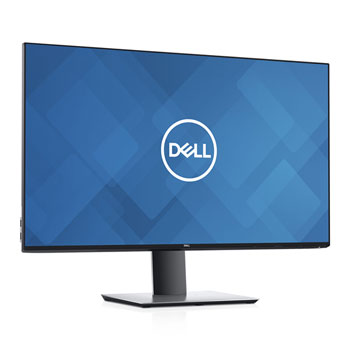

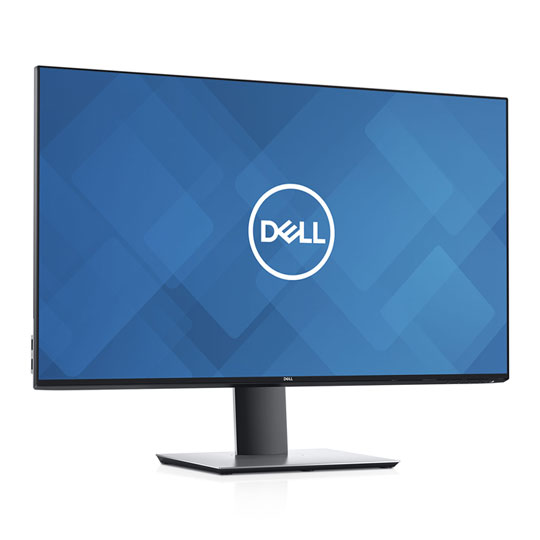

Dell UltraSharp 32" 4K Ultra HD HDR400 IPS Monitor with USB-C Height/Tilt/Swivel/Pivot Adjustable
End Of Life
Dell UltraSharp 32" 4K Ultra HD HDR400 IPS Monitor with USB-C Height/Tilt/Swivel/Pivot Adjustable
Scan code: LN98234 Manufacturer code: U3219Q
End Of Life
  • Thumbnail 1 : Dell UltraSharp 32" 4K Ultra HD HDR400 IPS Monitor with USB-C Height/Tilt/Swivel/Pivot Adjustable
  • Dell UltraSharp 32" 4K Ultra HD HDR400 IPS Monitor with USB-C Height/Tilt/Swivel/Pivot Adjustable : video thumbnail 1
End Of Life

Dell UltraSharp 32" 4K Ultra HD HDR400 IPS Monitor with USB-C Height/Tilt/Swivel/Pivot Adjustable

31.5" Dell UltraSharp U3219Q 4K Monitor, IPS, HDR400, 3840x2160, sRGB 60Hz, 5ms, 400cd/m², 1300:1, USB-C/HDMI/DP USB Hub

Scan code: LN98234 Manufacturer code: U3219Q
End of life
This product is no longer available to purchase.

Email me when the availability or price changes

  • SCANPROTECT Protect against installation damage for 28 days.
Product Overview

Exquisite Details, Incredible Colour

• Capture every element: Experience four times more detail than Full HD with 3840x2160 Ultra HD 4K resolution.
• Visually stunning: Your images shine the way they were meant to on the world’s first 31.5” 4K Ultra HD monitor with VESA certified DisplayHDR™ 400 featuring HDR content playback support.
• Impressive colour and details: See realistic colours—from the brightest whites to the deepest darks—with a peak brightness of 400 nits, an impressive colour depth of 1.07 billion colours and a high contrast ratio.
• Colour consistency comes standard: Your UltraSharp monitor is factory calibrated at 99% sRGB coverage to an accuracy of Delta-E less than or equal to 2, for precise hues right out of the box. And, with 95% DCI-P3 and 99% Rec. 709 colour coverage, you can trust that your videos reflect lifelike colour.


Easy to Use, Efficient to Manage

• One cable. Many uses: Declutter your desk with the included USB-C cable. This single cable solution delivers up to 90W of power, charging your device, while transmitting data, video and audio at the same time.
• Multitask efficiently: Picture-In-Picture (PIP) and Picture-By-Picture (PBP) features make it easy for you to view content from two different computer sources simultaneously.
• Simple manageability: Switch between applications from two PCs on your screen and work on the content using only one keyboard and mouse with the convenient Keyboard, Video and Mouse (KVM) feature.
• More ways to work: Conveniently select from predefined templates with the Easy Arrange feature on Dell Display Manager software. Quickly tile and arrange your applications and get back to work faster with Auto-restore, a feature that remembers where you left off.


Comfortable Design, Ultimate Productivity

• Take your view to the edge: With Dell InfinityEdge, you can enjoy an expansive edge-to-edge viewing experience on this virtually borderless display.
• Adjust to your comfort: Pivot, tilt, swivel and adjust the height of your monitor for a comfortable setup all day long. Or choose from a variety of mounts and stands, including VESA, for even more flexibility.
• Easy on the eyes: This TUV Certified monitor has a flicker-free screen with ComfortView, a feature that reduces harmful blue light emissions. It’s designed to optimize eye comfort even over extended viewing sessions.

Features

• 32” Ultra HD 3840x2160 60Hz IPS display.
• 1.07 Billion colour range.
• Tilt up to 21° up & 5° down.
• 60° swivel support (30° Left, 30° Right).
• 150mm height adjustment.
• 180° pivot (90° Left, 90° Right).
• VESA Support.
• DisplayPort and HDMI support.
• DisplayHDR 400.
• USB passthrough.
Warranty

Please note your statutory rights are not affected.

For further information regarding Scan's warranty procedure please see our terms and conditions

Details
Duration:
36 months
Type:
Direct
DOA Period:
7 days
Manufacturer Contact Details
Telephone:
0800 028 2660
Buying Guide
Need help? Read our Monitors Buying Guide
HDR Monitors
HDR Monitors
Date Issued: 11th May 2020

PC monitor manufacturers tend to focus on a particular buzzword or acronym almost every year. In the past, we have been treated to HD (high definition), denoting the screen is capable of running a minimum 720p resolution.

Read More

Display Panel Types
Display Panel Types
Date Issued: 15th May 2015

Choosing a monitor is not an easy decision to make, and not just because of the large number of variations in resolution, refresh rates, sizes and connectivity options. There are also varying panel technologies used to form each display that need to be considered. These panel technologies can be grouped into three broad categories which cover the vast majority of monitors sold in the consumer market.

Read More

31.5" Dell UltraSharp U3219Q Monitor, IPS, HDR400, 3840x2160, sRGB 60Hz, 5ms, 400cd/m², 1300:1, USB-C/HDMI/DP USB Hub is rated 4.7 out of 5 by 3.
Rated 5 out of 5 by from Gorgeous display with USB-C A gorgeous display with thin bezels, non-glossy screen and plenty of USB ports. I am using this screen with a Dell XPS and a Surface Pro 7 via USB-C. All my devices connect to the monitor and from the monitor there is only a single cable going to my Dell or Surface. It is so convenient to connect audio, video, USB devices to your laptop or tablet with a single cable that also take care of charging.
Date published: 2020-03-13
Rated 5 out of 5 by from Excellent for CG, Editing and Grading, It's an excellent choice for work. There is a HDR mode which is best left off for day to day working because it's like working from a TV, the colour gets blown out on folder icons etc. This applies to all HDRs on the market at present. If you want HDR workflow for editing you keep one monitor just in HDR and the other for working. It is beneficial for the PS4 plugged into the extra HDMI socket though. That looks incredible in HDR. As for general colour performance in sRGB, it's absolutely stunning. The blacks are never going to be ultra deep black because it is a matte panel and even apple couldn't overcome that without applying a glossy screen to the surface. This is just perfect like the previous matte Apple displays. It's also pretty smart and the menus are quick. You plug something in it just recognises and switches input, even automatically switching to HDR if that is what the input wants.. you know the sort of things that would otherwise drive you up the wall if the software was unresponsive.
Date published: 2020-02-10
Rated 4 out of 5 by from great monitor One of the best 4k 32 inch monitors you can get,,,amazing colors and very sharp picture, i have returned two 32 inch 4k monitors from different brands before i tried this one. I game a lot mostly single player games nothing competitive. No dead or stuck pixels but little bit of ips light bleed. Giving 4 of 5 stars due to a high price ...£550 this would be a no brainer
Date published: 2020-01-31
  • y_2020, m_9, d_10, h_15
  • bvseo_bulk, prod_bvrr, vn_bulk_3.0.12
  • cp_1, bvpage1
  • co_hasreviews, tv_0, tr_3
  • loc_en_GB, sid_98234, prod, sort_[SortEntry(order=FEATURED, direction=DESCENDING), SortEntry(order=SUBMISSION_TIME, direction=DESCENDING)]
  • clientName_scan
Dell UltraSharp 32" 4K Ultra HD HDR400 IPS Monitor with USB-C Height/Tilt/Swivel/Pivot Adjustable