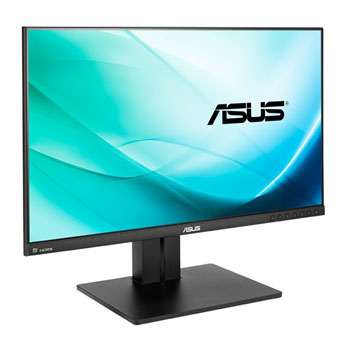
ASUS PB258Q 25" ZeroFrame LED Monitor with AH-IPS Panel
Scan code: LN64490
Manufacturer code: PB258Q
End Of Life

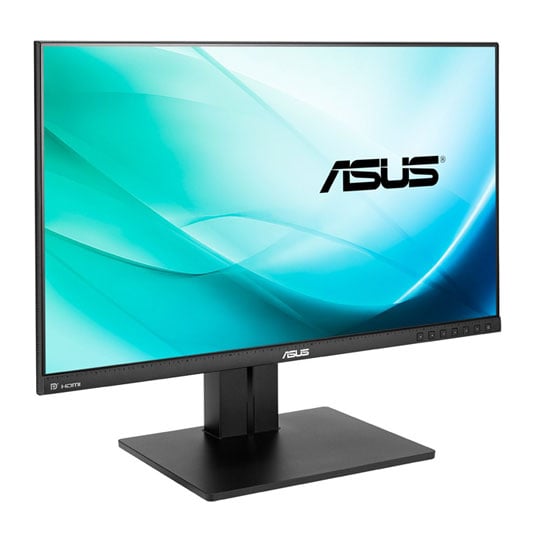

ASUS PB258Q 25" ZeroFrame LED Monitor with AH-IPS Panel
25" ASUS PB258Q ZeroFrame Ultra-Low Blue Light IPS Professional Monitor 2560 x 1440 5ms DP1.2/HDMI/MHL/DVI/VGA
Scan code:
LN64490
Manufacturer code:
PB258Q
This product is no longer available to purchase.
- 48HR REPLACEMENT If you need to return this item, your replacement will be dispatched within 2 working days of your product arriving back at Scan.
- 3XS Approved Custom picked by our award winning 3XS Systems team.
Product Overview
Concept to Creation
Precision to the Finest Detail
Envision bigger with 2560 x 1440 WQHD, packing four times the pixel density of 720p! New premium 16:9 wide-format PB258Q LED display with IPS panel affords 178° wide viewing angles for better productivity, opening extra multitasking space to fit more windows and projects on-screen. ASUS exclusive SplendidPlus Video Intelligence Technology, QuickFit Virtual Scale, and 100% sRGB fidelity ensure reality-defining color and image accuracy, giving you true “what you imagine is what you create” power. HDMI/MHL2.0, DisplayPort, and dual-link DVI support WQHD natively, accentuated by room-dominating audio via twin 2.5-Watt speakers. To help you stay naturally focused, ergonomic design includes tilt, swivel, pivot, and height adjustment, plus streamlined cabling that keeps clutter off your desktop. PB258Q’s edge-to-edge frameless design is ideal for seamless multi-display environment setup.
True-to-life Visuals
See Better and Wider
The PB258Q WQHD monitor features an IPS LED-backlit panel that provides 117 pixels per inch (PPI), resulting in high quality 2560 x 1440 visuals – equaling four times the resolution of standard 720p sets. It allows users to view greater image detail and do more with an onscreen footprint larger than that of standard displays.
The screen’s 117 PPI density means there are 117 RGB matrices within one inch. Generally, the more pixels a display has, the more lighting (or power) those pixels require to achieve the best visuals. However, with advanced LED backlighting on the PB258Q, power and energy savings are no longer compromised, while better visuals are assured.
Made for Work and Play
The ASUS PB258Q features IPS panel which provides an ultra-wide 178° viewing angle on both horizontal and vertical planes, thereby minimizing onscreen color shift even when viewed from extreme angles. With its WQHD display, you enjoy 77% more desktop space than a full HD screen to spread out your windows and palettes. It is also about 25% sharper than a generic 25” full HD display, delivering ultra-smooth visuals thanks to 5ms (GTG) response time. This ensures you get lag-free experiences in movies and gaming, with the latter looking more vivid, with all in-game details shown in true color. The ASUS PB258Q is undoubtedly your best choice for work and play.
Extensive Connectivity
Native WQHD Content Support
The PB258Q features a host of connectivity options that include HDMI/MHL2.0, DisplayPort1.2, and dual-link DVI for native WQHD, plus D-sub for full HD 1080p content transmission. Twin built-in 2.5W speakers provide quality audio for a completely immersive home theater experience.
Protect your eyes with ASUS Eye Care technology
Flicker-free and Low Blue Light
Say goodbye to tired, strained eyes. PB258Q features ASUS Flicker-free and Low Blue Light technologies to reduce instances of eyestrain and other damaging effects when spending long, countless hours in front of a display.
ASUS Blue Light Filter
PB258Q also comes with the ASUS Blue Light Filter to protect you from harmful blue light; a new OSD menu lets you easily access and select four different filter settings onscreen.
ASUS Exclusive Innovation and User-friendly Design
SplendidPlus™ Video Intelligence Technology
We’ve raised the bar by incorporating some of our proprietary technologies into the ASUS PB258Q to give you a truly vivid visual experience. The PB258Q features the new SplendidPlus™ Video Intelligence Technology that optimizes videos and images by enhancing color brightness, contrast, and sharpness. SplendidPlus™ features 8 preset modes – Reading, Darkroom, Scenery, Standard, Theater sRGB, Game, and Night View modes
Designed with You in Mind
The PB258Q offers a highly ergonomic and smart design that comes with tilt, pivot, swivel, and height adjustments to ensure an always-comfortable viewing and usage experience. Its smart cable management further promotes clutter-free spaces for work and enjoyment. Furthermore, the PB258Q features a Quick Release Stand to provide an easy way for frequent VESA wall mount scenario setup. Screw-free and it’s done in seconds.
Features • Impeccable lifelike visuals with 25” 16:9 2560 x 1440 with 100% sRGB and 178° wide-viewing angle in an edge-to-edge frameless design.
• Extensive connectivity features DisplayPort1.2, HDMI/MHL2.0 and Dual-link DVI for native WQHD content support.
• Frameless design with ergonomic Quick Release Stand with tilt, pivot, swivel, and height adjustment plus VESA wall mount support.
• Eye Care Technology : Flicker-free and Low Blue Light for comfortable viewing
Precision to the Finest Detail
Envision bigger with 2560 x 1440 WQHD, packing four times the pixel density of 720p! New premium 16:9 wide-format PB258Q LED display with IPS panel affords 178° wide viewing angles for better productivity, opening extra multitasking space to fit more windows and projects on-screen. ASUS exclusive SplendidPlus Video Intelligence Technology, QuickFit Virtual Scale, and 100% sRGB fidelity ensure reality-defining color and image accuracy, giving you true “what you imagine is what you create” power. HDMI/MHL2.0, DisplayPort, and dual-link DVI support WQHD natively, accentuated by room-dominating audio via twin 2.5-Watt speakers. To help you stay naturally focused, ergonomic design includes tilt, swivel, pivot, and height adjustment, plus streamlined cabling that keeps clutter off your desktop. PB258Q’s edge-to-edge frameless design is ideal for seamless multi-display environment setup.
True-to-life Visuals
See Better and Wider
The PB258Q WQHD monitor features an IPS LED-backlit panel that provides 117 pixels per inch (PPI), resulting in high quality 2560 x 1440 visuals – equaling four times the resolution of standard 720p sets. It allows users to view greater image detail and do more with an onscreen footprint larger than that of standard displays.
The screen’s 117 PPI density means there are 117 RGB matrices within one inch. Generally, the more pixels a display has, the more lighting (or power) those pixels require to achieve the best visuals. However, with advanced LED backlighting on the PB258Q, power and energy savings are no longer compromised, while better visuals are assured.
Made for Work and Play
The ASUS PB258Q features IPS panel which provides an ultra-wide 178° viewing angle on both horizontal and vertical planes, thereby minimizing onscreen color shift even when viewed from extreme angles. With its WQHD display, you enjoy 77% more desktop space than a full HD screen to spread out your windows and palettes. It is also about 25% sharper than a generic 25” full HD display, delivering ultra-smooth visuals thanks to 5ms (GTG) response time. This ensures you get lag-free experiences in movies and gaming, with the latter looking more vivid, with all in-game details shown in true color. The ASUS PB258Q is undoubtedly your best choice for work and play.
Extensive Connectivity
Native WQHD Content Support
The PB258Q features a host of connectivity options that include HDMI/MHL2.0, DisplayPort1.2, and dual-link DVI for native WQHD, plus D-sub for full HD 1080p content transmission. Twin built-in 2.5W speakers provide quality audio for a completely immersive home theater experience.
Protect your eyes with ASUS Eye Care technology
Flicker-free and Low Blue Light
Say goodbye to tired, strained eyes. PB258Q features ASUS Flicker-free and Low Blue Light technologies to reduce instances of eyestrain and other damaging effects when spending long, countless hours in front of a display.
ASUS Blue Light Filter
PB258Q also comes with the ASUS Blue Light Filter to protect you from harmful blue light; a new OSD menu lets you easily access and select four different filter settings onscreen.
ASUS Exclusive Innovation and User-friendly Design
SplendidPlus™ Video Intelligence Technology
We’ve raised the bar by incorporating some of our proprietary technologies into the ASUS PB258Q to give you a truly vivid visual experience. The PB258Q features the new SplendidPlus™ Video Intelligence Technology that optimizes videos and images by enhancing color brightness, contrast, and sharpness. SplendidPlus™ features 8 preset modes – Reading, Darkroom, Scenery, Standard, Theater sRGB, Game, and Night View modes
Designed with You in Mind
The PB258Q offers a highly ergonomic and smart design that comes with tilt, pivot, swivel, and height adjustments to ensure an always-comfortable viewing and usage experience. Its smart cable management further promotes clutter-free spaces for work and enjoyment. Furthermore, the PB258Q features a Quick Release Stand to provide an easy way for frequent VESA wall mount scenario setup. Screw-free and it’s done in seconds.
Features • Impeccable lifelike visuals with 25” 16:9 2560 x 1440 with 100% sRGB and 178° wide-viewing angle in an edge-to-edge frameless design.
• Extensive connectivity features DisplayPort1.2, HDMI/MHL2.0 and Dual-link DVI for native WQHD content support.
• Frameless design with ergonomic Quick Release Stand with tilt, pivot, swivel, and height adjustment plus VESA wall mount support.
• Eye Care Technology : Flicker-free and Low Blue Light for comfortable viewing


ASUS PB258Q 25" ZeroFrame LED Monitor with AH-IPS Panel
![ASUS PB258Q 25" ZeroFrame LED Monitor with AH-IPS Panel]()