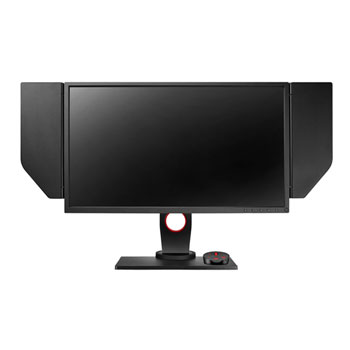
Zowie XL2540 24.5" 240Hz e-Sports 1080p Gaming Monitor
Scan code: LN77551
Manufacturer code: XL2540
End Of Life


Product Overview
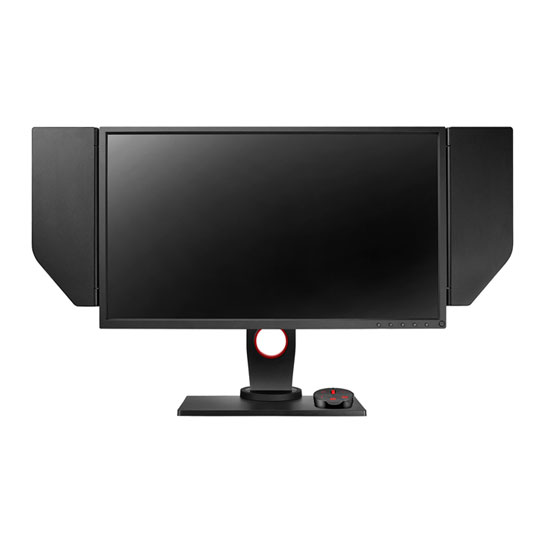
BenQ ZOWIE XL2540 240Hz 24.5 inch e-Sports Monitor
XL-series features the premiere monitors for PC s-Sports, fine-tuned to guarantee the smoothest and responsive experience, and the clearest images to arm you for competition. Features Features:
Native 240Hz Refresh Rate - Smoothness Evolution
Catch every detail of motion and enjoy the most fluid gameplay by BenQ ZOWIE native 240Hz refresh rate monitor, which ensures a flawless view of fast-motion consistently at all time. (Please make sure the PC performance is up to par to fully activate 240Hz)
Shield - Help You Focus On The Game
Shield - reveal the way to be concentrated in games. The adjustable angle and removable design allows Shield to adopt various environments according to preference. Just focus on winning the game.
Spot Hidden Enemies
Never fall victim to some cowardly camper in a dark corner again. Black eQualizer increases the visibility in dark scenes without overexposing the bright areas.
Optimize Gaming Precision
Color Vibrance gives you the flexibility to get the color performance. With 20 levels of Color Vibrance settings, you can get specific viewing requirements and preferences for all types of gameplay.
Personalize Viewing Angles
The Height Adjustable Stand can be operated with just one finger so you can easily adjust the height of the monitor to your preferred viewing angle, maximizing your comfort.
Easily Access Settings for Different Scenarios
Different usage scenarios require different display settings. The S Switch is designed for easy access to settings and switching between saved modes and different inputs. Whether you are watching, reading, surfing, gaming or connecting with multiple monitors, switching between the presets and different monitors, or navigating among menus is as simple as 1-2-3.
Game Modes for Enhanced Gaming Experience
Every game has its own optimal settings. We’ve outfitted every XL-series monitor with several settings. You can easily switch to these game modes with the touch of a hot key.
Minimize Visual Distractions
Concentration is a key factor for e-Sports. The XL-series LCD frame was specially designed to reduce light reflection from the screen, keeping your focus on the game.
XL-series features the premiere monitors for PC s-Sports, fine-tuned to guarantee the smoothest and responsive experience, and the clearest images to arm you for competition. Features Features:
Native 240Hz Refresh Rate - Smoothness Evolution
Catch every detail of motion and enjoy the most fluid gameplay by BenQ ZOWIE native 240Hz refresh rate monitor, which ensures a flawless view of fast-motion consistently at all time. (Please make sure the PC performance is up to par to fully activate 240Hz)
Shield - Help You Focus On The Game
Shield - reveal the way to be concentrated in games. The adjustable angle and removable design allows Shield to adopt various environments according to preference. Just focus on winning the game.
Spot Hidden Enemies
Never fall victim to some cowardly camper in a dark corner again. Black eQualizer increases the visibility in dark scenes without overexposing the bright areas.
Optimize Gaming Precision
Color Vibrance gives you the flexibility to get the color performance. With 20 levels of Color Vibrance settings, you can get specific viewing requirements and preferences for all types of gameplay.
Personalize Viewing Angles
The Height Adjustable Stand can be operated with just one finger so you can easily adjust the height of the monitor to your preferred viewing angle, maximizing your comfort.
Easily Access Settings for Different Scenarios
Different usage scenarios require different display settings. The S Switch is designed for easy access to settings and switching between saved modes and different inputs. Whether you are watching, reading, surfing, gaming or connecting with multiple monitors, switching between the presets and different monitors, or navigating among menus is as simple as 1-2-3.
Game Modes for Enhanced Gaming Experience
Every game has its own optimal settings. We’ve outfitted every XL-series monitor with several settings. You can easily switch to these game modes with the touch of a hot key.
Minimize Visual Distractions
Concentration is a key factor for e-Sports. The XL-series LCD frame was specially designed to reduce light reflection from the screen, keeping your focus on the game.


Zowie XL2540 24.5" 240Hz e-Sports 1080p Gaming Monitor
![Zowie XL2540 24.5" 240Hz e-Sports 1080p Gaming Monitor]()