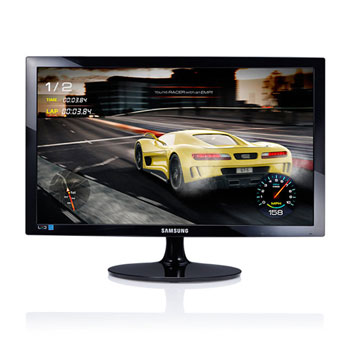
Samsung 24" Full HD 1ms Gaming Monitor
Scan code: LN75207
Manufacturer code: LS24D330HSX/EN
End Of Life

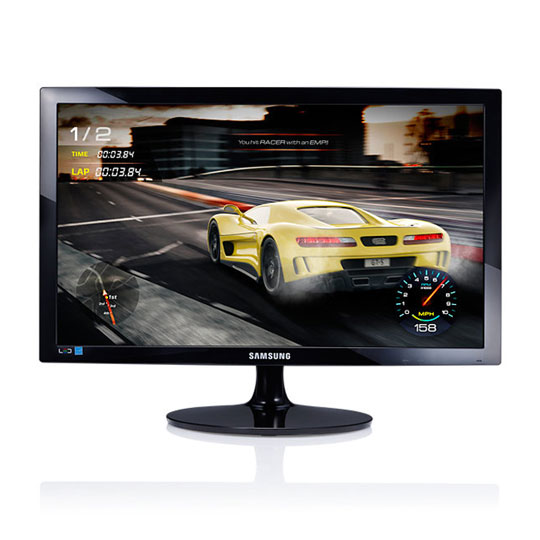

Samsung 24" Full HD 1ms Gaming Monitor
24" S24D330H Samsung Full HD Gaming Monitor 1920x1080, 1ms, 250cd/m², 1000:1, HDMI/VGA Black
Scan code:
LN75207
Manufacturer code:
LS24D330HSX/EN
This product is no longer available to purchase.
- 48HR REPLACEMENT If you need to return this item, your replacement will be dispatched within 2 working days of your product arriving back at Scan.
Product Overview
Experience darker blacks with Game modeInstantly optimising screen colours and contrast for gaming, Game Mode ensures you get to see game scenes at their best.Experience darker blacks with Game modeEasy on the eyes for a more comfortable viewing experience
• Eye Saver Mode: Unlike other colours emitted from screens, blue light wavelengths have a more stimulating effect on the retina, causing eye fatigue. Eye Saver Mode optimises your viewing comfort by smartly reducing blue light emissions at the touch of a button.
• Flicker Free: Flicker Free technology reduces screen flickering for a more comfortable viewing experience. Easy on the eyes for a more comfortable viewing experience
• Optimise screen colours and contrast for gaming.
• Reduce eyestrain with Eye Saver Mode.
• Reduce screen brightness for increased energy efficiency.
• Lessen environmental impact.
Save energy and the environment with this eco-friendly monitor
• Eco Saving Plus: Eco-saving technology reduces screen brightness for increased energy efficiency. In addition to the two standard manual settings (Minimum at 25% and Maximum at 50%), there is now a brand new Auto Setting that reduces energy up about 10%*, based on the luminescence of the screen’s black sections. The screen brightness transitions fluidly while simultaneously saving energy.
• PVC Free: Monitor mechanisms and circuits are constructed without PVC** making for an eco-friendly device, lessening environmental impact. * Based on internal testing ** Some cabling contains PVC Features Diagonal Size 24"
Response Time 1 ms (grey-to-grey)
Aspect Ratio 16:9
Backlight Technology LED backlight
Brightness 250 cd/m²
Colour High glossy black
Colour Support 16.7 million colours
Contrast Ratio 1000:1
Dimensions (WxDxH) 56.9 cm x 19.7 cm x 41.72 cm - with stand
Display Type LED-backlit LCD monitor / TFT active matrix
Energy Consumption per Year 34 kWh
Features MagicBright, MagicAngle, game mode, Mega Dynamic Contrast Ratio, Eco Saving, Magic Upscale, Flicker Free technology, Image Size, Eco Saving Plus, Eye Saver Mode
Horizontal Viewing Angle 170
Native Resolution Full HD (1080p) 1920 x 1080 at 60 Hz
Panel Type TN
Power Consumption (On mode) 23 W
Vertical Viewing Angle 160
Weight 3.15 kg
Connectivity
Interfaces VGA ¦ HDMI
Dimensions & Weight
Dimensions & Weight Details
With stand - width: 56.9 cm - depth: 19.7 cm - height: 41.72 cm - weight: 3.15 kg
Without stand - width: 56.9 cm - depth: 5.39 cm - height: 34.21 cm - weight: 2.8 kg
Environmental Parameters
Humidity Range Operating 10 - 80% (non-condensing)
Max Operating Temperature 40 °C
Min Operating Temperature 10 °C
Mechanical
Display Position Adjustments Tilt
Tilt Angle -1/+20
Miscellaneous
Cables Included 1 x HDMI cable
Features PVC free
Power
Power Consumption (Off Mode) 0.3 Watt
Power Consumption Operational 25 Watt
Voltage Required AC 120/230 V
Software / System Requirements
OS Required Windows 10
Similar items selected for you
• Eye Saver Mode: Unlike other colours emitted from screens, blue light wavelengths have a more stimulating effect on the retina, causing eye fatigue. Eye Saver Mode optimises your viewing comfort by smartly reducing blue light emissions at the touch of a button.
• Flicker Free: Flicker Free technology reduces screen flickering for a more comfortable viewing experience. Easy on the eyes for a more comfortable viewing experience
• Optimise screen colours and contrast for gaming.
• Reduce eyestrain with Eye Saver Mode.
• Reduce screen brightness for increased energy efficiency.
• Lessen environmental impact.
Save energy and the environment with this eco-friendly monitor
• Eco Saving Plus: Eco-saving technology reduces screen brightness for increased energy efficiency. In addition to the two standard manual settings (Minimum at 25% and Maximum at 50%), there is now a brand new Auto Setting that reduces energy up about 10%*, based on the luminescence of the screen’s black sections. The screen brightness transitions fluidly while simultaneously saving energy.
• PVC Free: Monitor mechanisms and circuits are constructed without PVC** making for an eco-friendly device, lessening environmental impact. * Based on internal testing ** Some cabling contains PVC Features Diagonal Size 24"
Response Time 1 ms (grey-to-grey)
Aspect Ratio 16:9
Backlight Technology LED backlight
Brightness 250 cd/m²
Colour High glossy black
Colour Support 16.7 million colours
Contrast Ratio 1000:1
Dimensions (WxDxH) 56.9 cm x 19.7 cm x 41.72 cm - with stand
Display Type LED-backlit LCD monitor / TFT active matrix
Energy Consumption per Year 34 kWh
Features MagicBright, MagicAngle, game mode, Mega Dynamic Contrast Ratio, Eco Saving, Magic Upscale, Flicker Free technology, Image Size, Eco Saving Plus, Eye Saver Mode
Horizontal Viewing Angle 170
Native Resolution Full HD (1080p) 1920 x 1080 at 60 Hz
Panel Type TN
Power Consumption (On mode) 23 W
Vertical Viewing Angle 160
Weight 3.15 kg
Connectivity
Interfaces VGA ¦ HDMI
Dimensions & Weight
Dimensions & Weight Details
With stand - width: 56.9 cm - depth: 19.7 cm - height: 41.72 cm - weight: 3.15 kg
Without stand - width: 56.9 cm - depth: 5.39 cm - height: 34.21 cm - weight: 2.8 kg
Environmental Parameters
Humidity Range Operating 10 - 80% (non-condensing)
Max Operating Temperature 40 °C
Min Operating Temperature 10 °C
Mechanical
Display Position Adjustments Tilt
Tilt Angle -1/+20
Miscellaneous
Cables Included 1 x HDMI cable
Features PVC free
Power
Power Consumption (Off Mode) 0.3 Watt
Power Consumption Operational 25 Watt
Voltage Required AC 120/230 V
Software / System Requirements
OS Required Windows 10
Similar items selected for you


Samsung 24" Full HD 1ms Gaming Monitor
![Samsung 24" Full HD 1ms Gaming Monitor]()