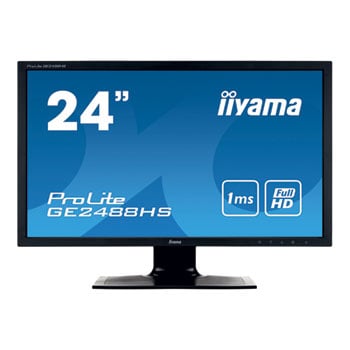
iiyama ProLite GE2488HS 24" Black Hawk Gaming 1ms Flicker Free LED Monitor
Scan code: LN59180
Manufacturer code: GE2488HS-B1
End Of Life

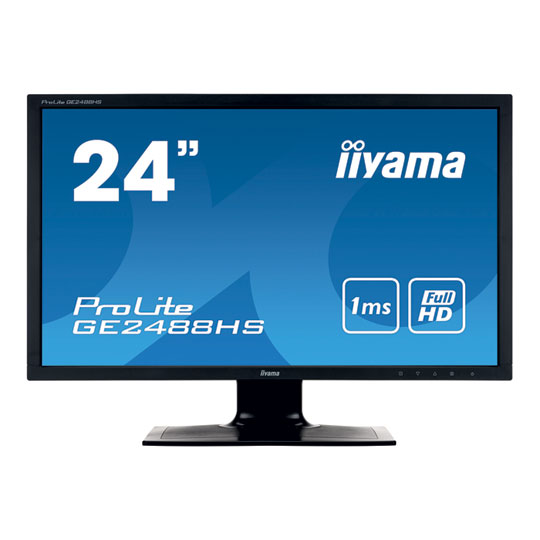

iiyama ProLite GE2488HS 24" Black Hawk Gaming 1ms Flicker Free LED Monitor
24" iiyama ProLite GE2488HS-B1 Gaming Monitor 1920x1080, 1ms, 250cd/m², Speakers, D-Sub/DVI/HDMI, Black
Scan code:
LN59180
Manufacturer code:
GE2488HS-B1
This product is no longer available to purchase.
Email me when the availability or price changes
- SCANPROTECT Protect against installation damage for 28 days.
- 3XS Approved Custom picked by our award winning 3XS Systems team.
Product Overview
ProLite GE2488HS is a real game changer, giving true hardcore gamers the competitive edge they need to make split second decisions. It features a response time of 1ms, which ensures fluid and accurate transition between the images and effects ghosting or smearing issues directly.
Additionally, it is also possible to adjust the brightness and the dark shades with the Black Tuner, giving greater viewing performance in shadowed areas. The ProLite GB2488HSU is an ideal screen for the strategy games (like RTS, MOBA and MMO) and the demanding gamers who settle only for the best specifications.
When very fast graphics are displayed your monitor can sometimes get blurry. Turning on the OverDrive feature will eliminate that.
The ultimate solution for the comfort and health of your eyes. Flicker free monitors with blue light reducer function. Absolutely no flickering. And the amount of blue light emitted by the screen and responsible for your eyes feeling fatigued substantially reduced.
Playing with friends? Use the integrated high quality speakers. Don’t want to disturb anybody? Plug your headset to the headphone socket and turn the volume up.
Contrast Ratio is a measurement of the difference between the darkest black and the brightest white your monitor can display. Advanced Contrast Ratio is a feature that automatically adjusts contrast and brightness of the screen to assure perfect picture quality while watching films and playing games. Features Diagonal 24"
Panel TN LED
Display area h x w 298.89 x 531.36 mm; 11.8" x 20.9"
Response time 1 ms
Contrast 1000 : 1 typical
Contrast 5 000 000 : 1 ACR
Brightness 250 cd/m² typical
Viewing zone horizontal/vertical: 170°/ 160°; right/left: 85°/ 85°; up/down: 80°/ 80°
Display colour 16.7 million
Pixel pitch h x v 0.277 x 0.277 mm
Native resolution Full HD 1080p, 1920 x 1080 ( 2.1 megapixel)
Horizontal sync 30 - 80 KHz
Vertical sync 55 - 75 Hz
Synchronization Separate Sync
Aspect ratio 16 : 9
Analog input connector VGA
Digital input connector DVI-D, HDMI
HDCP yes
Headphone connector Yes
Output connector headphone socket
Apple - Mac All iiyama monitors are compatible with Apple-Macintosh computers.
Plug & Play VESA DDC2B™
Controls Via OSD in 9 languages (EN, FR, DE, NL, PL, RU, JP, Chinese (simplified and traditional) and 5 front controls (Power, Select/ Input Select, Scroll up/ Audio Adjust, Scroll down/ i-Style Mode, Menu)
User controls picture adjust (contrast, brightness, OverDrive, ACR, ECO), input select, audio adjust (volume, mute, HDMI audio input), store user setting, colour adjust, manual image adjust (i-style mode, H./V. position, clock, phase, sharpness, black tuner, HDMI RGB range, video mode adjust, blue light reducer), setup menu (language select, OSD position, OSD time out, OSD background, opening logo, LED), information, memory recall
Speakers 2 x 1 W (Stereo)
Anti-theft-device Kensington-lock™ prepared
Certificates CE, TÜV-Bauart, VCCI-B, PSE, CU
Tilt angle 20° up; 2° down
VESA mounting 100 x 100 mm
Colour Black
Additionally, it is also possible to adjust the brightness and the dark shades with the Black Tuner, giving greater viewing performance in shadowed areas. The ProLite GB2488HSU is an ideal screen for the strategy games (like RTS, MOBA and MMO) and the demanding gamers who settle only for the best specifications.
When very fast graphics are displayed your monitor can sometimes get blurry. Turning on the OverDrive feature will eliminate that.
The ultimate solution for the comfort and health of your eyes. Flicker free monitors with blue light reducer function. Absolutely no flickering. And the amount of blue light emitted by the screen and responsible for your eyes feeling fatigued substantially reduced.
Playing with friends? Use the integrated high quality speakers. Don’t want to disturb anybody? Plug your headset to the headphone socket and turn the volume up.
Contrast Ratio is a measurement of the difference between the darkest black and the brightest white your monitor can display. Advanced Contrast Ratio is a feature that automatically adjusts contrast and brightness of the screen to assure perfect picture quality while watching films and playing games. Features Diagonal 24"
Panel TN LED
Display area h x w 298.89 x 531.36 mm; 11.8" x 20.9"
Response time 1 ms
Contrast 1000 : 1 typical
Contrast 5 000 000 : 1 ACR
Brightness 250 cd/m² typical
Viewing zone horizontal/vertical: 170°/ 160°; right/left: 85°/ 85°; up/down: 80°/ 80°
Display colour 16.7 million
Pixel pitch h x v 0.277 x 0.277 mm
Native resolution Full HD 1080p, 1920 x 1080 ( 2.1 megapixel)
Horizontal sync 30 - 80 KHz
Vertical sync 55 - 75 Hz
Synchronization Separate Sync
Aspect ratio 16 : 9
Analog input connector VGA
Digital input connector DVI-D, HDMI
HDCP yes
Headphone connector Yes
Output connector headphone socket
Apple - Mac All iiyama monitors are compatible with Apple-Macintosh computers.
Plug & Play VESA DDC2B™
Controls Via OSD in 9 languages (EN, FR, DE, NL, PL, RU, JP, Chinese (simplified and traditional) and 5 front controls (Power, Select/ Input Select, Scroll up/ Audio Adjust, Scroll down/ i-Style Mode, Menu)
User controls picture adjust (contrast, brightness, OverDrive, ACR, ECO), input select, audio adjust (volume, mute, HDMI audio input), store user setting, colour adjust, manual image adjust (i-style mode, H./V. position, clock, phase, sharpness, black tuner, HDMI RGB range, video mode adjust, blue light reducer), setup menu (language select, OSD position, OSD time out, OSD background, opening logo, LED), information, memory recall
Speakers 2 x 1 W (Stereo)
Anti-theft-device Kensington-lock™ prepared
Certificates CE, TÜV-Bauart, VCCI-B, PSE, CU
Tilt angle 20° up; 2° down
VESA mounting 100 x 100 mm
Colour Black


iiyama ProLite GE2488HS 24" Black Hawk Gaming 1ms Flicker Free LED Monitor
![iiyama ProLite GE2488HS 24" Black Hawk Gaming 1ms Flicker Free LED Monitor]()