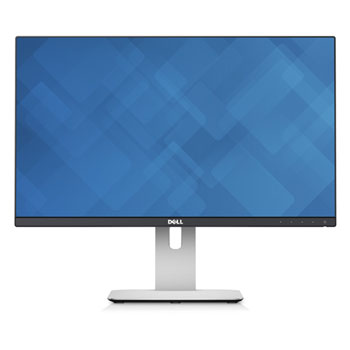

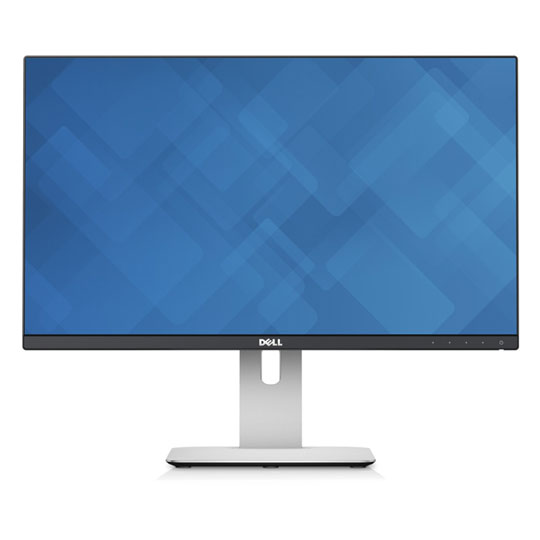
Dell UltraSharp U2415 24" IPS ZeroFrame Slim Monitor Height/Tilt/Swivel/Pivot Adjustable 6x USB Hub
End Of Life
Dell UltraSharp U2415 24" IPS ZeroFrame Slim Monitor Height/Tilt/Swivel/Pivot Adjustable 6x USB Hub
Scan code: LN60684 Manufacturer code: U2415
End Of Life
End Of Life

Dell UltraSharp U2415 24" IPS ZeroFrame Slim Monitor Height/Tilt/Swivel/Pivot Adjustable 6x USB Hub

24" Dell UltraSharp U2415 IPS Slim Monitor 1920x1200, 6ms, 300cd/m², DP/HDMI/mDP/, USB 6x Hub Height/Tilt/Pivot/Swivel

Scan code: LN60684 Manufacturer code: U2415
End of life
This product is no longer available to purchase.

Email me when the availability or price changes

  • SCANPROTECT Protect against installation damage for 28 days.

Dell U2415 UltraSharp 24" IPS Slim Monitor

24-inch Dell UltraSharp U2415 Monitor

World-Class Screen Performance Revel in the superior screen performance of the Dell UltraSharp 24 Monitor, loaded with premium features for an exceptional viewing experience, without the premium price tag. This monitor features WUXGA (1980x1200) resolution with an IPS panel for high performance visuals. It's reliable and ergonomic with a range of ways to connect to your other devices. Help boost your productivity with a dual or multi-monitor setup and take advantage of the ultra-thin 6.9mm bezel that allows virtually borderless viewing between monitors! Dell U2415 comes factory tuned at 99% sRGB coverage at a deltaE < 3. Enjoy 24-inch screen clarity on a large 16:10 aspect ratio, across an ultra-wide 178° viewing angle.

24"Screen Size

1920x1200WUXGA Resolution

IPSPanel Type

Slim Ergonomic Design with an Anti-Glare Coating

Ergonomic

Outstanding Usability and ConnectivityPosition your monitor to comfortably fit the way you work with a full range of tilt, pivot, swivel and height adjustments along with easy connections to your PC and peripherals. Easily pivot 90° clockwise or counter-clockwise, placing the thinnest edges side-by-side for an enhanced viewing experience, especially ideal for dual or multi-monitor set up. or easy connections to other devices in your workspace, the U2415 provides two HDMI (MHL) ports, a DisplayPort and a mini-DisplayPort. Quickly charge BC1.2 compatible and other USB devices with a USB 3.0 port found on the back of the monitor that supplies high-speed charging and powering. The U2415 is VESA-compatible, so you can wall mount your monitor or attach it to the Dell Single Monitor Arm.

Warranty

Please note your statutory rights are not affected.

For further information regarding Scan's warranty procedure please see our terms and conditions

Details
Duration:
36 months
Type:
Direct
DOA Period:
7 days
Manufacturer Contact Details
Manufacturer:
Dell
Telephone:
0800 028 2660
Buying Guide
Need help? Read our Monitors Buying Guide
HDR Monitors
HDR Monitors
Date Issued: 11th May 2020

PC monitor manufacturers tend to focus on a particular buzzword or acronym almost every year. In the past, we have been treated to HD (high definition), denoting the screen is capable of running a minimum 720p resolution.

Read More

Display Panel Types
Display Panel Types
Date Issued: 15th May 2015

Choosing a monitor is not an easy decision to make, and not just because of the large number of variations in resolution, refresh rates, sizes and connectivity options. There are also varying panel technologies used to form each display that need to be considered. These panel technologies can be grouped into three broad categories which cover the vast majority of monitors sold in the consumer market.

Read More

NVIDIA G-Sync
NVIDIA G-Sync
Date Issued: 17th Dec 2013

G-SYNC works in a surprisingly simple way - it calculates how long the present frame takes to compute and then, crucially, varies the refresh rate of the monitor to match. It works between a minimum of 33.3ms (30fps) and the maximum supported refresh of the display. The key takeaway here is that the graphics card and monitor are both synced up to one another - the monitor doesn't have the limitations imposed by a rigid, fixed-rate scanning routine.

Read More

Graphics Card Outputs
Date Issued: 8th Oct 2010

Modern desktop computers and notebooks comprise of a CPU, motherboard, graphics, storage, and, usually an optical drive. Computers have a number of ports and sockets that enable the user to plug-in various peripherals such as a printer, USB mouse, or, perhaps most importantly of all, an Internet connection.

Read More

HDMI
HDMI
Date Issued: 3rd Dec 2008

Keeping in tandem with technological developments, audio/video connectors continue to evolve at a steady pace. Today, the most common digital connector comes in the form of HDMI and we're here to tell you what it is, what it does, and why you might need it.

Read More

Blu-ray
Blu-ray
Date Issued: 3rd Dec 2008

Blu-ray Disc is now widely regarded as the physical successor to DVD, we take a closer look at what it is, what advantages it brings, and what it could mean to you.

Read More

DVI
DVI
Date Issued: 20th Oct 2008

As you’ll all likely know by now, DVI is the current standard for connection of a PC or other display generator to a digital display output. You’ll recognise the multi-pin connector and know that almost all modern LCD displays have the corresponding input connector, for feeding from your PC. But do you know how DVI works? This TekSpek seeks to teach you how.

Read More

HDTV 720/1080
HDTV 720/1080
Date Issued: 14th Jun 2008

Whether the broadcasters are going HD or not, TV sets and projectors are arriving thick and fast which claim to support higher resolutions than regular telly. But HDTV is far from just one standard – it incorporates a couple of different resolutions, two different scanning modes, and a number of different frame rates. In this article, we present a guide to what all the terms actually mean.

Read More

DVI/HDMI/HDCP
DVI/HDMI/HDCP
Date Issued: 14th Jun 2008

There’s a lot more to High Definition than just having the ability to run your screen at the right resolution. With more than one type of connection available, and the thorny subject of signal encryption to contend with, just because your monitor and graphics are capable of 1,920 x 1,080 or better does not necessarily mean they will be able to display HDTV in all its glory.

Read More

24" Dell UltraSharp U2415 IPS Slim Monitor 1920x1200, 6ms, 300cd/m², DP/HDMI/mDP/, USB 6x Hub Height/Tilt/Pivot/Swivel is rated 5.0 out of 5 by 14.
Rated 5 out of 5 by from Great for work, especially if you have two of them. Wonderful monitors that are calibrated at the factory so no messing around once you get them home. Great stand and build quality is high. OSD is good and the ability to turn off the power LED is welcome! There is a slight shadow from the bezel on the edge of the screen if you are at an extreme angle but really this isn’t an issue. If you are doing colour critical work you should be perpendicular to your monitor anyway. Very happy with them, I use two for UE4, Substance, PhotoShop and Maya.
Date published: 2020-05-16
Rated 5 out of 5 by from Stunning monitor for a steal of a price Scores of connection options, IPS panel, no glare or reflection. Absolute workhorse and for the price ... a steal!
Date published: 2020-04-23
Rated 5 out of 5 by from Great monitor Good quality screen and resolution at 1920 x 1200. Some people have said USB hub is difficult to access, I havent tried this but is not important to me
Date published: 2020-04-17
Rated 5 out of 5 by from Just what I needed! I was looking for 2 key things from my new monitor: to trust the colours; and to give good visibility for spreadsheet work, without paying lots of money. This monitor fits the bill perfectly. It was easy to set up and delivery from Scan was speedy.
Date published: 2020-03-21
Rated 5 out of 5 by from Excellent well worth the price I have 27 inch and 24 inch screens and they are quality and worth the price tag, crystal clear and bright screens with high resolution
Date published: 2018-04-28
Rated 5 out of 5 by from Great picture but the firmware could be better designed This screen was bought for my father, whose eyesight isn't what it used to be but whose taste in photography is as refined as ever. It has quite a low DPI by today's standards (94 DPI) but this suits him as it keeps fixed-size text legible. Its main selling point, in my opinion, is accurate colour at a modest price. I could not find another affordable screen whose DPI is so low but whose colour is so good. It displays 100% of the sRGB colour space and is factory calibrated to high accuracy. It also has a flicker-free backlight that is easy on the eyes, once you've turned it down. In my opinion, the display's housing is handsome and its adjustable stand is very nice. Many screens that can rotate to portrait only turn one way but this one goes 90 degrees in either direction. It has a built-in USB 3.0 hub with five downstream ports. The four underneath are not very easy to reach but the one on the back is. That one also supplies more current for charging, although I haven't tried that. Its USB hub switches on and off with the screen, which is good for saving energy but I would caution against using it for things like disks. If you had some disks plugged into the screen and brushed your hand against the touch-sensitive power button then your disks would suddenly turn off, which your computer might not be very happy about. To my knowledge, my father hasn't done this yet so maybe I am being over-cautious. In any case, I connected his keyboard and mouse to the screen's hub so that he can't click on things when the screen is off. The UltraSharp U2415's achilles heel, in my opinion, is its firmware. While the on-screen menu is fairly straightforward, the firmware's behaviour when its HDMI input turns off is not fit for this century. (My father's computer does not have DisplayPort.) When the computer shuts down, the screen displays a notice that it will turn off in five minutes. Since this is not a CRT that takes an hour to warm up but an LED-backlit LCD that comes on in seconds, it should not stay on for more than ten seconds after the signal stops. But it even moves the no-signal message around as if to prevent burn-in, which can't happen to an LCD! It's distracting, so shame on Dell for spoiling an otherwise great screen with a bit of lousy firmware design. Anyway, this is a really nice monitor that I would recommend to anyone who doesn't want more DPI. Higher-DPI UltraSharp screens are available.
Date published: 2016-12-25
Rated 5 out of 5 by from excellent image rendering very satisfied with this display, pictures are very crisps... just love it. Delivery from scan was very quick. very good service ...
Date published: 2016-04-02
Rated 5 out of 5 by from Great Monitor If you feel limited by the 16:9 format get one of these! That extra bit of visible screen really does make a difference.
Date published: 2015-10-12
  • y_2020, m_9, d_10, h_15
  • bvseo_bulk, prod_bvrr, vn_bulk_3.0.12
  • cp_1, bvpage1
  • co_hasreviews, tv_0, tr_14
  • loc_en_GB, sid_60684, prod, sort_[SortEntry(order=FEATURED, direction=DESCENDING), SortEntry(order=SUBMISSION_TIME, direction=DESCENDING)]
  • clientName_scan

Display Settings.

Hello people, I bought an AOC ultra-wide when they were a new concept to the market and while it was advertised as having a thin bezel, the display had around 1cm inside of the bezel that could not be used. So is this a true thin bezel design? can all of the screen up to the edge be used? Thank you.
Asked by: Brackenwall
The bezel is 1mm ... there is a gap of 5mm from the bezel to the usable area of the screen. I have this in a multi-screen setting and it is not intrusive
Answered by: DrLDN
Date published: 2020-06-22
  • y_2020, m_9, d_10, h_15CST
  • bvseo_bulk, prod_bvqa, vn_bulk_3.0.12
  • cp_1, bvpage1
  • co_hasquestionsanswers, tq_1
  • loc_en_GB, sid_60684, prod, sort_[SortEntry(order=LOCALE, direction=DESCENDING), SortEntry(order=FEATURED, direction=DESCENDING), SortEntry(order=NUM_ANSWERS, direction=DESCENDING)]
  • clientName_scan
Dell UltraSharp U2415 24" IPS ZeroFrame Slim Monitor Height/Tilt/Swivel/Pivot Adjustable 6x USB Hub