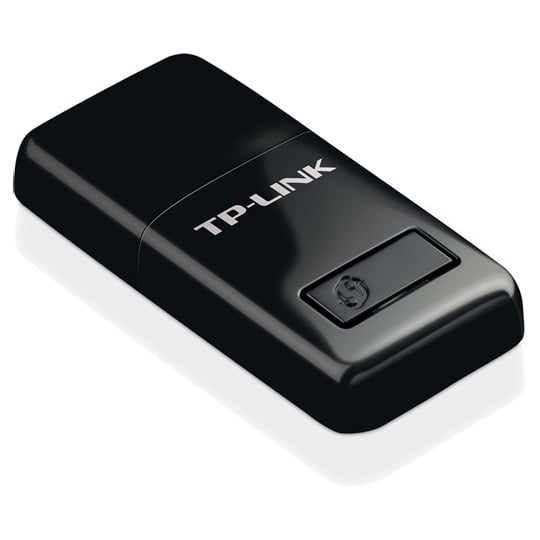
tp-link 300Mbps Mini Wireless N USB WiFi Adapter
End Of Life
tp-link 300Mbps Mini Wireless N USB WiFi Adapter
Scan code: LN56819 Manufacturer code: TL-WN823N
End Of Life
End Of Life

tp-link 300Mbps Mini Wireless N USB WiFi Adapter

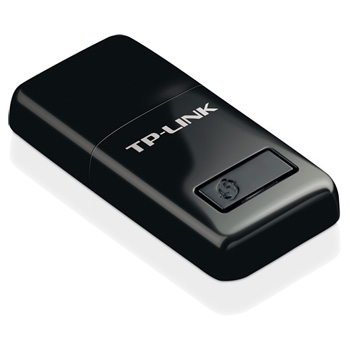
tp-link TL-WN823N Mini Wireless N USB Adapter, 300Mbps, SoftAP Mode, One Button WPS Setup, Black

Scan code: LN56819 Manufacturer code: TL-WN823N
End of life
This product is no longer available to purchase. See our suggested alternatives below.

Email me when the availability or price changes

  • SCANPROTECT Protect against installation damage for 28 days.

Suggested Alternatives
Product Overview

300Mbps Wireless N Speed – Extend Wireless Coverage

With wireless speeds of up to 300Mbps and advanced MIMO technology, the TL-WN823N provides you with a fast, reliable wireless connection for lag-free online gaming and video streaming. Better still, TL-WN823N achieves the best performance with wireless N devices, but also works seamlessly with existing IEEE 802.11b/g networks.


Easy to Install

A friendly user interface utility on a CD for simple installation.


Soft AP

Easily establish a high speeds Wi-Fi hotspot with just a few clicks.


WPS

Easy wireless security encryption at a push of the WPS button.

Features

• 300Mbps wireless speed ideal for smooth HD video, voice streaming and online gaming.
• Mini-sized design for convenient portability with a reliable high performance.
• SoftAP Mode – Turn a wired internet connection to a PC or Laptop into a Wi-Fi hotspot.
• Easily setup a secure wireless connection with one-touch WPS button.

Warranty

Please note your statutory rights are not affected.

For further information regarding Scan's warranty procedure please see our terms and conditions

Details
Duration:
36 months
Type:
Direct
DOA Period:
28 days
RTB Period:
12 months
Manufacturer Contact Details
Manufacturer:
TP-LINK
Telephone:
0845 147 0017 (UK) or 0818 229 000 (Ireland)

Additional Notes:
UK Users Tel:
0845 147 0017

E-mail:
[email protected]

http://uk.tp-link.com/support-contact.html#E-mail-Support

Service Time:
24 hours a day, 7 days a week

Procedures in Detail

Step 1: Contact us through our Technical Support Line 0845 147 0017 (UK) or 0818 229 000 (Ireland), a representative will help you with remote troubleshooting. If the product is judged to be defective, the representative will provide you with a unique RMA number. Customer contact and product info will be requested during this process.

Step 2: An email explaining the RMA process will be sent from TP-LINK UK.

Step 3: Send defective product, purchase receipt along with RMA number to TP-LINK.

Note: Customers are responsible for the shipping fee in Step 3.

Step 4) Once the defective product is received, TP-LINK UK Limited will send back a replacement and inform customer of the tracking number. The warranty starts from the purchase date of your original unit and lasts for 2+1 years on SOHO products regardless of how many replacements are made.

Note: TP-LINK UK Limited will pay the one way shipping fee in Step 4

PLEASE NOTE: If you register your product with TP-LINK then you can enjoy a free 3rd year warranty.

Registration http://warranty.uk.tp-link.com/register.aspx
Sign in portal http://warranty.uk.tp-link.com/SignIn.aspx
Warranty information http://uk.tp-link.com/rma.html

Buying Guide
Need help? Read our Home Broadband Buying Guide
Wi-Fi
Wi-Fi
Date Issued: 20th Oct 2008

Home networking let’s you do great things that aren’t possible with standalone PCs. Printers can be shared between PC, so there’s no need to buy one for each machine.

Read More

Wi-Fi Security
Wi-Fi Security
Date Issued: 19th Jun 2008

WiFi is a wonderful thing. You can take your laptop anywhere in your house and access the Internet, or access your network from the garden. However, it does introduce the grim possibility of somebody else doing exactly the same, without you ever knowing. This guide seeks to make you aware of various security terms and ideas associated with wireless networking and what you should consider when setting up a wireless network.

Read More

Home Networking
Home Networking
Date Issued: 26th Oct 2006

As a growing number of homes contain more than one computer, their users must find ways to network them. The primary purpose for creating a home network tends to be to provide Internet access to all computers within the house. There are other good reasons, however. These include enabling LAN gaming, data backups from one machine to another and the sharing of music within the home.

Read More

TP-LINK TL-WN823N 300Mbps Mini Wireless N USB Adapter, One button WPS Setup is rated 4.0 out of 5 by 2.
Rated 5 out of 5 by from The product performs as expected A good product, reasonable price, easy to install, does the job.
Date published: 2020-04-21
Rated 3 out of 5 by from DOES NOT WORK ON WIN10 please be aware, I bought this by accident, don't do the same if you want to use with windows 10 - it simply wont work, I searched for hours and eventually found a driver but the performance was terrible under windows 10, works great on windows 7 though as I already have this on my own machine and seems to perform well on windows 7
Date published: 2017-12-21
  • y_2020, m_9, d_10, h_15
  • bvseo_bulk, prod_bvrr, vn_bulk_3.0.12
  • cp_1, bvpage1
  • co_hasreviews, tv_0, tr_2
  • loc_en_GB, sid_56819, prod, sort_[SortEntry(order=FEATURED, direction=DESCENDING), SortEntry(order=SUBMISSION_TIME, direction=DESCENDING)]
  • clientName_scan
tp-link 300Mbps Mini Wireless N USB WiFi Adapter