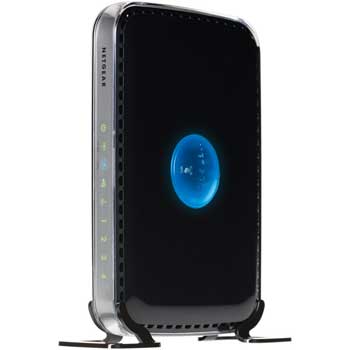
Netgear N600 Wireless DualBand Router N600
Scan code: LN37571
Manufacturer code: WNDR3400-100UKS
End Of Life

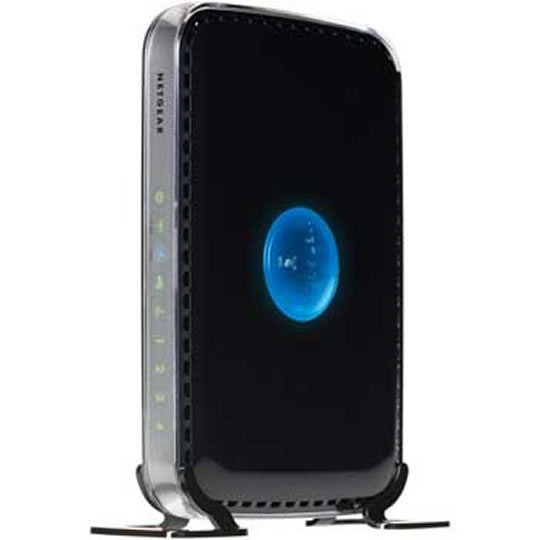

Product Overview
The NETGEAR N600 Wireless Dual Band Router offers the high-performance wireless Internet access needed for demanding applications, such as streaming multimedia and multiplayer gaming. Simultaneous Dual Band is the ultimate in flexibility and performance by providing two independent, dedicated networks.
Simultaneous Dual Band — Runs both 2.4 and 5GHz bands concurrently, ensuring top speeds and the greatest range while minimizing interference
Dedicated Wi-Fi for video and gaming — Provides Wireless-N speed and dual band performance for streaming video, multiplayer online gaming and simultaneous downloads
ReadySHARE® USB — Fast and easy shared acccess to an external USB storage device
NETGEAR Genie™ — Simple setup with easy dashboard control to manage, monitor, and repair home networks
Automatic Quality-of-Service (QoS) — Keeps Internet videos streaming by recognizing video streaming and gives them priority bandwidth that delivers jitter-free video and gaming
Live Parental Controls
Keeps your Internet experience safe
Blocks unsafe Internet content and applications and can be managed from anywhere
Protects connected devices through the router such as PCs, gaming consoles, and iPod touch®
To learn more visit www.netgear.com/lpc
Guest network access — Provides separate security and access restrictions for guests using the network
Broadband usage meter — Monitors Internet traffic and sends customized reports to help keep costs under control
Secured connection — Push ‘N’ Connect with Wi-Fi Protected Setup® (WPS)1 ensure a quick and secure network connection
NETGEAR Green features — Power and Wi-Fi on/off buttons and 80% recycled packaging
Features Package Contents
N600 Wireless Dual Band Router (WNDR3400v2)
Stand
Ethernet cable
Smart Wizard™ installation CD
Power adapter, localized to country of sale
Advanced Features
Live Parental Controls with flexible and customizable filter settings
Simultaneous Dual Band—runs both 2.4 and 5GHz bands at the same time
ReadySHARE® USB—Wirelessly share a USB hard drive with Macs and PCs
Multiple SSID guest networks (separate security and access restrictions)
Broadband usage meter measures Internet usage
Power and Wi-Fi on/off buttons
Warranty
Lifetime Warranty‡ (For full warranty details go to www.netgear.com/lifetimewarranty. Limited to hardware only for as long as the original buyer owns the product. External power supply excluded.)
System Requirements
Broadband (cable, DSL) Internet service and modem with Ethernet connection
2.4 or 5.0 GHz 802.11a/b/g/n specification wireless adapter or an Ethernet adapter and cable for each computer
Microsoft® Windows® 7, Vista®, XP, 2000, Mac OS®, UNIX®, or Linux®
Microsoft® Internet Explorer® 5.0, Firefox® 2.0 or Safari 1.4 or higher
Standards
IEEE® 802.11 b/g/n 2.4 GHz
IEEE 802.11 a/n 5.0 GHz
Five (5) 10/100 (1 WAN and 4 LAN) Ethernet ports with auto-sensing technology
Performance
530 MHz powerful MIPS 32-bit processor
Memory: 8 MB flash and 64 MB RAM
Five (5) (1 WAN, 4 LAN) Fast Ethernet ports
Advanced Quality of Service (QoS)
Supports Wireless Multimedia (WMM) based QoS
Security
Wi-Fi Protected Access® (WPA/WPA2—PSK) and WEP
Double firewall protection (SPI and NAT firewall)
Denial-of-service (DoS) attack prevention
Ease of Use
NETGEAR Genie™—Easy dashboard control to manage, monitor, and repair home networks
Push ‘N’ Connect using Wi-Fi Protected Setup® (WPS)1
Physical Specifications
Dimensions: 223 x 153 x 31 mm (8.8 x 6.0 x 1.2 in)
Weight: 0.5 kg (1.2 lb)
Simultaneous Dual Band — Runs both 2.4 and 5GHz bands concurrently, ensuring top speeds and the greatest range while minimizing interference
Dedicated Wi-Fi for video and gaming — Provides Wireless-N speed and dual band performance for streaming video, multiplayer online gaming and simultaneous downloads
ReadySHARE® USB — Fast and easy shared acccess to an external USB storage device
NETGEAR Genie™ — Simple setup with easy dashboard control to manage, monitor, and repair home networks
Automatic Quality-of-Service (QoS) — Keeps Internet videos streaming by recognizing video streaming and gives them priority bandwidth that delivers jitter-free video and gaming
Live Parental Controls
Keeps your Internet experience safe
Blocks unsafe Internet content and applications and can be managed from anywhere
Protects connected devices through the router such as PCs, gaming consoles, and iPod touch®
To learn more visit www.netgear.com/lpc
Guest network access — Provides separate security and access restrictions for guests using the network
Broadband usage meter — Monitors Internet traffic and sends customized reports to help keep costs under control
Secured connection — Push ‘N’ Connect with Wi-Fi Protected Setup® (WPS)1 ensure a quick and secure network connection
NETGEAR Green features — Power and Wi-Fi on/off buttons and 80% recycled packaging
Features Package Contents
N600 Wireless Dual Band Router (WNDR3400v2)
Stand
Ethernet cable
Smart Wizard™ installation CD
Power adapter, localized to country of sale
Advanced Features
Live Parental Controls with flexible and customizable filter settings
Simultaneous Dual Band—runs both 2.4 and 5GHz bands at the same time
ReadySHARE® USB—Wirelessly share a USB hard drive with Macs and PCs
Multiple SSID guest networks (separate security and access restrictions)
Broadband usage meter measures Internet usage
Power and Wi-Fi on/off buttons
Warranty
Lifetime Warranty‡ (For full warranty details go to www.netgear.com/lifetimewarranty. Limited to hardware only for as long as the original buyer owns the product. External power supply excluded.)
System Requirements
Broadband (cable, DSL) Internet service and modem with Ethernet connection
2.4 or 5.0 GHz 802.11a/b/g/n specification wireless adapter or an Ethernet adapter and cable for each computer
Microsoft® Windows® 7, Vista®, XP, 2000, Mac OS®, UNIX®, or Linux®
Microsoft® Internet Explorer® 5.0, Firefox® 2.0 or Safari 1.4 or higher
Standards
IEEE® 802.11 b/g/n 2.4 GHz
IEEE 802.11 a/n 5.0 GHz
Five (5) 10/100 (1 WAN and 4 LAN) Ethernet ports with auto-sensing technology
Performance
530 MHz powerful MIPS 32-bit processor
Memory: 8 MB flash and 64 MB RAM
Five (5) (1 WAN, 4 LAN) Fast Ethernet ports
Advanced Quality of Service (QoS)
Supports Wireless Multimedia (WMM) based QoS
Security
Wi-Fi Protected Access® (WPA/WPA2—PSK) and WEP
Double firewall protection (SPI and NAT firewall)
Denial-of-service (DoS) attack prevention
Ease of Use
NETGEAR Genie™—Easy dashboard control to manage, monitor, and repair home networks
Push ‘N’ Connect using Wi-Fi Protected Setup® (WPS)1
Physical Specifications
Dimensions: 223 x 153 x 31 mm (8.8 x 6.0 x 1.2 in)
Weight: 0.5 kg (1.2 lb)


