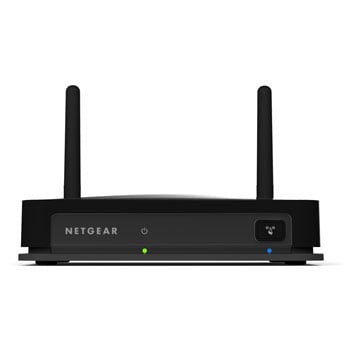
4x RJ45 to Wireless Adaptor 11n Dual Band with WPS Push to Connect ideal TV, DVR, Game Console
Scan code: LN43095
Manufacturer code: WNCE4004-100UKS
End Of Life

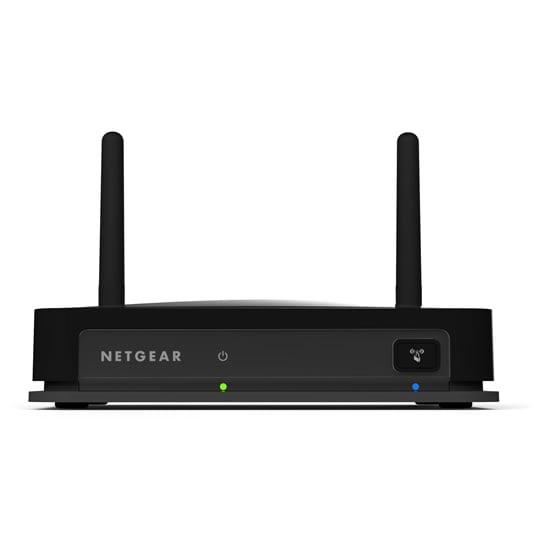

4x RJ45 to Wireless Adaptor 11n Dual Band with WPS Push to Connect ideal TV, DVR, Game Console
Netgear WNCE4004 N900 Video and Gaming 4-Port Ethernet to WiFi Adapter - Perfect for Internet READY TVs/SKY Boxes
Scan code:
LN43095
Manufacturer code:
WNCE4004-100UKS
This product is no longer available to purchase.
Product Overview
NETGEAR N900 Dual Band WiFi HD Video and Gaming 4-Port Adapter makes any wired device a part of your WiFi network. The adapter is optimized for wireless video streaming and is designed to provide the best performance while enjoying HD video entertainment.
• Wirelessly stream multiple 1080p HD videos throughout your home
• Connect up to four (4) devices like Blu-ray™ players, Smart TVs, media players and game consoles
• Connect any device with an Ethernet port to the latest WiFi speed
• Dual band WiFi eliminates interference, providing greater signal quality and performance for 3D and HD video streaming
• Optimized for buffer and glitch-free HD video streaming when watching video from streaming sites like Netflix®, Hulu®, Amazon®, Vudu®, Crackle®, YouTube® and more
• One-touch Wi-Fi Protected Setup (WPS) wireless connection
Connect up to four (4) digital entertainment devices wirelessly, including Ethernet-enabled Smart TVs, Blu-ray players, DVRs, Xbox 360®, PlayStation3® and more, at blazing fast speeds of up to 450 Mbps. No need to place router next to the home theater center and eliminates the need for cables or expensive proprietary USB adapters.
Features Package Contents
• N900 Video and Gaming 4-Port WiFi Adapter (WNCE4004)
• Power adapter
Warranty
• NETGEAR 1-year Warranty
Features
• Connects to any existing 2.4 or 5 GHz Wi-Fi access point, gateway or router
• Push 'N' Connect using Wi-Fi Protected Setup® for easy setup
• Dynamic LEDs display real-time network connection status
• Wi-Fi Protected Access® (WPA2-PSK, WPA-PSK) and WEP data encryption
• Four (4) 10/100 Mbps Ethernet port to connect to home A/V devices
Standards
• IEEE® 802.11n version 2.0‡
Physical Specifications
• Dimensions: 106 x 138 x 32 mm (4.17 x 5.43 x 1.25 in)
• Weight: 180 g (0.40 lbs)
System Requirements
• Existing wireless home network with Internet connection – 2.4 or 5 GHz 802.11 b/g/n AP/Gateway/Router
• TV, DVR, game console, home A/V device, or other network-enabled device with Ethernet port
• Microsoft® Internet Explorer® 6.0, Firefox® 2.0 or Safari® 1.4 or higher for software configuration
• Wirelessly stream multiple 1080p HD videos throughout your home
• Connect up to four (4) devices like Blu-ray™ players, Smart TVs, media players and game consoles
• Connect any device with an Ethernet port to the latest WiFi speed
• Dual band WiFi eliminates interference, providing greater signal quality and performance for 3D and HD video streaming
• Optimized for buffer and glitch-free HD video streaming when watching video from streaming sites like Netflix®, Hulu®, Amazon®, Vudu®, Crackle®, YouTube® and more
• One-touch Wi-Fi Protected Setup (WPS) wireless connection
Connect up to four (4) digital entertainment devices wirelessly, including Ethernet-enabled Smart TVs, Blu-ray players, DVRs, Xbox 360®, PlayStation3® and more, at blazing fast speeds of up to 450 Mbps. No need to place router next to the home theater center and eliminates the need for cables or expensive proprietary USB adapters.
Features Package Contents
• N900 Video and Gaming 4-Port WiFi Adapter (WNCE4004)
• Power adapter
Warranty
• NETGEAR 1-year Warranty
Features
• Connects to any existing 2.4 or 5 GHz Wi-Fi access point, gateway or router
• Push 'N' Connect using Wi-Fi Protected Setup® for easy setup
• Dynamic LEDs display real-time network connection status
• Wi-Fi Protected Access® (WPA2-PSK, WPA-PSK) and WEP data encryption
• Four (4) 10/100 Mbps Ethernet port to connect to home A/V devices
Standards
• IEEE® 802.11n version 2.0‡
Physical Specifications
• Dimensions: 106 x 138 x 32 mm (4.17 x 5.43 x 1.25 in)
• Weight: 180 g (0.40 lbs)
System Requirements
• Existing wireless home network with Internet connection – 2.4 or 5 GHz 802.11 b/g/n AP/Gateway/Router
• TV, DVR, game console, home A/V device, or other network-enabled device with Ethernet port
• Microsoft® Internet Explorer® 6.0, Firefox® 2.0 or Safari® 1.4 or higher for software configuration


4x RJ45 to Wireless Adaptor 11n Dual Band with WPS Push to Connect ideal TV, DVR, Game Console
![4x RJ45 to Wireless Adaptor 11n Dual Band with WPS Push to Connect ideal TV, DVR, Game Console]()