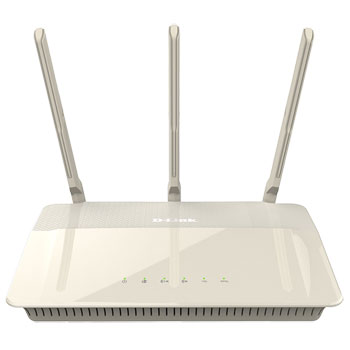
D-Link DIR-880L Wireless AC1900 Dual Band Router with 4 Port Gigabit Switch
Scan code: LN60638
Manufacturer code: DIR-880L
End Of Life

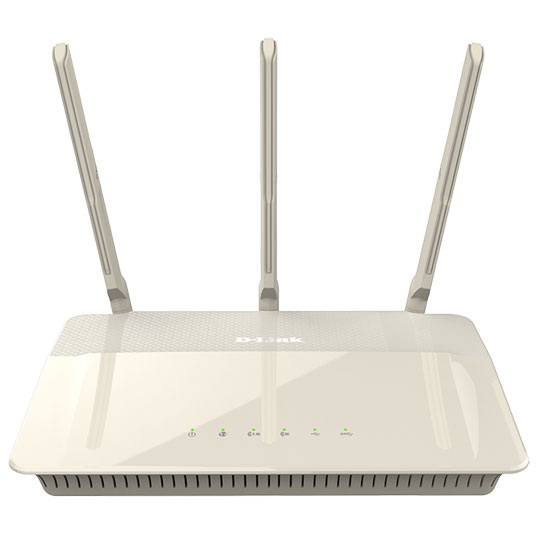


Product Overview
The DIR-880L Wireless AC1900 Dual-Band Gigabit Cloud Router offers the ultimate wireless connectivity with combined wireless speeds of up to 1.9 Gbps*. Advanced AC SmartBeam™ provides a dramatic increase in wireless coverage, while advanced Quality of Service (QoS) efficiently and automatically distributes your Internet bandwidth. The touch screen enhanced web-based setup wizard and configuration allows you to easily setup and get connected. It’s mydlink™-enabled which allows you to control and manage your network wherever you are over the Internet, as well as stream and share media files through the free mydlink™ SharePort™ app. The DIR-880L is high performance, easy-to-use and IPv6-ready for a reliable network today and tomorrow.
Superior Coverage and Speed with Advanced AC SmartBeam™
The D-Link DIR-880L Wireless AC1900 Dual-Band Gigabit Cloud Router creates a blazing fast home network that connects all of your devices to your broadband Internet connection. Advanced AC SmartBeam™ technology brings you the future of high-bandwidth wireless connectivity, vastly increasing the speed and coverage of your network. This allows you to stream HD video, make Internet calls, and surf the Internet from every corner of your home without interruption.
The high-gain external antennas send the signal into the furthest corners of your home, giving you a strong connection wherever you are. Gigabit Ethernet ports provide high-speed wired connections for up to four PCs or other devices.
Use mydlink™ to Monitor Your Network
The Wireless AC1900 Dual-Band Gigabit Cloud Router is mydlink™ Cloud enabled, so you can effortlessly access and view your network no matter where you are. See who is connected to your router, change settings, or block someone from using your network connection, all from an Internet connected PC, tablet, or smartphone. Parents can monitor what sites their children are visiting, to stay informed and in control on the go.
File Sharing at Your Fingertips
The mydlink™ SharePort™ app allows you to connect a USB storage device to the DIR-880L and instantly share documents, movies, pictures, and music with mobile devices. Put your music library on a USB drive and share it with everyone else in your home, or show photos on the living room TV while a family member watches a movie on their tablet. Stream media files to multiple devices without interruption, or save them to your device for offline playback. The intuitive interface lets anyone immediately connect to a variety of entertainment options stored securely on your own storage device.
Reliable and Efficient
Using the latest Wireless AC technology, which can provide transfer rates of up to 1.9 Gbps1 (1300 + 600 Mbps), the DIR-880L operates on both the 2.4 GHz and 5 GHz wireless bands at the same time using concurrent dual-band technology and three external antennas. This allows you to browse the web, chat and e-mail using the 2.4 GHz band, while simultaneously streaming digital media, playing online games, or making Internet phone calls on the 5 GHz band. Advanced Quality of Service (QoS) prioritises the most important data, such as movie streaming and online gaming; its band steering feature efficiently balances the data load between the two bands, while airtime fairness ensures that wireless clients are provided with the most appropriate bandwidth for their needs.
Easy to Set Up and Use
Get the DIR-880L up and running in no time right from your sofa with the touch screen enhanced web-based setup wizard. Simply open the web browser on your smartphone or tablet to setup and follow a few easy steps to get your home network connected without having to switch on a computer. You can also set up a secure network with the touch of a button using Wi-Fi Protected Setup. Simply press the WPS button to instantly establish a secure connection to a new device. If you have additional mydlink™ cloud products, you can take advantage of mydlink™ Zero Configuration. Simply connect your mydlink™-enabled device to the DIR-880L and the router will automatically link it to your mydlink™ account with no configuration required. Features Connectivity
Combined dual-band wireless speeds of up to 1.9 Gbps1
Advanced AC SmartBeam™ dramatically enhances wireless signal strength and throughput
802.11 a/b/g/n/ac wireless LAN for a complete range of wireless compatibility
Gigabit WAN and LAN ports for high-speed wired connections
Two USB ports (1 x USB 3.0, 1 x USB 2.0) to connect storage drives and printers for sharing
mydlink™-enabled
Remotely and securetly view and manage your network over the Internet
mydlink™ Lite mobile app helps you access, manage and view your network remotely
Advanced Quality of Service (QoS)
Band steering efficiently balances the data load between the two wireless bands
Airtime fairness optimally adjusts the data rate of wireless clients for the best performance
Security
WPA & WPA2 wireless encryption protects the network from intruders
Wi-Fi Protected Setup (WPS) securely adds devices to your network at the push of a button
Technical Specifications
General
Device Interfaces
802.11 a/b/g/n/ac wireless LAN
Four 10/100/1000 Gigabit LAN ports
10/100/1000 Gigabit WAN port
Two USB ports (one USB 3.0, one USB 2.0)
Antenna Type
Three dual-band dipole antennas
Standards
IEEE 802.11ac
IEEE 802.11n
IEEE 802.11g
IEEE 802.11b
IEEE 802.11a
IEEE 802.3
IEEE 802.3u
Minimum System Requirements
Windows 8/7/Vista/XP SP3 / Mac OS X 10.4 or higher
Microsoft Internet Explorer 6 or higher, Firefox 1.5 or higher, or other Java-enabled browser
Ethernet network interface
Cable or DSL modem
Subscription with an Internet service provider
Functionality
Advanced Features
Guest zone
mydlink™ SharePort™ web access
Multi-language web setup wizard
Green Ethernet
DLNA media server support
Advanced AC SmartBeam™
Bridge mode
Dual active firewall
Network Address Translation (NAT)
Stateful Packet Inspection (SPI)
VPN passthrough/multi-session PPTP/L2TP/IPSec
Advanced QoS with band steering
VPN server - L2TP over IPSec
mydlink™ Features
Remote Management
View current upload/download bandwidth
View currently connected clients
View web browsing history per client
Block/unblock client network access
Manage wireless network details
Accessible through a web browser or iOS or Android mobile app
Mobile App Support
mydlink™ Lite
mydlink™ SharePort™
QRS Mobile v1.5
Wireless Security
WPA & WPA2 (Wi-Fi Protected Access)
Wi-Fi Protected Setup (WPS) PIN/PBC
Physical
Dimensions (L x W x D)
246.9 x 190.4 x 47.2 mm (9.72 x 7.50 x 1.86 inches)
Weight
745 grams (1.62 lbs)
Power
Input: 100 to 240 V AC, 50/60 Hz
Output: 12 V DC, 3 A
Temperature
Operating: 0 to 40 °C (32 to 104 °F)
Storage: -20 to 65 °C (-4 to 149 °F)
Humidity
Operating: 0% to 90% non-condensing
Storage: 5% to 95% non-condensing
Certifications
FCC Class B
CE Class B
C-Tick
DLNA
IPv6 Ready
Wi-Fi Certified
Wi-Fi Protected Setup (WPS)
Wi-Fi Multimedia (WMM)
Compatible with Windows 8
Superior Coverage and Speed with Advanced AC SmartBeam™
The D-Link DIR-880L Wireless AC1900 Dual-Band Gigabit Cloud Router creates a blazing fast home network that connects all of your devices to your broadband Internet connection. Advanced AC SmartBeam™ technology brings you the future of high-bandwidth wireless connectivity, vastly increasing the speed and coverage of your network. This allows you to stream HD video, make Internet calls, and surf the Internet from every corner of your home without interruption.
The high-gain external antennas send the signal into the furthest corners of your home, giving you a strong connection wherever you are. Gigabit Ethernet ports provide high-speed wired connections for up to four PCs or other devices.
Use mydlink™ to Monitor Your Network
The Wireless AC1900 Dual-Band Gigabit Cloud Router is mydlink™ Cloud enabled, so you can effortlessly access and view your network no matter where you are. See who is connected to your router, change settings, or block someone from using your network connection, all from an Internet connected PC, tablet, or smartphone. Parents can monitor what sites their children are visiting, to stay informed and in control on the go.
File Sharing at Your Fingertips
The mydlink™ SharePort™ app allows you to connect a USB storage device to the DIR-880L and instantly share documents, movies, pictures, and music with mobile devices. Put your music library on a USB drive and share it with everyone else in your home, or show photos on the living room TV while a family member watches a movie on their tablet. Stream media files to multiple devices without interruption, or save them to your device for offline playback. The intuitive interface lets anyone immediately connect to a variety of entertainment options stored securely on your own storage device.
Reliable and Efficient
Using the latest Wireless AC technology, which can provide transfer rates of up to 1.9 Gbps1 (1300 + 600 Mbps), the DIR-880L operates on both the 2.4 GHz and 5 GHz wireless bands at the same time using concurrent dual-band technology and three external antennas. This allows you to browse the web, chat and e-mail using the 2.4 GHz band, while simultaneously streaming digital media, playing online games, or making Internet phone calls on the 5 GHz band. Advanced Quality of Service (QoS) prioritises the most important data, such as movie streaming and online gaming; its band steering feature efficiently balances the data load between the two bands, while airtime fairness ensures that wireless clients are provided with the most appropriate bandwidth for their needs.
Easy to Set Up and Use
Get the DIR-880L up and running in no time right from your sofa with the touch screen enhanced web-based setup wizard. Simply open the web browser on your smartphone or tablet to setup and follow a few easy steps to get your home network connected without having to switch on a computer. You can also set up a secure network with the touch of a button using Wi-Fi Protected Setup. Simply press the WPS button to instantly establish a secure connection to a new device. If you have additional mydlink™ cloud products, you can take advantage of mydlink™ Zero Configuration. Simply connect your mydlink™-enabled device to the DIR-880L and the router will automatically link it to your mydlink™ account with no configuration required. Features Connectivity
Combined dual-band wireless speeds of up to 1.9 Gbps1
Advanced AC SmartBeam™ dramatically enhances wireless signal strength and throughput
802.11 a/b/g/n/ac wireless LAN for a complete range of wireless compatibility
Gigabit WAN and LAN ports for high-speed wired connections
Two USB ports (1 x USB 3.0, 1 x USB 2.0) to connect storage drives and printers for sharing
mydlink™-enabled
Remotely and securetly view and manage your network over the Internet
mydlink™ Lite mobile app helps you access, manage and view your network remotely
Advanced Quality of Service (QoS)
Band steering efficiently balances the data load between the two wireless bands
Airtime fairness optimally adjusts the data rate of wireless clients for the best performance
Security
WPA & WPA2 wireless encryption protects the network from intruders
Wi-Fi Protected Setup (WPS) securely adds devices to your network at the push of a button
Technical Specifications
General
Device Interfaces
802.11 a/b/g/n/ac wireless LAN
Four 10/100/1000 Gigabit LAN ports
10/100/1000 Gigabit WAN port
Two USB ports (one USB 3.0, one USB 2.0)
Antenna Type
Three dual-band dipole antennas
Standards
IEEE 802.11ac
IEEE 802.11n
IEEE 802.11g
IEEE 802.11b
IEEE 802.11a
IEEE 802.3
IEEE 802.3u
Minimum System Requirements
Windows 8/7/Vista/XP SP3 / Mac OS X 10.4 or higher
Microsoft Internet Explorer 6 or higher, Firefox 1.5 or higher, or other Java-enabled browser
Ethernet network interface
Cable or DSL modem
Subscription with an Internet service provider
Functionality
Advanced Features
Guest zone
mydlink™ SharePort™ web access
Multi-language web setup wizard
Green Ethernet
DLNA media server support
Advanced AC SmartBeam™
Bridge mode
Dual active firewall
Network Address Translation (NAT)
Stateful Packet Inspection (SPI)
VPN passthrough/multi-session PPTP/L2TP/IPSec
Advanced QoS with band steering
VPN server - L2TP over IPSec
mydlink™ Features
Remote Management
View current upload/download bandwidth
View currently connected clients
View web browsing history per client
Block/unblock client network access
Manage wireless network details
Accessible through a web browser or iOS or Android mobile app
Mobile App Support
mydlink™ Lite
mydlink™ SharePort™
QRS Mobile v1.5
Wireless Security
WPA & WPA2 (Wi-Fi Protected Access)
Wi-Fi Protected Setup (WPS) PIN/PBC
Physical
Dimensions (L x W x D)
246.9 x 190.4 x 47.2 mm (9.72 x 7.50 x 1.86 inches)
Weight
745 grams (1.62 lbs)
Power
Input: 100 to 240 V AC, 50/60 Hz
Output: 12 V DC, 3 A
Temperature
Operating: 0 to 40 °C (32 to 104 °F)
Storage: -20 to 65 °C (-4 to 149 °F)
Humidity
Operating: 0% to 90% non-condensing
Storage: 5% to 95% non-condensing
Certifications
FCC Class B
CE Class B
C-Tick
DLNA
IPv6 Ready
Wi-Fi Certified
Wi-Fi Protected Setup (WPS)
Wi-Fi Multimedia (WMM)
Compatible with Windows 8


D-Link DIR-880L Wireless AC1900 Dual Band Router with 4 Port Gigabit Switch
![D-Link DIR-880L Wireless AC1900 Dual Band Router with 4 Port Gigabit Switch]()