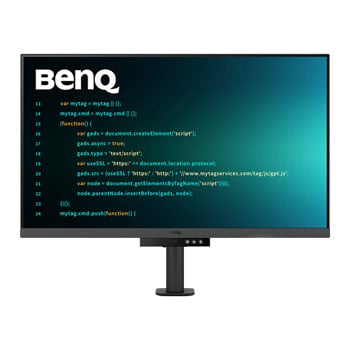

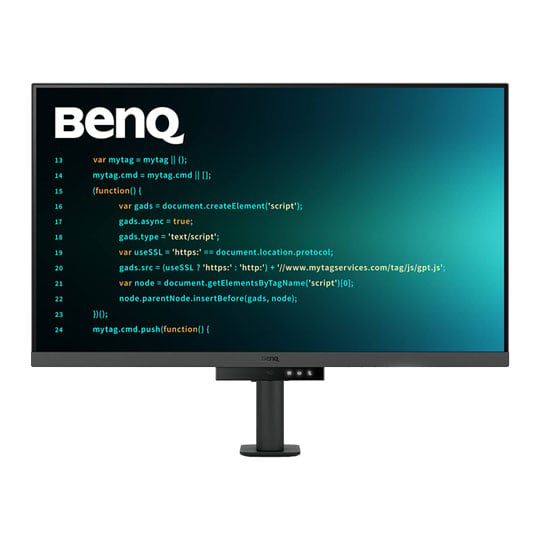
BenQ 32" RD320UA 4K IPS 60Hz HDR Programming Monitor
32" BenQ RD320UA Programming Monitor, IPS, 3840x2160, 5ms, 60Hz, 2000:1, 400cd/m², 2x 3w Speakers, HDMI / DP / USB-A/C
Email me when the availability or price changes
Finance this product
- From £24.52 / month (APR 16.9%) for 36 months or 0% for 4 months
- With a 10% deposit from just £17.48 / month (APR 15.9%)
BenQ RD320UA
32” 4K Programming Monitor with Backlight & Flexible Arm

Astonishing Clarity for the Ultimate Coding ExperienceDiscover the BenQ RD320UA, a 32-inch 4K programming monitor built for developers, coders, and creative professionals who demand clarity, comfort, and productivity. Featuring a reflection-reducing Nano Matte Panel, 4K UHD 3840 x 2160 resolution, and a 2000:1 contrast ratio, the RD320UA delivers sharp code, rich detail, and an immersive viewing experience. With dedicated Coding Modes, a Coding HotKey and Function Bar, MoonHalo ambient backlight, Night Hours Protection, and Brightness Intelligence Gen 2, it is designed to support focus and eye comfort throughout long workdays. The included BenQ Ergo Arm offers flexible pivot, swivel, tilt, and height adjustment, while 90W USB Type-C connectivity, KVM switching, PIP/PBP support, and Display Pilot 2 make it easy to create a streamlined multi-device workstation.

Reflection Free

4K (3840x2160)

Coding Modes

Body Comfort

USB Type-C

Crystal Clear, Entirely Focused

Enter the Coding Flow in SecondsEnter the coding flow in seconds with BenQ Nano Matte Panel. Featuring a low reflection property to minimize distractions, this advanced technology enhances focus and boosts productivity, delivering unparalleled clarity for peak performance. Elevate your coding experience and unlock your full potential with BenQ.
Clearer Code & Stunning Visuals

2000:1 Contrast RatioExperience unparalleled clarity with a 2000:1 contrast ratio. Enjoy deeper blacks and high contrast with a premium 4K display for coding, movies, and gaming, ensuring exceptional visual performance. This enhancement not only improves image quality but also increases overall immersion, providing a more engaging and captivating experience.
Ignite Night Coding Inspiration

Long-lasting Eye CareWhether you prefer working in a soft, ambient glow, or complete darkness during late-night work, we've got you covered for long-lasting eye care.
Effortless Comfort

Night Hours ProtectionBenefit from minimum brightness technology for reduced eye strain, discover enhanced eye protection during night hours and dark room usage with our Night Hours Protection. Its intelligent ambient light detection and auto-switch capabilities require minimal user intervention, ensuring effortless and consistent eye care.

MoonHaloExperience MoonHalo by BenQ – a seamless blend of immersive illumination and comforting ambiance. With customisable colour temperature, brightness, and light modes, along with Auto Dimming powered by B.I. Gen2, MoonHalo ensures optimal eye protection and focus, anytime whether you're working from home or the office.
Designed for Coding Excellence

Exclusive Coding Modes Boost ProductivityBenQ's advanced coding modes deliver clear fonts and better code differentiation, reducing eye strain. Choose from dark and light themes and easily adjust brightness, sharpness, and contrast for optimal coding conditions.

Instant Coding with Hotkey & Function BarEffortlessly boost productivity with our unique Coding HotKey and Function Bar. With a swift press of the Coding HotKey at the heart of the function bar you can immediately start coding.
Infinite Desk Flexibility for Programmers
BenQ Ergo Arm enhances flexibility and provides the optimal screen position for a more comfortable and productive user experience. Relieve prolonged neck and body aches. BenQ Programming Monitors prioritize your comfort for long-term projects.

Pivot

Swivel

Tilt

Height Adjustable Stand

Ergo Arm StandBenQ Ergo Arm enhances flexibility and provides the optimal screen position for a more comfortable and productive user experience.
Quick Connectivity with Easy Plug & Play
BenQ Programming Monitor offers ample port options, including USB Type-C for all-in-one connectivity, meeting your multitasking needs.

KVM SwitchingMaximum efficiency through unified integration with diverse devices and built-in KVM (keyboard, video, mouse) for seamless source switching.

Daisy ChainMulti-Stream Transport Technology allows you to extend screens across multiple displays using the USB Type-C. The 90W USB Type-C carries images, videos, and other data seamlessly and charges your mobile devices simultaneously with one cable.

Effortless Multi-Device DisplayDualView Plus simplifies multi-device displays by letting you customise colour modes across applications or windows. With support for PIP and PBP, you can easily manage dual-source or single-source viewing.

Optimize ProductivityPIP (Picture-in-Picture) and PBP (Picture-by-Picture) efficiently optimise screen space. PIP overlays a secondary window for multitasking, while PBP splits the screen to display content from multiple sources, boosting productivity.

DualView PlusDualView Plus with PIP/PBP not only displays dual sources simultaneously but also allows different colour modes for each screen.
Display Pilot 2
Display Pilot 2 caters to your needs, allowing easy arrangement of functions like MoonHalo, Night Hours Protection, and Auto Pivot. Display Pilot 2 for the BenQ programming series also offers software features specifically designed for programmers, including FloW, Shortcuts, Desktop Partition, Application Mode, Software Dimming, and Circadian Mode.

FloWWe understand your need for precise planning. By learning your habits, BenQ RD320UA’s FloW will seamlessly adapt to your needs, transitioning between different scenarios and based on preset schedules to support your busy day.

Built-in MoonHalo LightWith Display Pilot 2, MoonHalo seamlessly syncs with your monitor for easy adjustments of switch, brightness, colour temperature, light mode, and non-stop mode.

Circadian ModeBenQ Low Blue Light Plus includes Circadian Mode, which automatically adjusts your screen's colour temperature throughout the day, mirroring the natural sunrise-to-sunset cycle. Enjoy eye comfort worry-free.

Assign Different Modes to ApplicationsApplication Mode makes it easy to assign different colour modes and remembers your frequently used settings for upcoming applications.

Customisable Desktop PartitionsLaunch Desktop Partition and drag the application you're working with into partitions by using preset templates or by customising your own layouts.

Double Your Coding SpeedDisplay Pilot 2 now stores an additional set of copy-and-paste functions, enhancing coding efficiency. Additionally, BenQ’s exclusive Shortcuts allow quick access to pre-set keyboard shortcuts for specific common functions.
Keep Your Eyes Fatigue-Free
Experience unmatched eye comfort with our Brightness Intelligence Gen2. BenQ Eye-Care Technology is dedicated to enhancing your visual comfort.

Brightness Intelligence Gen2BenQ B.I. Gen2 emphasizes automatic detection of environmental brightness for automated screen brightness adjustments, while also providing the option for manually fine-tuning the brightness.

TUV CertifiedBeing TUV Reflection Free Certificated ensures coding with minimized distractions, fostering a clearer and more efficient development process. Global safety authority TÜV Rheinland also certifies RD320UA's Low Blue Light as truly friendly to the human eye. Eyesafe 2.0 certification ensures that the display reduces blue light while maintaining vivid colour.
BenQ’s Green Commitment

A Vision of SustainabilityBenQ prioritises eco-friendly practices in our product development, underlining our commitment to sustainability.

85% PCRThe housing of monitors is made with 85% PCR (Post-Consumer Recycled) materials, contributing to environmentally conscious production practices.

Recyclable PackingBenQ package their monitors in recyclable cardboard, minimizing their environmental impact and promoting eco-friendliness.

Auto Power OffThe Auto Power Off of our feature allows users to automatically power down the screen after 10, 20, or 30 minutes of inactivity, conserving energy and further promoting sustainability.

EcoPrivacySave power and safeguard screen privacy effortlessly with their feature that automatically dims your monitor during inactivity.


PayPal Credit
| Monthly Payment: | £63.42 |
| Instalment Rate: | 16.9% p.a. (fixed) |
| Cost of purchase: | £699.98 |
| Total inc. interest: | £761.00 |
| Monthly Payment: | £34.18 |
| Instalment Rate: | 16.9% p.a. (fixed) |
| Cost of purchase: | £699.98 |
| Total inc. interest: | £820.29 |
| Monthly Payment: | £24.52 |
| Instalment Rate: | 16.9% p.a. (fixed) |
| Cost of purchase: | £699.98 |
| Total inc. interest: | £882.34 |
| Example | |
| Minimum Spend: | £99 |
| Instalment Rate: | N/A |
| Cost of purchase: | £99 |
| Total inc. interest: | £99 |
Representative Example:
Purchase Rate: 23.9% p.a. (variable)
Representative: 23.9% APR (variable)
Assumed Credit Limit: £1,200
Subject to status. Terms and Conditions apply.