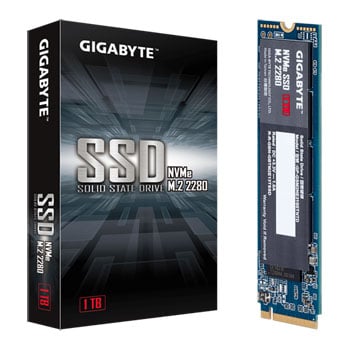

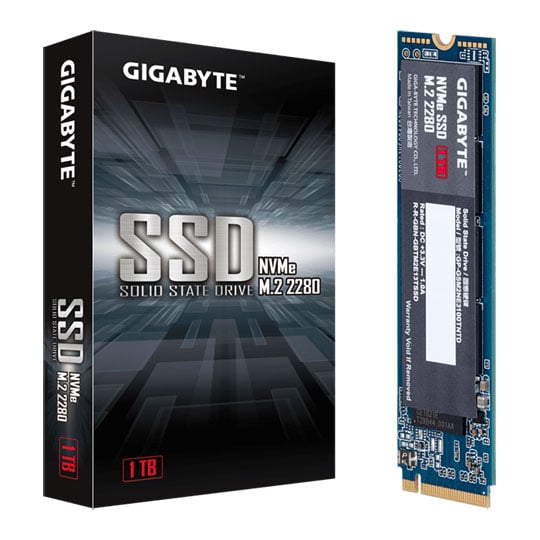
Gigabyte 1TB M.2 PCIe NVMe Performance SSD/Solid State Drive
End Of Life
Gigabyte 1TB M.2 PCIe NVMe Performance SSD/Solid State Drive
Scan code: LN103080 Manufacturer code: GP-GSM2NE3100TNTD
End Of Life
End Of Life

Gigabyte 1TB M.2 PCIe NVMe Performance SSD/Solid State Drive

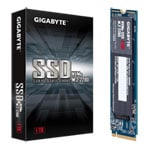
1TB Gigabyte, M.2 (2280) PCIe 3.0 (x4) NVMe SSD, HMB, V-NAND, 2500MB/s Read, 2100MB/s Write, 430k/295k

Scan code: LN103080 Manufacturer code: GP-GSM2NE3100TNTD
End of life
This product is no longer available to purchase.

Email me when the availability or price changes

  • SCANPROTECT Protect against installation damage for 28 days.

1TB Gigabyte NVMe Solid State Drive
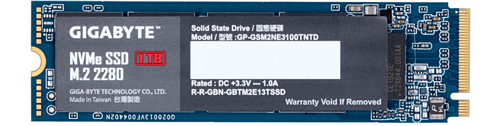
Gigabyte NVMe SSD 1TB

performance. stability. Introducing the new GIGABYTE NVMe SSD with a total capacity of 1TB and PCI-Express 3.0 x4, NVMe 1.3 interface. Complete your daily computing tasks boasting the best controller and NAND Flash that provide incredible Sequential read and write speeds. Compared to the 2.5" SATA SSD, the GIGABYTE M.2 PCIe SSD gives you a rapid data transfer experience. Featuring HMB (Host Memory Buffer) support, plus TRIM & S.M.A.R.T supported. Included five-year warranty for peace of mind.

Other GIGABYTE M.2 2280 NVMe SSDs:

128GB 256GB 512GB

1TB M.2 PCIe 3.0NVMe 1.3 Storage 2280

2500 / 2100 MBsMaximum Read / Write

295K / 430K IOPSRandom Read / Write

Breaking the Barriers of SATA Limitations

performance

outstanding read/write performance GIGABYTE NVMe SSD provides performance for your daily computing tasks, boast of best controller & NAND flash. GIGABYTE M.2 PCIe SSD gives you a faster data transferring experience compared to 2.5" SATA solid state drive.

Host Memory Buffer (HMB)

memory buffer

PCIE 3.0 (x4) interface The Host Memory Buffer (HMB) feature utilizes the DMA (Direct Memory Access) of PCI Express to allow SSDs to use some of the DRAM on PC system, instead of requiring the SSD to bring its own DRAM.

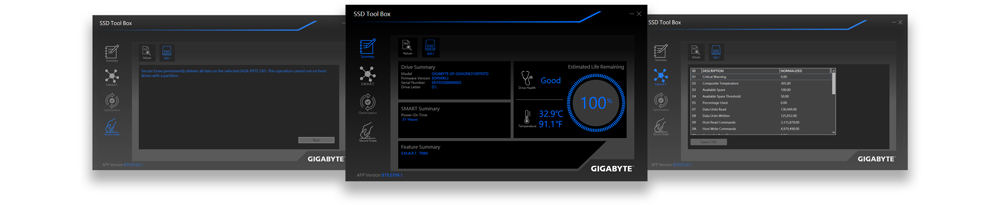
Check your SSD's Health Using the Tool Box
Tool box

monitor the ssd's status with ease The freshly restructured SSD Tool Box is an innovative application that assists users by monitoring SSD Status, providing general information such as model name, FW version, health condition, drive optimization and also detects sensor temperature. Furthermore, users can clear all the data with the Secure Erase function. You can download the SSD Tool Box from the Support.

Reliability you can Trust

warranty

5 Years Limited Warranty GIGABYTE NVMe SSDs possess both high data transferring speed and enhanced endurance, providing durable MTBF of 1.5 million hours and 5 years or 1600TBW limited warranty.

Warranty

Please note your statutory rights are not affected.

For further information regarding Scan's warranty procedure please see our terms and conditions

Details
Duration:
36 months
Type:
Direct
DOA Period:
28 days
RTB Period:
28 months
Manufacturer Contact Details
Manufacturer:
Gigabyte Uk
Buying Guide
SSD Form Factors
SSD Form Factors
Date Issued: 27th Nov 2017

The arrival of the solid-state drive (SSD) has revolutionised the speed at which modern PCs perform common tasks. This is because SSDs have no moving parts, compared to larger, bulkier mechanical drives, thus they store information on memory chips. This means that accesses, reads and writes are many, many times faster

Read More

1TB Gigabyte, M.2 (2280) PCIe 3.0 (x4) NVMe SSD, HMB, V-NAND, 2500MB/s Read, 2100MB/s Write, 430k/295k is rated 5.0 out of 5 by 3.
Rated 5 out of 5 by from 1TB Gigabyte, M.2 (2280) PCIe 3.0 (x4) NVMe SSD, HMB, V-NAND, 2500MB/s Read, 2100MB/s Write, 430k/295k It is a lot faster than a hard drive no noise brilliant good product
Date published: 2020-06-08
Rated 5 out of 5 by from Good bit of Kit No dramas installing, popped it into a Gigabyte Z370XP SLI board and the BIOS sorted it out automatically, Just had to let Win 10 Partition it. Job done.
Date published: 2020-01-11
Rated 5 out of 5 by from Windows Boot Device for Gigabyte Z97 Motherboard I use this on a Gigabyte Z97X SLI motherboard. The chipset is limited to 10 Gb/s, but that was a big improvement over the M2 SATA I had before. I needed more space and so a swap was the best option. I bought an external M2 SATA case to make the swap easy, placing my old drive in that and the new drive in the motherboard slot. I then booted from USB and used mini-tool free to duplicate the windows disk over to the new drive. I get about 820 MB/s read or write, which is what you would expect on this motherboard. On the old M2 SATA drive I was hitting about 500 and 400, so this is a nice improvement. Boot time is pretty quick, about 10 seconds from cold. It was easy to fit and set up. I did not bother to add the included free heat spreader. It runs at about 20-30 C so it does not see to be much of an issue. In summary, if you need to replace an M2 drive this seemed good value and has a reassuring 5 year warranty. The raw speed is better than my hardware could cope with, but that might be worth thinking about with newer motherboards. That said, it really is fast enough for most needs!
Date published: 2019-12-28
  • y_2020, m_9, d_10, h_15
  • bvseo_bulk, prod_bvrr, vn_bulk_3.0.12
  • cp_1, bvpage1
  • co_hasreviews, tv_0, tr_3
  • loc_en_GB, sid_103080, prod, sort_[SortEntry(order=FEATURED, direction=DESCENDING), SortEntry(order=SUBMISSION_TIME, direction=DESCENDING)]
  • clientName_scan

Do you need to buy a seperate scew to install the product

Asked by: Islaypup
  • y_2020, m_9, d_10, h_15CST
  • bvseo_bulk, prod_bvqa, vn_bulk_3.0.12
  • cp_1, bvpage1
  • co_hasquestions, tq_1
  • loc_en_GB, sid_103080, prod, sort_[SortEntry(order=LOCALE, direction=DESCENDING), SortEntry(order=FEATURED, direction=DESCENDING), SortEntry(order=NUM_ANSWERS, direction=DESCENDING)]
  • clientName_scan
Gigabyte 1TB M.2 PCIe NVMe Performance SSD/Solid State Drive