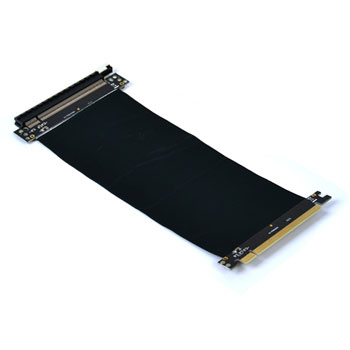
PCI Express Extender Riser Cable from Thermaltake
Scan code: LN71147
Manufacturer code: AC-039-CN1OTN-C1
End Of Life

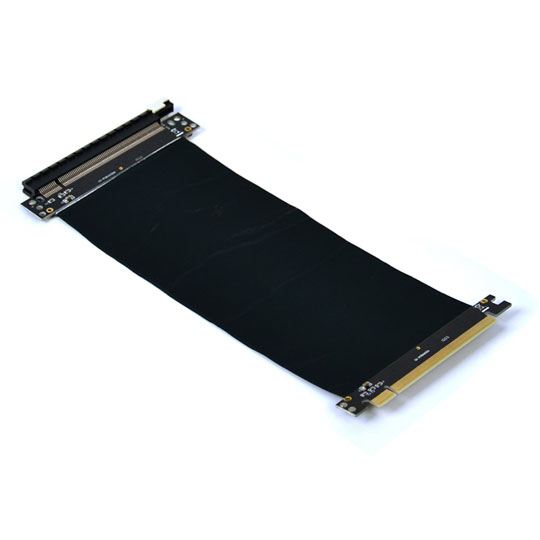

PCI Express Extender Riser Cable from Thermaltake
Thermaltake PCI-E x16 3.0 Riser Cable (Core P7/P5/P3/G3)
Scan code:
LN71147
Manufacturer code:
AC-039-CN1OTN-C1
This product is no longer available to purchase.
Email me when the availability or price changes
- SCANPROTECT Protect against installation damage for 28 days.
- 48HR REPLACEMENT If you need to return this item, your replacement will be dispatched within 2 working days of your product arriving back at Scan.
Product Overview
Thermaltake PCI-e X16 Riser Cable
Expand your Core P5 GPU performance for SLI/CrossFire configurations with the Thermaltake PCI-E x16 3.0 Riser Cable. Support a wide range of GPU solutions and match the cable included in Core P5 or other chassis, protect your GPU investment with EMI shielding and gain high conductivity to one of your most vital components.
EMI Shielding Cover
Electromagnetic interference shielding covers the cable with conductive or magnetic materials to guard against incoming or outgoing emissions of electromagnetic frequencies, minimizing disturbance and degradation on performance.
Durable Usage and Easy Installation
This 220mm 16X PCI-e riser cable provides the best connectivity and lifespan. Support both AMD and Intel motherboard.
PCI-e X16 Riser Cable Installing Notice
1. Don’t fold up PCI-e cable when installing
To prevent from damaging the cable, please do not fold the PCI-e cable during installation
2. Please connect to motherboard PCI-e 3.0 slot (at X16 mode)
To get PCI-e 3.0 bandwidth, please ensure to plug the PCI-e cable into the PCI-e 3.0 X16 interface. Features Features:
• Replacement PCI-E x16 Riser Cable for Core P5 Chassis
• Provides options for SLI/Crossfire Configurations
• Matching cable included with Core P5 Chassis
• Easy Installation
Specification:
• P/N: AC-039-CN1OTN-C1
• PCI-E Details: x16 3.0 Compatible
• Colour: Black
PCI-e X16 Riser Cable Installing Notice
1. Don’t fold up PCI-e cable when installing
To prevent from damaging the cable, please do not fold the PCI-e cable during installation
2. Please connect to motherboard PCI-e 3.0 slot (at X16 mode)
To get PCI-e 3.0 bandwidth, please ensure to plug the PCI-e cable into the PCI-e 3.0 X16 interface.
Expand your Core P5 GPU performance for SLI/CrossFire configurations with the Thermaltake PCI-E x16 3.0 Riser Cable. Support a wide range of GPU solutions and match the cable included in Core P5 or other chassis, protect your GPU investment with EMI shielding and gain high conductivity to one of your most vital components.
EMI Shielding Cover
Electromagnetic interference shielding covers the cable with conductive or magnetic materials to guard against incoming or outgoing emissions of electromagnetic frequencies, minimizing disturbance and degradation on performance.
Durable Usage and Easy Installation
This 220mm 16X PCI-e riser cable provides the best connectivity and lifespan. Support both AMD and Intel motherboard.
PCI-e X16 Riser Cable Installing Notice
1. Don’t fold up PCI-e cable when installing
To prevent from damaging the cable, please do not fold the PCI-e cable during installation
2. Please connect to motherboard PCI-e 3.0 slot (at X16 mode)
To get PCI-e 3.0 bandwidth, please ensure to plug the PCI-e cable into the PCI-e 3.0 X16 interface. Features Features:
• Replacement PCI-E x16 Riser Cable for Core P5 Chassis
• Provides options for SLI/Crossfire Configurations
• Matching cable included with Core P5 Chassis
• Easy Installation
Specification:
• P/N: AC-039-CN1OTN-C1
• PCI-E Details: x16 3.0 Compatible
• Colour: Black
PCI-e X16 Riser Cable Installing Notice
1. Don’t fold up PCI-e cable when installing
To prevent from damaging the cable, please do not fold the PCI-e cable during installation
2. Please connect to motherboard PCI-e 3.0 slot (at X16 mode)
To get PCI-e 3.0 bandwidth, please ensure to plug the PCI-e cable into the PCI-e 3.0 X16 interface.
PCI Express Extender Riser Cable from Thermaltake
![PCI Express Extender Riser Cable from Thermaltake]()