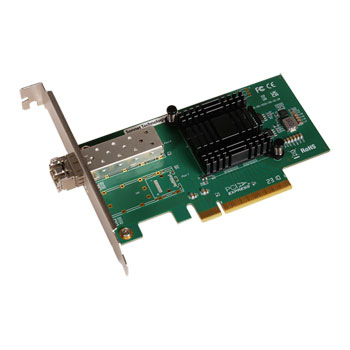

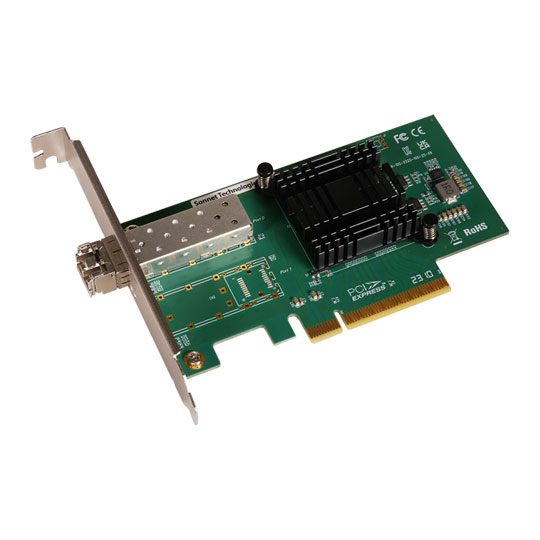

Sonnet Solo10G SFP+ V2 PCIe Card
Sonnet Solo10G SFP+ V2 PCIe Card, 10GbE SFP+ PCIe Adapter Card, Mac/Win/Linux
Email me when the availability or price changes
Finance this product
- From £12.96 / month (APR 16.9%) for 12 months or 0% for 4 months
- Spend over £390.00 and Buy Now, Pay Later or spread the cost of your finance over 24-48 months with a 10% deposit.
- SCANPROTECT Protect against installation damage for 28 days.
Sonnet - 'Solo10G SFP+ V2 PCIe Card'

Blazing Fast 10GbE Optical NetworkingAs the needs for faster data transfer speeds and greater bandwidth grow with tasks like high-resolution video editing, and transfering files from high-performance shared storage, 10 Gigabit Ethernet connectivity has become a necessity. The Sonnet Solo10G SFP+ V2 PCIe card delivers ten times the performance of standard Gigabit Ethernet that most computers offer, with greater transmission reliability over long distances with an easy to add, cost-effective solution for your Mac Pro, Windows, or Linux computer or server with the included full-height or low-profile mounting brackets.
Includes SFP+ Transceiver

Simple Network ConnectionSolo10G SFP+ V2 PCIe Card includes a short-range multi-mode fibre SFP+ transceiver to enable easy connection to your optical 10GbE network at distances up to 300 meters.
Sonnet also offers long-range single-mode fibre modules that support 10Gb connections at up to 10 kilometres - Long Range SFP28 Transceiver
Higher-Performance Computing
Easy Set-UpSolo10G SFP+ V2 PCIe Card connects your computer to high-speed infrastructure and storage without stepping down in speed. Setup is simple - just download and install a driver, install Solo10G SFP+ V2 PCIe Card into one of your computer’s or Sonnet Thunderbolt™ expansion system’s x8 PCIe slots, and then connect the card to the network switch or directly to 10GbE-enabled storage. Configure the adapter’s settings through macOS Network control panel, Windows Device Manager, or Linux command line (or graphical utility). This Sonnet solution is perfect for high-performance computing where low latency, high bandwidth, and low CPU overhead are required.

Install Driver

install Card into a PCIe Slot

Connect to Switch

Configure Settings
Key Features

Adds High-performance 10GbE Fibre ConnectivityCost-effective way to add a high performance 10GbE fiber connection to your 2023 or 2019 Mac Pro, Windows, or Linux computer with PCIe slots.

SFP+ Transceiver IncludedHigh-performance adapter includes short range (300m) SFP+ transceiver.

Simple Setup and ConfigurationInstall the driver, insert the card into an available x8 card slot, connect the card to the network switch or directly to 10GbE-enabled storage, and then configure via your computer’s operating system tools.

Mac CompatibleSupports 2023 and 2019 Mac Pro computers running macOS 13+, 14.4+.

Windows CompatibleSupports computers with PCIe 3.0 or 4.0 slots running Windows 11, Windows Server 2025 or 2022.

Linux CompatibleSupports computers with PCIe 3.0 or 4.0 slots running Linux Kernel 6.1 or 6.12.

Great for Use in Thunderbolt Expansion SystemsUse in a Sonnet multi-slot Echo™ or xMac Thunderbolt expansion system to add an optical 10Gb Ethernet connection to your computer without PCIe card slots.
PayPal Credit
| Monthly Payment: | £12.96 |
| Instalment Rate: | 16.9% p.a. (fixed) |
| Cost of purchase: | £142.99 |
| Total inc. interest: | £155.46 |
| Example | |
| Minimum Spend: | £99 |
| Instalment Rate: | N/A |
| Cost of purchase: | £99 |
| Total inc. interest: | £99 |
Representative Example:
Purchase Rate: 23.9% p.a. (variable)
Representative: 23.9% APR (variable)
Assumed Credit Limit: £1,200
Subject to status. Terms and Conditions apply.