Product Overview
High Performance Intel and AMD CPU Cooler
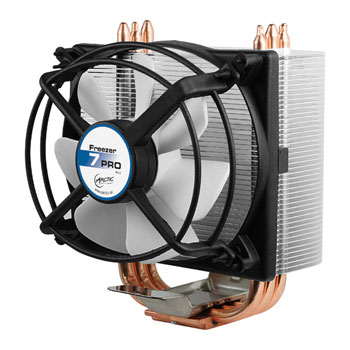
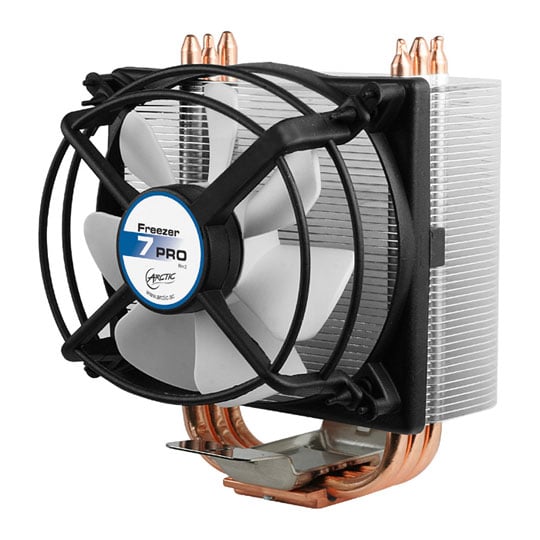
The Freezer 7 Pro Rev.2 is the upgraded version of the renowned Freezer 7 Pro. With the flexible mounting design, this version is compatible with the Intel Core i7, Core i5, as well as AMD Socket AM3. Featuring an ultra quiet 92mm fan and six heatpipes, the Freezer 7 Pro Rev.2 is one of the most efficient and quiet CPU coolers for power users.
Extremely Cool
The unique heatsink design consists of 42 fins which significantly increase the heat dissipation area to distribute massive amounts of heat faster and more efficiently. Featuring a 92mm PWM fan, six heatpipes and pre-applied ARCTIC MX-2 thermal paste, the Freezer 7 Pro Rev.2 offers performance far beyond stock coolers and achieves 130 watts cooling capacity, making it one of the most efficient CPU coolers available.
Extremely Quiet
The Freezer 7 Pro Rev.2 is extremely quiet. Thanks to its low noise impeller and patented fan holder, the 92mm fan is almost inaudible. Controlled by a PWM signal, the fan runs at just the minimum necessary speed for lowest noise level and optimum cooling capacity. The Freezer 7 Pro Rev.2 generates only 0.8 Sone at 2,500 rpm which is much quieter than standard coolers and many other after market coolers.
Easy Installation
The unique mounting system is very user-friendly. The whole installation can be done in a few minutes. This is a total peace of mind solution for both Intel and AMD users.
Features
Special Features
• Excellent cooling performance - 130 Watts.
• Ultra quiet 92mm PWM fan.
• 6 heatpipes and 42 fins for efficient heat dissipation.
• Patented vibration absorption to eliminate buzzing sounds.
• Pre-applied ARCTIC MX-2.
• Easy installation.
Intel Socket
• LGA1366/1155/1156/775.
AMD Socket
• FM1/AM3+/AM3/AM2+/AM2/939/940/754.
Arctic Freezer 7 Pro v2 CPU Air Cooler, 92mm PWM Fan, 42x Aluminium Fins, 6x Copper Heatpipes, Intel/AMD is rated
4.9 out of
5 by
25.
Rated 5 out of
5
by
hsb1 from
Better than stock cpu cooler
CPU temperature under 65 degrees now before it would overheat and program would stop working
Date published: 2020-08-19
Rated 5 out of
5
by
James999 from
Cracking cooler
Using this on a 9th Generation Core i3 and it runs super cool with fan on silent mode. Don't know how it performs with AMD processors but for Intel it is great.
Highly recommended.
Date published: 2020-01-12
Rated 5 out of
5
by
CarlosE from
Excellent cooler for non overclocked processors
I just installed this cooler on a i7 2600k and let me tell you, it is a beast of a cooler.
The PC had previously an intel stock cooler which did not do a good job what so ever. Idle temps would have been around 60c and full load would reach up to 43c which was obviously an issue. This cooler however brought down the idle temp to 30-33c and the full load temperature to not exceeding 52c which is astonishing!
One thing to look out for is the size of the fan. It is a 92mm fan but the fan casing sticks out quite a bit so I couldn't fit it with the 4 ram sticks already installed so I had to turn heatsink so that the exhaust goes to the top - this is not a problem for me but it may be for some.
Installation took about 10mins on the intel board and you do not have to take your motherboard out for the 115x socket. and it looks like the AMD process is the same.
all in all great cooler for a minimum amount of money but use it with stock speeds just in case!
Date published: 2017-09-26
Rated 5 out of
5
by
Forester from
Really well designed and a bit of a bargain.
Very simple to install - much simpler that the Gelid cooler I've installed - and very secure once in place. Quiet and cool in operation.
In the immortal words of Jerry Pournelle - recommended!
(I guess that last comment dates me...)
Date published: 2016-02-06
Rated 5 out of
5
by
Teagz from
Don't ponder just buy!!
excellent! It reduced the temps of my G3258 processor over 10 Celsius runs quiet I strongly recommend
Date published: 2016-01-14
Rated 5 out of
5
by
brianthesnail from
simply the best cpu cooler around
Ive used many cpu coolers over the years,however the freezer 7 pro ( both rev2.0 and rev1.0 ) stands out from the crowd
firstly theres the mounting system ... this allows effortless installation of the cooler and can be done by the most novice pc builder
then theres performance .. the cpu temps with this cooler are as good as many closed loop water coolers and can cool core i3,5,7,s and all amd cpu,s ( except for the FX9000 series with the 220w tdp )
overall a highly impressive cooler and I highly recommend it to any system builder
Date published: 2016-01-12
Rated 5 out of
5
by
never75 from
Very good and silent cooler!
I bought this cooler for aa core 2 duo cpu, as didn't want to spend too much on it. With my surprise it's very silent and keep the temperature lower than expected.
Date published: 2015-11-23
Rated 5 out of
5
by
Icklef from
Very easy to fit cooler for good price
Fitted one of these to the new skylake i5.
Very easy to fit with no hassle. Temperatures very stable and not too high under full load approx 60 degrees.
Date published: 2015-09-17