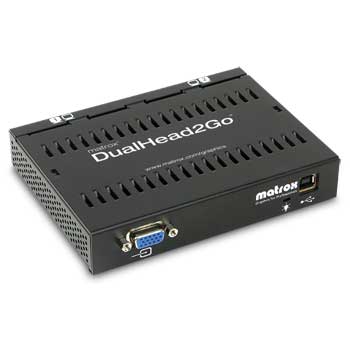
Matrox DualHead2Go External Dual Monitor D2G-A2A-IF
Scan code: LN12472
Manufacturer code: D2G-A2A-IF
End Of Life

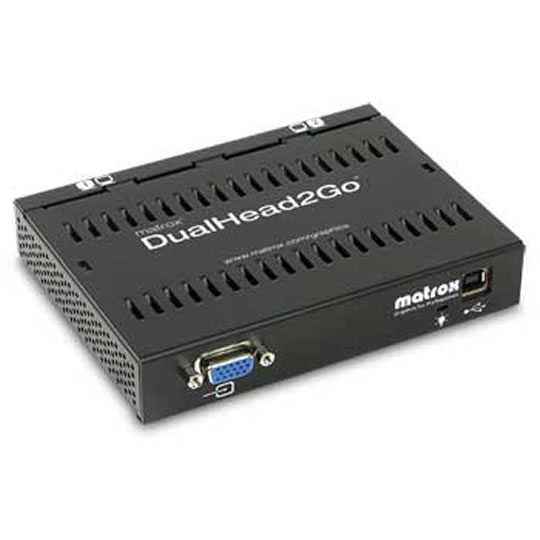

Matrox DualHead2Go External Dual Monitor D2G-A2A-IF
Matrox DualHead2Go Dual Head Monitor Support for PC and Notebook
Scan code:
LN12472
Manufacturer code:
D2G-A2A-IF
This product is no longer available to purchase.
Email me when the availability or price changes
- SCANPROTECT Protect against installation damage for 28 days.
Product Overview
Its what we've been waiting for!
Matrox's new DualHead2Go offers a revolutionary way of bringing DualHead® support to both laptop and integrated graphics-based desktop PCs. Increase your productivity with this innovative external multi-display upgrade that is so compact it can fit in the palm of your hand. Unlike installing a new graphics card which requires opening your computer, DualHead2Go simply connects to the monitor connector of your system.
Turn your laptop into a productivity powerhouse
Using patent-pending technology, Matrox proudly delivers the world's first commercially available multi-display upgrade of its type, bringing DualHead capability to your laptop or desktop computer. The revolutionary new Matrox DualHead2Go external multi-display upgrade is not a graphics card. Rather it is a palm-sized box that sits outside of your system. DualHead2Go takes the existing single monitor display output (i.e. external VGA output) from your system and expands it into dual display outputs, allowing you to run your Windows desktop at up to 2560 x 1024 resolution stretched across two displays. Using DualHead2Go in conjunction with the built-in display of your laptop, you actually benefit from 3 displays at a time.
Each display can be used to view different information. You can surf the internet on one display and write email on the second, or view photo albums and zoomed photos at the same time. Keep your toolbars, menus and palettes on one display, and enjoy working on full-page documents on the other. Or stretch a large spreadsheet across two displays and view more information without wasting time scrolling and opening & closing windows. You can see more, do more, be more productive. The included Matrox PowerDesk software seamlessly manages window positioning and message pop-up.
With DualHead2Go, you no longer have to sacrifice productivity when using your laptop. DualHead2Go turns even the most ultra-portable laptop into a full PC replacement. If you want to use your laptop as your main computer and avoid the extra time and effort needed to synchronize data with a second desktop computer, you are no longer confined to a tiny display area. DualHead2Go creates a cost-effective, space saving, multi-display docking station for your laptop or tablet.
DualHead2Go harnesses the native graphics hardware already present in your system for all 2D, 3D and video drawing. There is no loss of image quality or speed on your system. The more powerful your existing graphics, the more powerful your DualHead2Go multi-display environment.
Matrox DualHead2Go is an affordable, highly portable, easy-to-use solution, perfect for the office, mobile workstation, home or on the go.
Features Feature Benefit
* Add two independent displays to your laptop from a standard monitor output. Or transform your single display PC to DualHead. See More. Do More. Run your Windows desktop at up to 2560 x 1024 resolution in 16.7M colors at 60Hz stretched across two displays (1280 x 1024 per display).
* Increase your productivity. Two 17" panels provide 45% more desktop area than a single 20" panel at less cost. Get more work done. Harness the full graphics rendering power of your existing notebook or desktop graphics solution. This includes the full video and 3D capabilities of your embedded graphics solution.
* DualHead2Go leverages the native power of the existing graphics hardware in your machine. For example the powerful graphics engine in a workstation-class laptop computer will be directly responsible for all drawing on both DualHead2Go screens. Upgrade Intel integrated graphics on a desktop PC to DualHead without opening the PC. You don't have to 'crack the case' to install a graphics add-in-board for upgrading to multi-display. Furthermore, many PCs do not come with an available high performance graphics upgrade bus. Matrox PowerDesk software seamlessly manages window positioning and message pop-up.
* Experience all of the benefits of a DualHead desktop. Put different applications on each display. Increase your productivity. Very small device that fits in the palm of your hand. May easily be taken on the road with you.
Who needs DualHead2Go?
As industry awareness regarding the benefits of a multi-display workspace is intensifying and the price of flat panel technology is dramatically decreasing, there has never been a better time to upgrade your system to multi displays. In this ever-evolving, competitive world, get the productivity edge you need by entering the world of multi-display graphics. With DualHead2Go, you can now get your own multi-display environment without investing in a new graphics card or system; just hook-up DualHead2Go to your current PC and experience DualHead productivity today. You'll never look back.
If you're already benefiting from a multi-display setup at the office, DualHead2Go now makes it possible for you to enjoy DualHead productivity wherever you are. If you're one of the millions of workers who have made their laptop their main PC, you no longer have to sacrifice your work-place comfort zone for the sake of portability. DualHead2Go's multi-display functionality will make you as productive on the road as you are at the office.
DualHead2Go is equally indispensable if you do computer-aided presentations, whether in a tradeshow, an on-site sales demonstration or a face-to-face meeting with a customer. You no longer need to lug your clunky PC or docking station with you, and you can replicate your multi-display office environment for all to see. Take your demonstrations to the next level with DualHead2Go.
You may want multi-display on your PC and DualHead2Go is the only option available to you. You may want to get ahead of the class and use DualHead2Go in your education. You may just want to avoid the hassle of opening your PC and installing parts to upgrade to multi-display. There are so many usage scenarios for DualHead2Go. Read more examples of usage scenarios and see what DualHead2Go can do for you!
Portability and installation
Light-weight and ultra-compact, you can easily take DualHead2Go with you and experience all the benefits of a multi-display desktop at the office, at home and when you travel.
Unlike installing a new graphics card, DualHead2Go doesn't require opening your computer, inserting parts into it, or replacing any hardware or software.
Setup is a easy as 1, 2, 3. Once the software is installed,
it's basically just a matter of connecting your monitors.
All mode setting is available through Display Properties -> Settings.
Compatibility
DualHead2Go is compatible with a wide range of laptop models. Desktop PC support for DualHead2Go is limited to certain PCs based on integrated graphics. Graphic add-in-boards are not supported. A complete list of known compatible systems is available and will be regularly updated to reflect new system support.
In order for DualHead2Go to function properly and for the product warranty to be valid, your system must be included in the compatibility list, and you must run the Matrox DualHead2Go System Compatibility Tool, a free online utility that will enable you to pre-validate that your system is compatible with DualHead2Go prior to purchase.
Inside the box
DualHead2Go connector box
USB Cable for power
2-foot HD15-to-HD15 (analog) monitor cable
Quickstart paper and CD, which includes the following software:
- Install package
- PowerDesk SE (includes Image quality adjustment, center popup, window management, etc.)
- Electronic Product Manual
Requirements
System Single VGA output connector, on a compatible system
Operating system Microsoft Windows XP, Windows 2000
Display driver Support for 2048 x 768 or 2560 x 1024 resolution
Supported Display Modes
Resolution Refresh rate
2048 x 768 60, 75, 85Hz
2560 x 1024* 60Hz
*Only available on certain systems
Product information
Dimensions 9.2 cm x 9.5 cm x 2.5 cm
Weight 134 grams
Connectors HD-15 (analog) x 3 (1 input, 2 output), Power (5VDC, 2A)
EMC certifications Class B - CE, CSA, FCC, VCCI
Warranty 2-year limited warranty
Part numbers D2G-A2A-AJ (with a US-type power cable);
D2G-A2A-EU (with a UK-type and a Continental-European-type power cable);
D2G-A2A-FE (with an Australian-type power cable)
Matrox's new DualHead2Go offers a revolutionary way of bringing DualHead® support to both laptop and integrated graphics-based desktop PCs. Increase your productivity with this innovative external multi-display upgrade that is so compact it can fit in the palm of your hand. Unlike installing a new graphics card which requires opening your computer, DualHead2Go simply connects to the monitor connector of your system.
Turn your laptop into a productivity powerhouse
Using patent-pending technology, Matrox proudly delivers the world's first commercially available multi-display upgrade of its type, bringing DualHead capability to your laptop or desktop computer. The revolutionary new Matrox DualHead2Go external multi-display upgrade is not a graphics card. Rather it is a palm-sized box that sits outside of your system. DualHead2Go takes the existing single monitor display output (i.e. external VGA output) from your system and expands it into dual display outputs, allowing you to run your Windows desktop at up to 2560 x 1024 resolution stretched across two displays. Using DualHead2Go in conjunction with the built-in display of your laptop, you actually benefit from 3 displays at a time.
Each display can be used to view different information. You can surf the internet on one display and write email on the second, or view photo albums and zoomed photos at the same time. Keep your toolbars, menus and palettes on one display, and enjoy working on full-page documents on the other. Or stretch a large spreadsheet across two displays and view more information without wasting time scrolling and opening & closing windows. You can see more, do more, be more productive. The included Matrox PowerDesk software seamlessly manages window positioning and message pop-up.
With DualHead2Go, you no longer have to sacrifice productivity when using your laptop. DualHead2Go turns even the most ultra-portable laptop into a full PC replacement. If you want to use your laptop as your main computer and avoid the extra time and effort needed to synchronize data with a second desktop computer, you are no longer confined to a tiny display area. DualHead2Go creates a cost-effective, space saving, multi-display docking station for your laptop or tablet.
DualHead2Go harnesses the native graphics hardware already present in your system for all 2D, 3D and video drawing. There is no loss of image quality or speed on your system. The more powerful your existing graphics, the more powerful your DualHead2Go multi-display environment.
Matrox DualHead2Go is an affordable, highly portable, easy-to-use solution, perfect for the office, mobile workstation, home or on the go.
Features Feature Benefit
* Add two independent displays to your laptop from a standard monitor output. Or transform your single display PC to DualHead. See More. Do More. Run your Windows desktop at up to 2560 x 1024 resolution in 16.7M colors at 60Hz stretched across two displays (1280 x 1024 per display).
* Increase your productivity. Two 17" panels provide 45% more desktop area than a single 20" panel at less cost. Get more work done. Harness the full graphics rendering power of your existing notebook or desktop graphics solution. This includes the full video and 3D capabilities of your embedded graphics solution.
* DualHead2Go leverages the native power of the existing graphics hardware in your machine. For example the powerful graphics engine in a workstation-class laptop computer will be directly responsible for all drawing on both DualHead2Go screens. Upgrade Intel integrated graphics on a desktop PC to DualHead without opening the PC. You don't have to 'crack the case' to install a graphics add-in-board for upgrading to multi-display. Furthermore, many PCs do not come with an available high performance graphics upgrade bus. Matrox PowerDesk software seamlessly manages window positioning and message pop-up.
* Experience all of the benefits of a DualHead desktop. Put different applications on each display. Increase your productivity. Very small device that fits in the palm of your hand. May easily be taken on the road with you.
Who needs DualHead2Go?
As industry awareness regarding the benefits of a multi-display workspace is intensifying and the price of flat panel technology is dramatically decreasing, there has never been a better time to upgrade your system to multi displays. In this ever-evolving, competitive world, get the productivity edge you need by entering the world of multi-display graphics. With DualHead2Go, you can now get your own multi-display environment without investing in a new graphics card or system; just hook-up DualHead2Go to your current PC and experience DualHead productivity today. You'll never look back.
If you're already benefiting from a multi-display setup at the office, DualHead2Go now makes it possible for you to enjoy DualHead productivity wherever you are. If you're one of the millions of workers who have made their laptop their main PC, you no longer have to sacrifice your work-place comfort zone for the sake of portability. DualHead2Go's multi-display functionality will make you as productive on the road as you are at the office.
DualHead2Go is equally indispensable if you do computer-aided presentations, whether in a tradeshow, an on-site sales demonstration or a face-to-face meeting with a customer. You no longer need to lug your clunky PC or docking station with you, and you can replicate your multi-display office environment for all to see. Take your demonstrations to the next level with DualHead2Go.
You may want multi-display on your PC and DualHead2Go is the only option available to you. You may want to get ahead of the class and use DualHead2Go in your education. You may just want to avoid the hassle of opening your PC and installing parts to upgrade to multi-display. There are so many usage scenarios for DualHead2Go. Read more examples of usage scenarios and see what DualHead2Go can do for you!
Portability and installation
Light-weight and ultra-compact, you can easily take DualHead2Go with you and experience all the benefits of a multi-display desktop at the office, at home and when you travel.
Unlike installing a new graphics card, DualHead2Go doesn't require opening your computer, inserting parts into it, or replacing any hardware or software.
Setup is a easy as 1, 2, 3. Once the software is installed,
it's basically just a matter of connecting your monitors.
All mode setting is available through Display Properties -> Settings.
Compatibility
DualHead2Go is compatible with a wide range of laptop models. Desktop PC support for DualHead2Go is limited to certain PCs based on integrated graphics. Graphic add-in-boards are not supported. A complete list of known compatible systems is available and will be regularly updated to reflect new system support.
In order for DualHead2Go to function properly and for the product warranty to be valid, your system must be included in the compatibility list, and you must run the Matrox DualHead2Go System Compatibility Tool, a free online utility that will enable you to pre-validate that your system is compatible with DualHead2Go prior to purchase.
Inside the box
DualHead2Go connector box
USB Cable for power
2-foot HD15-to-HD15 (analog) monitor cable
Quickstart paper and CD, which includes the following software:
- Install package
- PowerDesk SE (includes Image quality adjustment, center popup, window management, etc.)
- Electronic Product Manual
Requirements
System Single VGA output connector, on a compatible system
Operating system Microsoft Windows XP, Windows 2000
Display driver Support for 2048 x 768 or 2560 x 1024 resolution
Supported Display Modes
Resolution Refresh rate
2048 x 768 60, 75, 85Hz
2560 x 1024* 60Hz
*Only available on certain systems
Product information
Dimensions 9.2 cm x 9.5 cm x 2.5 cm
Weight 134 grams
Connectors HD-15 (analog) x 3 (1 input, 2 output), Power (5VDC, 2A)
EMC certifications Class B - CE, CSA, FCC, VCCI
Warranty 2-year limited warranty
Part numbers D2G-A2A-AJ (with a US-type power cable);
D2G-A2A-EU (with a UK-type and a Continental-European-type power cable);
D2G-A2A-FE (with an Australian-type power cable)


