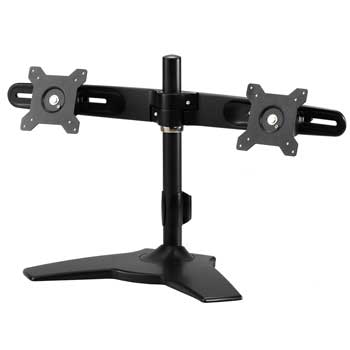
Dual Monitor Stand 15" to 25" from ScanFX TS742
Scan code: LN38981
Manufacturer code: TS742
End Of Life

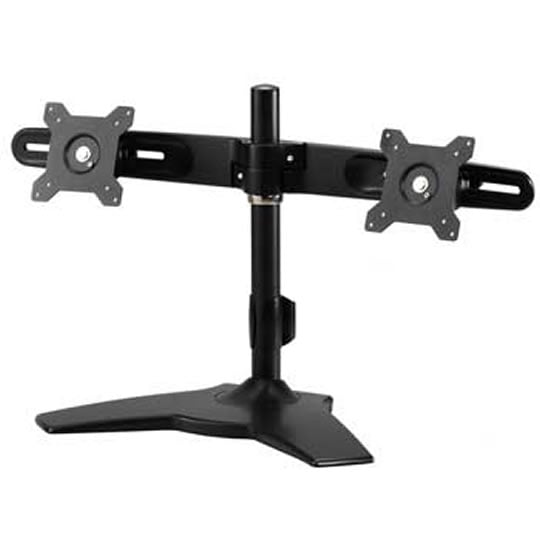

Dual Monitor Stand 15" to 25" from ScanFX TS742
ScanFX TS742 Dual Monitor Stand for 15"-25" Monitors with Height Tilt Pivot & Swivel VESA 100mm & 75mm
Scan code:
LN38981
Manufacturer code:
TS742
This product is no longer available to purchase.
Email me when the availability or price changes
- 3XS Approved Custom picked by our award winning 3XS Systems team.
Product Overview
http://www.youtube.com/watch?v=bu7a9DZwCkc&fb_source=message
The TS742 is the ideal dual LCD monitor desk stand. Hinged modules enable each monitor to be installed at the perfect postion, and apart from the rotation, swivel & tilt functions at each hinge module, the TS742 also facilitates:
1. Easy Cable Management system to ensure your cables stay tidy.
2. Each monitor can be adjusted horizontally to give you the perfect distance between them, as well as being able to adjust the overall height.
3. Smart Torque Adjust™ is always available at every hinge module to cover differences in monitor weights.
4. Quick Release ™ on each arm to enable easy and efficient installation.
This dual LCD monitor stand has been made with an aluminium alloy to ensure its sturdiness and is able to support:
1. Monitors at 12 Kgs (26.5 lbs) for each module.
2. Panel sizes upto and including most 25".
3. Complaint with VESA 100x100 & 75x75 mount pitch requirement. Features http://www.youtube.com/watch?v=bu7a9DZwCkc&fb_source=message
• Arm Angle Adjust
• Height Adjust
• 90 degrees rotation
• Cable Management
• Smart Torque Adjust
• Aluminium Alloy structure
• Easy Installation
Dual LCD Monitor Stand has been well utilized with Highgrade existing hinge modules which enable every display monitor to be installed at expected performance. Apart from its defined rotation, swivel & tilt functions at each hinge module, TS742 also facilitates:
1. Easy Cable ™ Management cover & column to make the cables tidy & well arranged.
2. The gap of each display monitor can be adjusted while height can be adjusted too.
3. Smart Torque Adjust™ is always available at every Hinge Module to meet various weights implemented.
4. Quick Release ™ on each ARM to enable the install mush efficient & easy.
5. Base option per Clamp & Grommet types.
Dual LCD Monitor Stand has been made by aluminum alloy to make sure its sturdiness. General specs have been listed to support:
1. Display monitor at 12 Kgs (26.5 lbs) for each module.
2. Panel size will be suggested ? 24”.
3. Complaint with VESA 100x100 & 75x75 mount pitch requirement.
Specification
• Max. wall mount hole pitch: 100x100mm/75x75mm
• Screw Type: M4
• Material: Steel/Aluminum Alloy
• Dimension(W*H*D): 672*240.2*370mm(26.46''x9.46''x14.57'')
• Weight: 3.3Kg (7.3lbs)
• Swivel: Max. +/- 20° (For each "Hinge")
• Tilt: Max. +/- 20° (For each "Hinge")
• Rotate(Pivot): 90° ( For each "Hinge")
• Support max. weight: 12 Kg( 26.5 lbs) ( For each "Hinge")
• Support flat panel size: 15''~ 24''
• Safety/Quality Approvals: SGS Tensile
The TS742 is the ideal dual LCD monitor desk stand. Hinged modules enable each monitor to be installed at the perfect postion, and apart from the rotation, swivel & tilt functions at each hinge module, the TS742 also facilitates:
1. Easy Cable Management system to ensure your cables stay tidy.
2. Each monitor can be adjusted horizontally to give you the perfect distance between them, as well as being able to adjust the overall height.
3. Smart Torque Adjust™ is always available at every hinge module to cover differences in monitor weights.
4. Quick Release ™ on each arm to enable easy and efficient installation.
This dual LCD monitor stand has been made with an aluminium alloy to ensure its sturdiness and is able to support:
1. Monitors at 12 Kgs (26.5 lbs) for each module.
2. Panel sizes upto and including most 25".
3. Complaint with VESA 100x100 & 75x75 mount pitch requirement. Features http://www.youtube.com/watch?v=bu7a9DZwCkc&fb_source=message
• Arm Angle Adjust
• Height Adjust
• 90 degrees rotation
• Cable Management
• Smart Torque Adjust
• Aluminium Alloy structure
• Easy Installation
Dual LCD Monitor Stand has been well utilized with Highgrade existing hinge modules which enable every display monitor to be installed at expected performance. Apart from its defined rotation, swivel & tilt functions at each hinge module, TS742 also facilitates:
1. Easy Cable ™ Management cover & column to make the cables tidy & well arranged.
2. The gap of each display monitor can be adjusted while height can be adjusted too.
3. Smart Torque Adjust™ is always available at every Hinge Module to meet various weights implemented.
4. Quick Release ™ on each ARM to enable the install mush efficient & easy.
5. Base option per Clamp & Grommet types.
Dual LCD Monitor Stand has been made by aluminum alloy to make sure its sturdiness. General specs have been listed to support:
1. Display monitor at 12 Kgs (26.5 lbs) for each module.
2. Panel size will be suggested ? 24”.
3. Complaint with VESA 100x100 & 75x75 mount pitch requirement.
Specification
• Max. wall mount hole pitch: 100x100mm/75x75mm
• Screw Type: M4
• Material: Steel/Aluminum Alloy
• Dimension(W*H*D): 672*240.2*370mm(26.46''x9.46''x14.57'')
• Weight: 3.3Kg (7.3lbs)
• Swivel: Max. +/- 20° (For each "Hinge")
• Tilt: Max. +/- 20° (For each "Hinge")
• Rotate(Pivot): 90° ( For each "Hinge")
• Support max. weight: 12 Kg( 26.5 lbs) ( For each "Hinge")
• Support flat panel size: 15''~ 24''
• Safety/Quality Approvals: SGS Tensile


