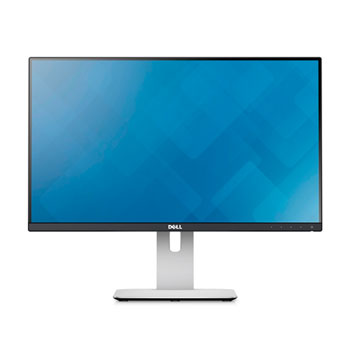
Dell U2414H Ultrasharp Super Thin Bezel 24" LED IPS Monitor
Scan code: LN55154
Manufacturer code: U2414H
End Of Life



Dell U2414H Ultrasharp Super Thin Bezel 24" LED IPS Monitor
24" Dell Ultrasharp U2414H Monitor IPS Ultra Thin Bezel 1920x1080, 8ms, 250cd/m², DP/mDP/HDMI, Black/Silver
Scan code:
LN55154
Manufacturer code:
U2414H
This product is no longer available to purchase.
Email me when the availability or price changes
- SCANPROTECT Protect against installation damage for 28 days.
- 3XS Approved Custom picked by our award winning 3XS Systems team.
Product Overview
The world’s thinnest display border 6.05mm - Perfect for Dual & Triple Monitor Setups
See your work in its best light on the Dell UltraSharp 24 Monitor – U2414H. Its upscale design features an amazingly thin 6.05mm border1 around a 23.8" Full HD display that delivers impeccable images.
With this incredible clarity across an ultra-wide 178-degree viewing angle comes the ability to pivot left-and right up to 90 degrees, so you can create a multiple screen arrangement with near-continual imagery between two or more monitors.
• Full HD resolution and ultra-wide viewing angle for crisp, clear viewing quality at virtually any angle
• Carefully colour calibrated at the factory, the DellTM UltraSharp 24 Monitor – U2414H features more than 96-percent sRGB colour space for impressive colour from the moment you set it up
• Great detail with a broad range of 16.77 million colours covering 96% sRGB

Easy adjustability and viewing
In addition to 90-degree clockwise or counter-clockwise pivoting capability for use in side-by-side or top-to-top applications, the Dell UltraSharp 24 Monitor – U2414H offers generous height, tilt and swivel adjustments.
Find the perfect position with 6.5-degree forward or 22-degree backward tilt adjustments and a height adjustability range of 130mm. An ultra-wide 178-degree viewing angle enables clear and easy sharing of your screen with multiple onlookers.

Bring your mobile devices to life on a large screen
Brilliance goes beyond the screen with easy connectivity to your favorite digital devices and fast USB charging capability.
A mobile high-definition link (MHL) port allows you to view high-definition content directly from your compatible smart phone or tablet. Three USB 3.0 ports enable fast data transfers while one high-current USB 3.0 port supplies twice the power for charging and powering compatible USB devices.
You can also connect your Dell UltraSharp 24 Monitor – U2414H to peripherals that require HDMI, DisplayPort or mini-DisplayPort connectivity.
 Features
Eco-conscious design
Features
Eco-conscious design
The Dell UltraSharp 24 Monitor – U2414H meets the latest regulatory and environmental standards .
Display
Diagonally Viewable Size:
60.47 cm
23.8" (31.5-inch wide viewable image size)
Aspect Ratio:
Widescreen (16:9)
Panel Type, Surface:
In-plane switching, anti glare with hard coat 3H
Optimal resolution:
1920 x 1080 at 60Hz
Contrast Ratio:
1000: 1 (typical)
2 Million:1 (Max) (Dynamic Contrast Ratio)
Brightness:
250 cd/m2 (typical)
Response Time:
8 ms (gray to gray)
Viewing Angle:
(178° vertical / 178° horizontal)
Colour Support:
Colour Gamut6 (typical): 85% (CIE1976), sRGB 96% ( average Delta E of>4)
16.77 Million colours
Pixel Pitch:
0.274 mm
Backlight Technology:
LED
Display Type:
Widescreen Flat Panel Display
Display Screen Coating:
Antiglare with hard-coating 3H
Connectivity
2 HDMI(MHL) connectors
1 Mini DisplayPort
1 DisplayPort (version 1.2a)
1 DisplayPort out (MST)
1 Audio Line out (connect your speakers)
4 USB 3.0 ports - Downstream (4 at the back, 1 with battery charging)
1 USB 3.0 port - Upstream
Built-in Devices
USB 3.0 Hi-Speed Hub (with 1 USB upstream port and 4 USB downstream ports)
Security
Security lock slot (cable lock sold separately)
Anti-theft stand lock slot (to panel)
Size and Weight
Dimensions with stand (H x W x D):
355.8mm ~ 485.8 mm (19.12" ~ 14.00") x 539.1 mm (21.23") x 185.0 mm (7.28")
Dimensions without stand (H x W x D):
321.1 mm (12.64") x 539.1 mm (21.23") x 45.6 mm (1.80")
Preset Display Area(H X V):
527.04 mm x 296.46 mm
20.75" x 11.67"
Weight (panel only - for VESA mount):
3.61 kg (7.95 lb)
Weight (with packaging):
8.00 kg (17.62 lb)
Environmental and Regulatory
Electrical
Voltage Required:
100 to 240 VAC / 50 or 60 Hz ± 3Hz / 1.5 A (typical)
Power Consumption (Operational):
16 (typical) / 74W (maximum)7
Power Consumption Stand by / Sleep:
Less than 0.5W
Environmental
Temperature Range Operating:
0° to 40°C (32° to 104°F)
Temperature Range Non-operating:
Storage : -20° to 60° (-4° to 140° F)
Shipping : -20° to 60° (-4° to 140° F)
Humidity Range Operating:
10% to 80% (non-condensing)
Humidity Range Non-operating:
Storage : 5% to 90% (non-condensing)
Shipping : 5% to 90% (non-condensing)
Altitude Operating:
5,000 m (16,400 ft) max
Altitude Non-operating:
12,192 m (40,000 ft) max
Stand
Height-adjustable stand, tilt, pivot, swivel and built in cable-management
Flat Panel Mount Interface:
VESA (100 mm)
See your work in its best light on the Dell UltraSharp 24 Monitor – U2414H. Its upscale design features an amazingly thin 6.05mm border1 around a 23.8" Full HD display that delivers impeccable images.
With this incredible clarity across an ultra-wide 178-degree viewing angle comes the ability to pivot left-and right up to 90 degrees, so you can create a multiple screen arrangement with near-continual imagery between two or more monitors.
• Full HD resolution and ultra-wide viewing angle for crisp, clear viewing quality at virtually any angle
• Carefully colour calibrated at the factory, the DellTM UltraSharp 24 Monitor – U2414H features more than 96-percent sRGB colour space for impressive colour from the moment you set it up
• Great detail with a broad range of 16.77 million colours covering 96% sRGB
Easy adjustability and viewing
In addition to 90-degree clockwise or counter-clockwise pivoting capability for use in side-by-side or top-to-top applications, the Dell UltraSharp 24 Monitor – U2414H offers generous height, tilt and swivel adjustments.
Find the perfect position with 6.5-degree forward or 22-degree backward tilt adjustments and a height adjustability range of 130mm. An ultra-wide 178-degree viewing angle enables clear and easy sharing of your screen with multiple onlookers.
Bring your mobile devices to life on a large screen
Brilliance goes beyond the screen with easy connectivity to your favorite digital devices and fast USB charging capability.
A mobile high-definition link (MHL) port allows you to view high-definition content directly from your compatible smart phone or tablet. Three USB 3.0 ports enable fast data transfers while one high-current USB 3.0 port supplies twice the power for charging and powering compatible USB devices.
You can also connect your Dell UltraSharp 24 Monitor – U2414H to peripherals that require HDMI, DisplayPort or mini-DisplayPort connectivity.
Features
Eco-conscious designThe Dell UltraSharp 24 Monitor – U2414H meets the latest regulatory and environmental standards .
Display
Diagonally Viewable Size:
60.47 cm
23.8" (31.5-inch wide viewable image size)
Aspect Ratio:
Widescreen (16:9)
Panel Type, Surface:
In-plane switching, anti glare with hard coat 3H
Optimal resolution:
1920 x 1080 at 60Hz
Contrast Ratio:
1000: 1 (typical)
2 Million:1 (Max) (Dynamic Contrast Ratio)
Brightness:
250 cd/m2 (typical)
Response Time:
8 ms (gray to gray)
Viewing Angle:
(178° vertical / 178° horizontal)
Colour Support:
Colour Gamut6 (typical): 85% (CIE1976), sRGB 96% ( average Delta E of>4)
16.77 Million colours
Pixel Pitch:
0.274 mm
Backlight Technology:
LED
Display Type:
Widescreen Flat Panel Display
Display Screen Coating:
Antiglare with hard-coating 3H
Connectivity
2 HDMI(MHL) connectors
1 Mini DisplayPort
1 DisplayPort (version 1.2a)
1 DisplayPort out (MST)
1 Audio Line out (connect your speakers)
4 USB 3.0 ports - Downstream (4 at the back, 1 with battery charging)
1 USB 3.0 port - Upstream
Built-in Devices
USB 3.0 Hi-Speed Hub (with 1 USB upstream port and 4 USB downstream ports)
Security
Security lock slot (cable lock sold separately)
Anti-theft stand lock slot (to panel)
Size and Weight
Dimensions with stand (H x W x D):
355.8mm ~ 485.8 mm (19.12" ~ 14.00") x 539.1 mm (21.23") x 185.0 mm (7.28")
Dimensions without stand (H x W x D):
321.1 mm (12.64") x 539.1 mm (21.23") x 45.6 mm (1.80")
Preset Display Area(H X V):
527.04 mm x 296.46 mm
20.75" x 11.67"
Weight (panel only - for VESA mount):
3.61 kg (7.95 lb)
Weight (with packaging):
8.00 kg (17.62 lb)
Environmental and Regulatory
Electrical
Voltage Required:
100 to 240 VAC / 50 or 60 Hz ± 3Hz / 1.5 A (typical)
Power Consumption (Operational):
16 (typical) / 74W (maximum)7
Power Consumption Stand by / Sleep:
Less than 0.5W
Environmental
Temperature Range Operating:
0° to 40°C (32° to 104°F)
Temperature Range Non-operating:
Storage : -20° to 60° (-4° to 140° F)
Shipping : -20° to 60° (-4° to 140° F)
Humidity Range Operating:
10% to 80% (non-condensing)
Humidity Range Non-operating:
Storage : 5% to 90% (non-condensing)
Shipping : 5% to 90% (non-condensing)
Altitude Operating:
5,000 m (16,400 ft) max
Altitude Non-operating:
12,192 m (40,000 ft) max
Stand
Height-adjustable stand, tilt, pivot, swivel and built in cable-management
Flat Panel Mount Interface:
VESA (100 mm)


Dell U2414H Ultrasharp Super Thin Bezel 24" LED IPS Monitor
![Dell U2414H Ultrasharp Super Thin Bezel 24" LED IPS Monitor]()