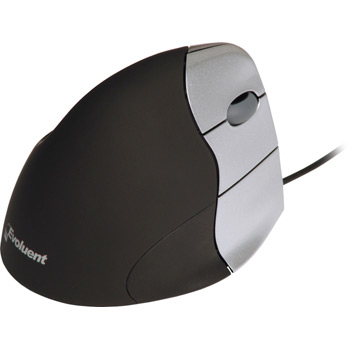
Evoluent VerticalMouse 3 Rev 2 Right Hand Version
Scan code: LN29076
Manufacturer code: VERTMOUSEV3
End Of Life
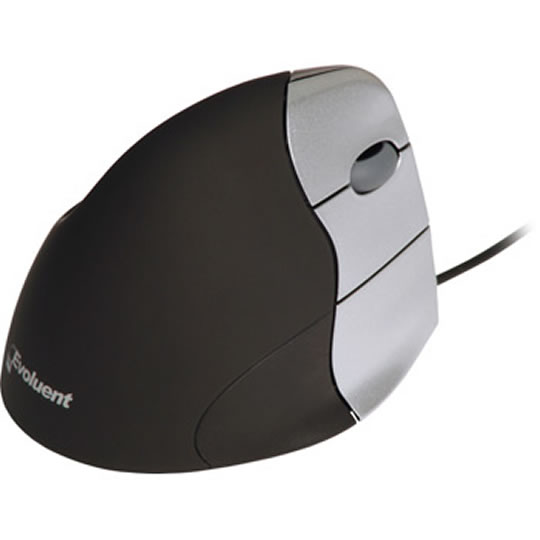

Evoluent VerticalMouse 3 Rev 2 Right Hand Version
Evoluent VerticalMouse 3 Rev 2 Black/Silver Right Hand Model 5 Button with Scroll Wired USB
Scan code:
LN29076
Manufacturer code:
VERTMOUSEV3
This product is no longer available to purchase.
Email me when the availability or price changes
Product Overview
http://www.evoluent.com/vm3.html
The Evoluent™ VerticalMouse™ 3 is the advanced third generation of the revolutionary mouse from the inventor of the handshake grip. Many users said earlier models relieved their wrist and arm pain.
Approved ergonomic mouse of University of California at Berkeley
The Evoluent VerticalMouse 2 was evaluated in 2007 by a team at the health services clinic in UC Berkeley, including medical doctors, physical therapists, ergonomists, and administrators. It was found to be comfortable, easily adapted to, and promote a neutral wrist and forearm posture. It is the only vertical type mouse approved for staff use within UC Berkeley and for sale in the campus store.
Features Eliminates arm twisting
The patented shape supports your hand in a fully upright handshake position that eliminates forearm twisting. Many users said earlier models relieved their hand, wrist, or arm pain.
An ordinary horizontal mouse requires your forearm to twist away from its natural position.
Familiar grip
The grip is the same as an ordinary mouse, just turned sideways into a handshake position. Many users said they got used to it very quickly.
The VerticalMouse does not move sideways when clicking with normal force because the thumb naturally opposes the fingers. Pointer control is as accurate as any other good mouse when the pointer speed settings are properly adjusted.
Easy to use buttons
All 5 buttons are easily operable without contorting your fingers. The button force is light for easy clicking, but still firm enough to avoid accidental actuation.
Fits different size hands
The new shape fits larger hands as well as smaller hands better.
Prevents desk rubbing
A small lip on the bottom edge prevents the little finger from rubbing the desk.
High performance tracking
An Avago 3080 gaming grade infrared sensor tracks more accurately on many surfaces than most laser sensors. The Rev 2 has a button and indicator light on the bottom for cycling the true optical hardware resolution among 4 settings: 2600, 1800, 1300, and 800 dpi. This makes adjusting pointer speed easier and further improves tracking.
Programmable buttons- (XP Pro, XP Home, Vista 32)
5 buttons are each programmable with different functions in different applications. For example, a button can be Double Click in one application and Ctrl in another application.
When the driver is not installed, the default functions in Windows are:
Top button - left click.
Wheel button - .middle click (e.g., for pan and rotate in CAD programs).
Middle button - right click.
Bottom button - back.
Thumb button - forward.
Special functions - (XP Pro, XP Home, Vista 32)
Speed toggle - cycle among up to 3 pointer speed settings with a keyboard shortcut or mouse button. For example, a high speed for ordinary tasks, and a slow speed for graphics work.
Auto click - automatically perform a single or double click by pausing the pointer. Adjustable time delay for activation.
Click lock - press and hold a button momentarily to simulate continued pressing without holding down the button. Adjustable time delay for activation.
Break Reminder - visual and/or audio alerts to remind you to take a break.
Repositioning
The VerticalMouse 3 can be repositioned without moving the pointer:
Slide it without moving the pointer.
Tilt it slightly to disable tracking.
Specifications
• Resolution: 800-2600 dpi true optical hardware resolution
• Dimensions: L 4.45" (113 mm), W 3.15" (80 mm), H 3.03" (77 mm)
• Weight: 6.7 oz (189 g)
The Evoluent™ VerticalMouse™ 3 is the advanced third generation of the revolutionary mouse from the inventor of the handshake grip. Many users said earlier models relieved their wrist and arm pain.
Approved ergonomic mouse of University of California at Berkeley
The Evoluent VerticalMouse 2 was evaluated in 2007 by a team at the health services clinic in UC Berkeley, including medical doctors, physical therapists, ergonomists, and administrators. It was found to be comfortable, easily adapted to, and promote a neutral wrist and forearm posture. It is the only vertical type mouse approved for staff use within UC Berkeley and for sale in the campus store.
Features Eliminates arm twisting
The patented shape supports your hand in a fully upright handshake position that eliminates forearm twisting. Many users said earlier models relieved their hand, wrist, or arm pain.
An ordinary horizontal mouse requires your forearm to twist away from its natural position.
Familiar grip
The grip is the same as an ordinary mouse, just turned sideways into a handshake position. Many users said they got used to it very quickly.
The VerticalMouse does not move sideways when clicking with normal force because the thumb naturally opposes the fingers. Pointer control is as accurate as any other good mouse when the pointer speed settings are properly adjusted.
Easy to use buttons
All 5 buttons are easily operable without contorting your fingers. The button force is light for easy clicking, but still firm enough to avoid accidental actuation.
Fits different size hands
The new shape fits larger hands as well as smaller hands better.
Prevents desk rubbing
A small lip on the bottom edge prevents the little finger from rubbing the desk.
High performance tracking
An Avago 3080 gaming grade infrared sensor tracks more accurately on many surfaces than most laser sensors. The Rev 2 has a button and indicator light on the bottom for cycling the true optical hardware resolution among 4 settings: 2600, 1800, 1300, and 800 dpi. This makes adjusting pointer speed easier and further improves tracking.
Programmable buttons- (XP Pro, XP Home, Vista 32)
5 buttons are each programmable with different functions in different applications. For example, a button can be Double Click in one application and Ctrl in another application.
When the driver is not installed, the default functions in Windows are:
Top button - left click.
Wheel button - .middle click (e.g., for pan and rotate in CAD programs).
Middle button - right click.
Bottom button - back.
Thumb button - forward.
Special functions - (XP Pro, XP Home, Vista 32)
Speed toggle - cycle among up to 3 pointer speed settings with a keyboard shortcut or mouse button. For example, a high speed for ordinary tasks, and a slow speed for graphics work.
Auto click - automatically perform a single or double click by pausing the pointer. Adjustable time delay for activation.
Click lock - press and hold a button momentarily to simulate continued pressing without holding down the button. Adjustable time delay for activation.
Break Reminder - visual and/or audio alerts to remind you to take a break.
Repositioning
The VerticalMouse 3 can be repositioned without moving the pointer:
Slide it without moving the pointer.
Tilt it slightly to disable tracking.
Specifications
• Resolution: 800-2600 dpi true optical hardware resolution
• Dimensions: L 4.45" (113 mm), W 3.15" (80 mm), H 3.03" (77 mm)
• Weight: 6.7 oz (189 g)

