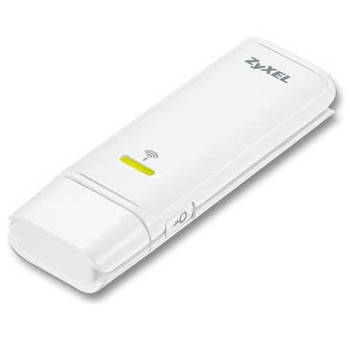
ZyXel 91-005-249001B, USB 2.0, 300Mbps, IEEE 802.11b/g/n, 2.4 Ghz, Wireless Adaptor
Scan code: LN27184
Manufacturer code: 91-005-249001B
End Of Life

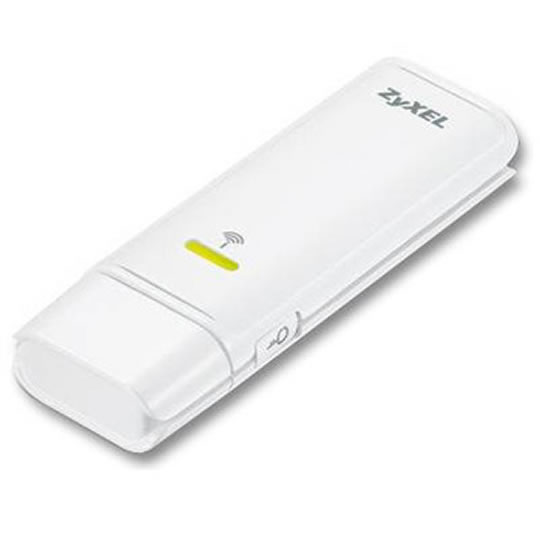

ZyXel 91-005-249001B, USB 2.0, 300Mbps, IEEE 802.11b/g/n, 2.4 Ghz, Wireless Adaptor
ZyXel 91-005-249001B, USB 2.0, 300Mbps, 802.11b/gn, 2.4 Ghz, Wireless Adaptor
Scan code:
LN27184
Manufacturer code:
91-005-249001B
This product is no longer available to purchase.
Email me when the availability or price changes
Product Overview
Allows you to connect to 802.11n wireless networks quickly and easily
The ZyXEL NWD271N USB adapter brings you a better internet experience than the existing 11g network. With the receive data rates up to 300Mbps, you can enjoy the incredible high-speed connection no matter at home or office. Not only provide you speed and coverage advantages, it also works with your existing 802.11b and 802.11g network.
Enjoy high quality file sharing and fast multimedia downloads
It is an excellent solution for your activities such as file transferring, music downloading, video streaming and online gaming. By using multiple radios and according reflections, it creates a robust signal which reaches up to 6 times farther and thus reduces as much dead zone as possible.
Easy security setup with one-touch button
To own a secure wireless network is not a headache anymore. The WPS (Wi-Fi Protected Setup) only takes you just a few seconds to set up a secure wireless network. No more complicated procedure. No need to ask for help from a technical expert. You can either connect to your WPS supported access point by simply push a button for configuration (PBC: Push Button Configuration) or enter 4 to 8 code given either by the ZyXEL NWD271N USB adapter or your access point to create a simple but safe wireless network. Features System Specifications
Complies with 802.11n draft specification
Backwards Compatible with IEEE 802.11b/g
Wi-Fi Multimedia (WMM) Support for Quality Video & Voice Streaming over Wireless Connection
Advanced Wireless Security Transmission with WPA / WPA2 and 802.1x Support
Support WPS (Wi-Fi Protected Setup) for simple security setup
Hardware Specifications
Operation Voltage: DC 5 V
PCB antenna
One Link / Act LED
One USB 2.0 male jack
Physical Specifications
Dimensions: 81(W) ×28 (D) ×12 (H) mm / 3.19 (W) x 1.10 (D) x 0.47 (H) inch
Weight: 21g / 0.74ounce
Environmental Specifications
Operating temperature : 0°C ~ 40°C
Operating Humidity : 20% ~ 90% (Non-condensing)
Storage temperature : -30°C ~ 70°C
Storage Humidity : 5% ~ 90% (Non-condensing)
Certification
FCC /CE /C-Tick /NCC /IC
WiFi, WMM-PS, Microsoft XP /Vista WHQL
The ZyXEL NWD271N USB adapter brings you a better internet experience than the existing 11g network. With the receive data rates up to 300Mbps, you can enjoy the incredible high-speed connection no matter at home or office. Not only provide you speed and coverage advantages, it also works with your existing 802.11b and 802.11g network.
Enjoy high quality file sharing and fast multimedia downloads
It is an excellent solution for your activities such as file transferring, music downloading, video streaming and online gaming. By using multiple radios and according reflections, it creates a robust signal which reaches up to 6 times farther and thus reduces as much dead zone as possible.
Easy security setup with one-touch button
To own a secure wireless network is not a headache anymore. The WPS (Wi-Fi Protected Setup) only takes you just a few seconds to set up a secure wireless network. No more complicated procedure. No need to ask for help from a technical expert. You can either connect to your WPS supported access point by simply push a button for configuration (PBC: Push Button Configuration) or enter 4 to 8 code given either by the ZyXEL NWD271N USB adapter or your access point to create a simple but safe wireless network. Features System Specifications
Complies with 802.11n draft specification
Backwards Compatible with IEEE 802.11b/g
Wi-Fi Multimedia (WMM) Support for Quality Video & Voice Streaming over Wireless Connection
Advanced Wireless Security Transmission with WPA / WPA2 and 802.1x Support
Support WPS (Wi-Fi Protected Setup) for simple security setup
Hardware Specifications
Operation Voltage: DC 5 V
PCB antenna
One Link / Act LED
One USB 2.0 male jack
Physical Specifications
Dimensions: 81(W) ×28 (D) ×12 (H) mm / 3.19 (W) x 1.10 (D) x 0.47 (H) inch
Weight: 21g / 0.74ounce
Environmental Specifications
Operating temperature : 0°C ~ 40°C
Operating Humidity : 20% ~ 90% (Non-condensing)
Storage temperature : -30°C ~ 70°C
Storage Humidity : 5% ~ 90% (Non-condensing)
Certification
FCC /CE /C-Tick /NCC /IC
WiFi, WMM-PS, Microsoft XP /Vista WHQL


