Shuttle SH67H3 Intel 1155 Barebone Computer
Scan code: LN39309
Manufacturer code: SH67H3
End Of Life



Product Overview
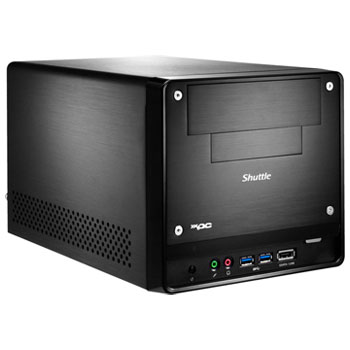
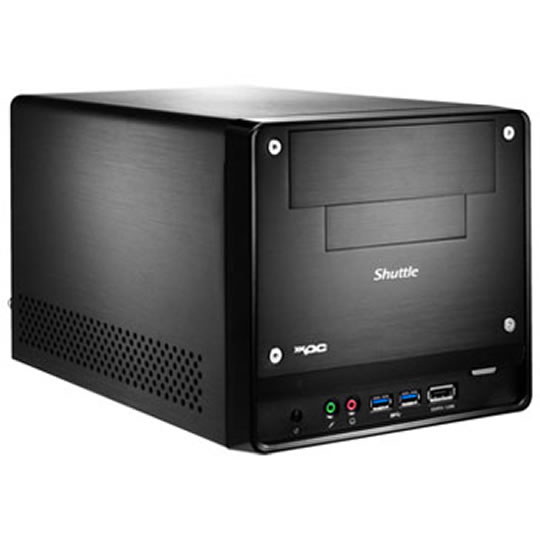
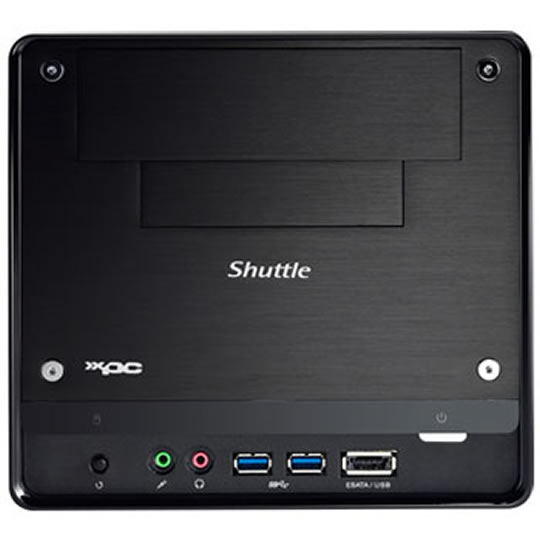
The Shuttle XPC Barebone SH67H3 supports Intel Core i3 / i5 / i7 processors with LGA1155 socket and up to 32 GB DDR3 RAM, split between four slots. The PCIe-x16 slot of the SH67H3 also accommodates large dual-slot graphics cards. Alternatively, the CPU-integrated graphics function*) can be used. Multi-monitoring is also possible thanks to the two digital HDMI and DVI monitor connections. The SH67H3 also comes with an array of ports including 4x USB 3.0, 4x USB 2.0, 2x eSATA and S/PDIF available on the front and rear panels. This attractive aluminium package is rounded off with Gigabit LAN and an effective heatpipe cooling system. *) Integrated graphics dependent on processor type
Features The fastest connection to external peripheral devices available to date
The USB 3.0 connectors of this model allow for data transfer of up to 5 Gbit/s (625 MB/s). This enables external devices such as USB hard disks to be connected and run at nearly the same speed as their internal siblings. USB 3.0 is downward compatible so that also devices of previous USB generations can be hooked up.
The interface for the fastest of memory media
Internal drives to be used inside this Mini-PC can transfer data at a speed of up to 6 Gbit/s. Hard drives thus run significantly faster and brand-new media technologies such as SSDs can use their full potential. Be sure to look for SATA 6 Gbit/s.
8-channel HD audio
The superior high-definition sound not only gives that perfect cinema feeling at home, it also offers optimal sound quality for your Skype VOIP telephone conferencing. Conveniently located ports ensure ultimate user friendliness.
Dual-slot graphic cards? No problem!
The creative engineers at Shuttle have worked out how to fit large and incredibly powerful dual-slot graphics cards into this compact PC. The special dimensions of the cards and the unusual fan size cause no problems at all in this Mini-PC.
HDMI interface
Goodbye cable spaghetti! Modern flat-screen TVs and large-format TFT screens can be connected to this Mini-PC with just a single thin cable. Often the audio output is also transferred in brilliant quality via the HDMI cable. If your Mini-PC already has a Blu-ray drive, the path to high-definition entertainment is clear.
Optimal air flow
Warm air is transported out of the chassis by means of cleverly arranged components, which enables a large number of parts to be cooled simultaneously in the air flow. At no time can heat build up and adversely affect the stability of the system.
Communication in the fast lane
The integrated gigabit LAN chipset opens up completely new possibilities for communication with no restriction on the speed of data transfer. Say goodbye to information bottlenecks, whether in the company network or for home Internet access.
PCI Express technology
A fast X16-PCI-E slot enables the use of modern 3D graphics cards and other expansion cards that have to transfer huge amounts of data at ultra-rapid speeds.
External eSATA port
With this interface external hard drives can reach the same speeds as inbuilt versions. Just give it a try.
The latest generation of super-fast RAM
In addition to a fast processor, high-performance PCs also require fast memory. This Shuttle Mini-PC offers DDR3-Triple-Channel RAM with up to 16 gigabytes of memory.
Pre-assembled cabling saves time
The most important power and data cables are already routed and just have to inserted into the relevant components. This saves valuable time when setting up the system.
Full support for Windows 7
Shuttle provides all the necessary drivers to ensure the smooth installation of Windows 7, and the enhanced 3D “Aero” interface runs without problem thanks to the integrated state-of-the-art graphics processor.
Space for two hard disks
This Mini-PC chassis provides plenty of space for two 3.5" HDDs that provide many Terabytes of memory. The generous ventilation between the drives ensures there is no build-up of heat.
Crystal-clear audio transmission
SPDIF allows the transmission of audio signals in digital quality. The sound of films, music and games is sent to the terminal via fibre-optic or coax cable without any data loss.
Features The fastest connection to external peripheral devices available to date
The USB 3.0 connectors of this model allow for data transfer of up to 5 Gbit/s (625 MB/s). This enables external devices such as USB hard disks to be connected and run at nearly the same speed as their internal siblings. USB 3.0 is downward compatible so that also devices of previous USB generations can be hooked up.
The interface for the fastest of memory media
Internal drives to be used inside this Mini-PC can transfer data at a speed of up to 6 Gbit/s. Hard drives thus run significantly faster and brand-new media technologies such as SSDs can use their full potential. Be sure to look for SATA 6 Gbit/s.
8-channel HD audio
The superior high-definition sound not only gives that perfect cinema feeling at home, it also offers optimal sound quality for your Skype VOIP telephone conferencing. Conveniently located ports ensure ultimate user friendliness.
Dual-slot graphic cards? No problem!
The creative engineers at Shuttle have worked out how to fit large and incredibly powerful dual-slot graphics cards into this compact PC. The special dimensions of the cards and the unusual fan size cause no problems at all in this Mini-PC.
HDMI interface
Goodbye cable spaghetti! Modern flat-screen TVs and large-format TFT screens can be connected to this Mini-PC with just a single thin cable. Often the audio output is also transferred in brilliant quality via the HDMI cable. If your Mini-PC already has a Blu-ray drive, the path to high-definition entertainment is clear.
Optimal air flow
Warm air is transported out of the chassis by means of cleverly arranged components, which enables a large number of parts to be cooled simultaneously in the air flow. At no time can heat build up and adversely affect the stability of the system.
Communication in the fast lane
The integrated gigabit LAN chipset opens up completely new possibilities for communication with no restriction on the speed of data transfer. Say goodbye to information bottlenecks, whether in the company network or for home Internet access.
PCI Express technology
A fast X16-PCI-E slot enables the use of modern 3D graphics cards and other expansion cards that have to transfer huge amounts of data at ultra-rapid speeds.
External eSATA port
With this interface external hard drives can reach the same speeds as inbuilt versions. Just give it a try.
The latest generation of super-fast RAM
In addition to a fast processor, high-performance PCs also require fast memory. This Shuttle Mini-PC offers DDR3-Triple-Channel RAM with up to 16 gigabytes of memory.
Pre-assembled cabling saves time
The most important power and data cables are already routed and just have to inserted into the relevant components. This saves valuable time when setting up the system.
Full support for Windows 7
Shuttle provides all the necessary drivers to ensure the smooth installation of Windows 7, and the enhanced 3D “Aero” interface runs without problem thanks to the integrated state-of-the-art graphics processor.
Space for two hard disks
This Mini-PC chassis provides plenty of space for two 3.5" HDDs that provide many Terabytes of memory. The generous ventilation between the drives ensures there is no build-up of heat.
Crystal-clear audio transmission
SPDIF allows the transmission of audio signals in digital quality. The sound of films, music and games is sent to the terminal via fibre-optic or coax cable without any data loss.


