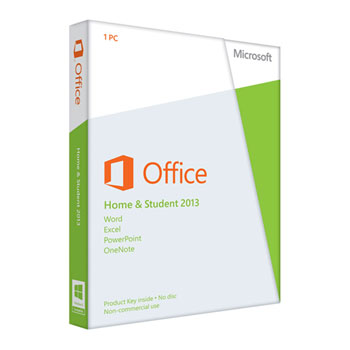
Microsoft Office Home and Student 2013 32/64Bit - 79G-03549
Scan code: LN49035
Manufacturer code: 79G-03549
End Of Life

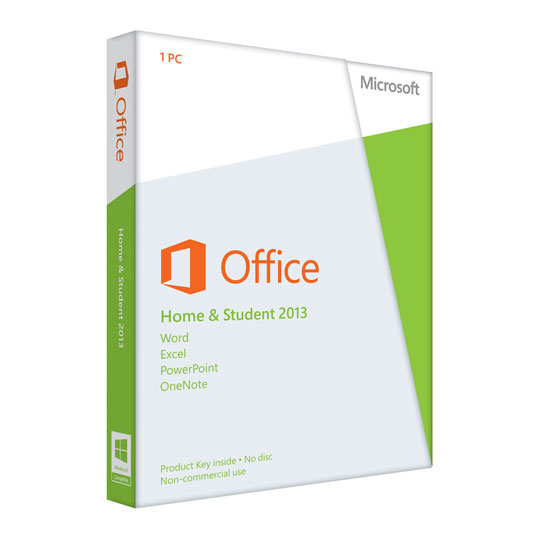


Microsoft Office Home and Student 2013 32/64Bit - 79G-03549
Microsoft Office Home and Student 2013, 32/64 Bit, English, Eurozone, Medialess
Scan code:
LN49035
Manufacturer code:
79G-03549
This product is no longer available to purchase.
Email me when the availability or price changes
- 3XS Approved Custom picked by our award winning 3XS Systems team.
Product Overview
Office Home & Student 2013 is designed to help you create and organise faster with new, time-saving features and a clean, modern look. Plus, you can save your documents in the cloud on SkyDrive and access them virtually anywhere.
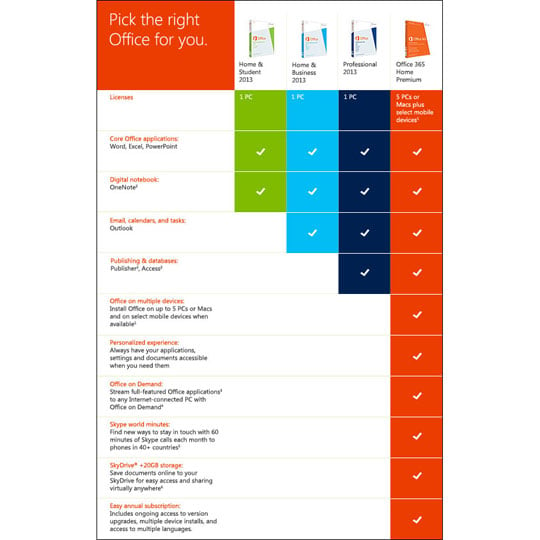
The latest versions of Word, Excel, PowerPoint and OneNote on 1 PC.
• The latest versions of Word, Excel, PowerPoint and OneNote.
• Office on one PC for household use.
• One-off purchase for the life of your PC; non-transferrable.
• 7 GB of online storage in SkyDrive.
• Free Office Web Apps* for accessing, editing and sharing documents.
• An improved user interface optimized for touch, pen and keyboard.
Features • Experience Office at its best on Windows 8 devices, with an improved user interface optimized for touch, pen and keyboard.
• An improved look and feel reduces distractions for a better reading experience.
• The new Start screen gives you a selection of recent documents and templates to get going quickly.
• Use OneNote to capture and share notes, pictures, web pages, voice memos and more.
• Allow others to scroll through your Word docs in a browser, even if they don’t have Word.
• Focus on your audience with PowerPoint tools that let you zoom in or skip to any slide without seeing the slides in between.
• Incorporate content from PDFs into Word documents quickly and easily.
• Add pictures, videos or online media to a Word doc with a simple drag and drop.
• Recommended Charts helps you visualise data quickly and effectively in Excel.
SYSTEM REQUIREMENTS
• Computer and Processor: 1 GHz or faster x86 or 64-bit processor with SSE2 instruction set
• Memory: 1 GB RAM (32-bit); 2 GB RAM (64-bit) recommended for graphics features, Outlook Instant Search and certain advanced functionalities*
• Hard Disk: 3.0 GB available disk space
• Display: 1366 x 768 or higher resolution monitor
• Operating System: Windows 7, Windows 8, Windows Server 2008 R2 with .NET 3.5 or later
• Graphics: Graphics hardware acceleration requires a DirectX 10 graphics card
• Additional Requirements: Internet Explorer 8, 9, 10; Firefox 10.x or later; Safari 5 (Mac) and Chrome 17.x
• A touch-enabled device is required to use any multi-touch functionality. However, all features and functionality are always available by using a keyboard, mouse or other standard or accessible input device. New touch features are optimised for use with Windows 8.
• Internet functionality requires an Internet connection. Fees may apply.
• Speech recognition functionality requires a close-talk microphone and audio output device.
• Microsoft and Skype accounts.
• Other: Product functionality and graphics may vary based on your system configuration. Some features may require additional or advanced hardware or server connectivity.
*An appropriate device, Internet connection and Internet Explorer, Firefox or Safari browser are required.
* 2 GHz processor or faster and 1 GB RAM or more recommended for OneNote Audio Search. Close-talking microphone required. Audio Search not available in all languages.
The latest versions of Word, Excel, PowerPoint and OneNote on 1 PC.
• The latest versions of Word, Excel, PowerPoint and OneNote.
• Office on one PC for household use.
• One-off purchase for the life of your PC; non-transferrable.
• 7 GB of online storage in SkyDrive.
• Free Office Web Apps* for accessing, editing and sharing documents.
• An improved user interface optimized for touch, pen and keyboard.
Features • Experience Office at its best on Windows 8 devices, with an improved user interface optimized for touch, pen and keyboard.
• An improved look and feel reduces distractions for a better reading experience.
• The new Start screen gives you a selection of recent documents and templates to get going quickly.
• Use OneNote to capture and share notes, pictures, web pages, voice memos and more.
• Allow others to scroll through your Word docs in a browser, even if they don’t have Word.
• Focus on your audience with PowerPoint tools that let you zoom in or skip to any slide without seeing the slides in between.
• Incorporate content from PDFs into Word documents quickly and easily.
• Add pictures, videos or online media to a Word doc with a simple drag and drop.
• Recommended Charts helps you visualise data quickly and effectively in Excel.
SYSTEM REQUIREMENTS
• Computer and Processor: 1 GHz or faster x86 or 64-bit processor with SSE2 instruction set
• Memory: 1 GB RAM (32-bit); 2 GB RAM (64-bit) recommended for graphics features, Outlook Instant Search and certain advanced functionalities*
• Hard Disk: 3.0 GB available disk space
• Display: 1366 x 768 or higher resolution monitor
• Operating System: Windows 7, Windows 8, Windows Server 2008 R2 with .NET 3.5 or later
• Graphics: Graphics hardware acceleration requires a DirectX 10 graphics card
• Additional Requirements: Internet Explorer 8, 9, 10; Firefox 10.x or later; Safari 5 (Mac) and Chrome 17.x
• A touch-enabled device is required to use any multi-touch functionality. However, all features and functionality are always available by using a keyboard, mouse or other standard or accessible input device. New touch features are optimised for use with Windows 8.
• Internet functionality requires an Internet connection. Fees may apply.
• Speech recognition functionality requires a close-talk microphone and audio output device.
• Microsoft and Skype accounts.
• Other: Product functionality and graphics may vary based on your system configuration. Some features may require additional or advanced hardware or server connectivity.
*An appropriate device, Internet connection and Internet Explorer, Firefox or Safari browser are required.
* 2 GHz processor or faster and 1 GB RAM or more recommended for OneNote Audio Search. Close-talking microphone required. Audio Search not available in all languages.
Microsoft Office Home and Student 2013 32/64Bit - 79G-03549
![Microsoft Office Home and Student 2013 32/64Bit - 79G-03549]()