
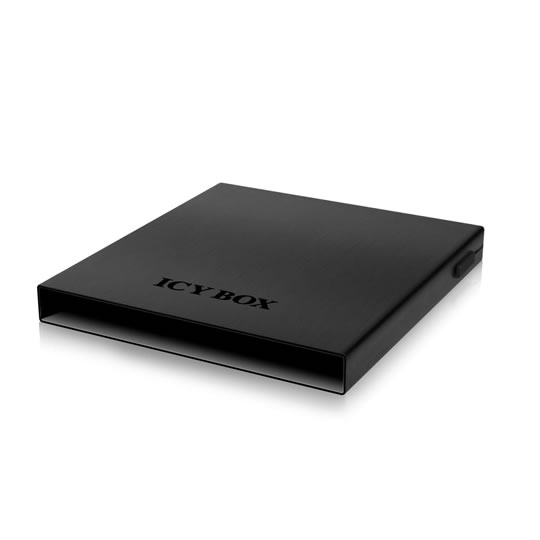
ICY BOX Laptop Optical Bay to 2.5" SSD/HDD w/ USB Cable
End Of Life
ICY BOX Laptop Optical Bay to 2.5" SSD/HDD w/ USB Cable
Scan code: LN44470 Manufacturer code: IB-AC642
End Of Life
  • Thumbnail 1 : ICY BOX Laptop Optical Bay to 2.5" SSD/HDD w/ USB Cable
  • Thumbnail 2 : ICY BOX Laptop Optical Bay to 2.5" SSD/HDD w/ USB Cable
End Of Life

ICY BOX Laptop Optical Bay to 2.5" SSD/HDD w/ USB Cable

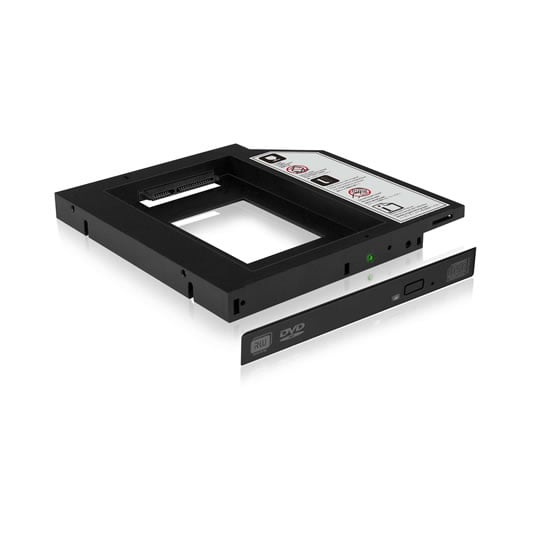
ICY BOX IB-AC642, Optical Bay to 2.5" SSD/HDD, w/ USB Cable, Add 2nd Drive to Most Notebooks/Laptops

Scan code: LN44470 Manufacturer code: IB-AC642
End of life
This product is no longer available to purchase.

Email me when the availability or price changes

  • SCANPROTECT Protect against installation damage for 28 days.
Product Overview

Expand Your Opportunities

Have you ever wished you could put an SSD or 2nd HDD in your laptop, because you are feeling that the boot times and data access becomes more and more slowly or you have realized that you have far too much data to fit on your 1st regular HDD inside your laptop? By putting an IB-AC642 in your optical bay, you can add a SSD or second hard drive to your computer.


Adding a solid state drive to your system can make it significantly faster, from decimating the boot times to speeding up application launch and data access or storing all of your large files on a 2nd regular hard drive.


Laptops rarely have a second HDD bay though. Fortunately, with an IB-AC642, you can add a second drive to your computer easily. With flash drives, online streaming video, and downloadable software installs becoming more popular, many users find themselves using the CD/DVD drive less and less, so replacing it with an SSD or 2nd HDD can be a good investment. Furthermore, in the rare cases that you do need access to optical media; you can always plug in your old DVD drive externally by using the enclosed external

Features
• Laptop solution for standard 12.7 mm DVD slot to 2.5" SSD or HDD
• Replace with SSD to increase OS speed
• Replace with HDD for notebook expansion
• Hot Swap SATA interface – removable backup solution
• Enclosed front panel keep visual appearance of your laptop
• Inkl. slim DVD enclosure with USB 2.0
Warranty

Please note your statutory rights are not affected.

For further information regarding Scan's warranty procedure please see our terms and conditions

Details
Duration:
12 months
Type:
Return to base
DOA Period:
28 days
RTB Period:
12 months
Manufacturer Contact Details
Manufacturer:
Scan
Telephone:
01204-474747
Buying Guide
Need help? Read our Internal Storage Buying Guide
System Buses & Bandwidth
Date Issued: 21st Oct 2008

In computing terms, system buses are used to connect various components to the motherboard’s core logic and, often, to each other. Modern PCs run with a multitude of high-speed buses ranging from the interconnects between, say, the chipset and the CPU, graphics card, memory, and peripherals.

Read More

PATA -vs- SATA
PATA -vs- SATA
Date Issued: 2nd Jul 2008

Serial ATA, or SATA, is a relatively new storage technology that is now being adopted in computers. It is the successor to Parallel ATA. SATA allows for faster transfers between the hard disk and the system, uses thinner cables and is easier to physically install

Read More

RAID
RAID
Date Issued: 14th Jun 2008

In this guide we will be examining a popular method used for increasing the performance and reliability of your hard drives and data storage

Read More

Gigabytes and Gibibytes
Date Issued: 23rd Aug 2005

If you've used a computer for any duration of time you'll have come across the terms “kilobyte, megabyte, gigabyte” and so on. Then there's “kilobit, megabit and gigabit” to add a bit of confusion and to top it all off you've maybe heard or read terms like “gibibyte” on occasion.

Read More

ICY BOX Laptop Optical Bay to 2.5" SSD/HDD w/ USB Cable