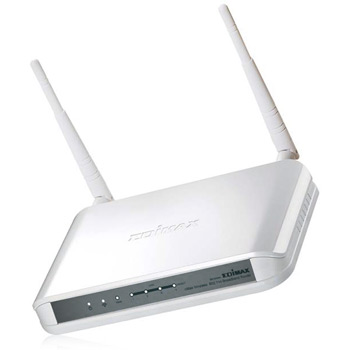
Broadband Router 11n Edimax BR-6428n
Scan code: LN38688
Manufacturer code: BR-6428n
End Of Life


Product Overview
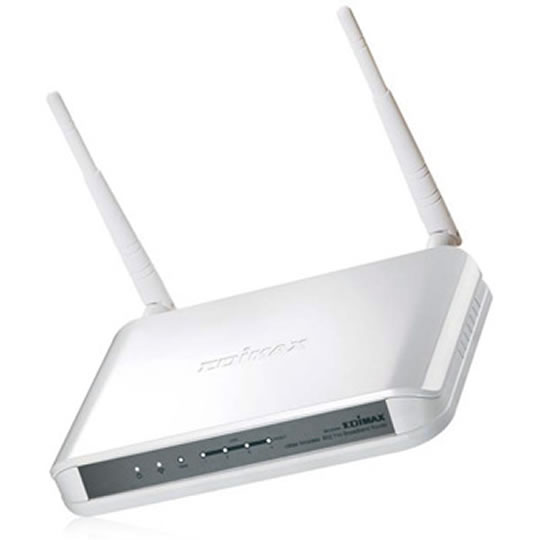
The Edimax BR-6428n is not just any wireless broadband device—it is the first among Edimax’s new generation of wireless broadband “iQ” routers. The combination of the latest, cutting-edge wireless technology and Edimax’s revolutionary “iQoS” bandwidth managing system makes the Edimax BR-6428n wireless broadband iQ router smart, innovative, and truly a product of the future.
Introducing Edimax’s Revolutionary “iQoS”
The revolutionary “iQoS” is Edimax’s answer to the need for a quicker, easier, and more effective way to manage Internet bandwidth. With iQoS, gaming*, video streaming, using VoIP applications and BT clients at the same time will no longer be a nightmare. Its simple and intuitive user interface allows you to arrange all your priority settings in just a few clicks. iQoS is no doubt the best guardian of your Internet bandwidth.
Green Technology
The Edimax BR-6428n iQ router is designed with the latest green technology. By detecting the amount of wireless transference and supplying only the amount of power needed, this iQ router is able to ensure the highest wireless performance while saving up to 66% of the usual power consumption. Even when it is in full loading, the BR-6428n uses 50% less power compared to other non-green 300Mbps routers.
Wireless 802.11n Standard (data rates up to 300Mbps)
The Edimax BR-6428n is a high-speed solution that complies with IEEE 802.11b/g/n standards. The latest wireless technology is built into this iQ router to broaden its wireless coverage by 5 times and to reduce dead spots within the wireless range. When it is connected to wireless 802.11n compatible devices, the BR-6428n can achieve transmission rates of up to 300Mbps. The BR-6428n is truly a cost-effective solution for any home or small business environment.
WPS (Wi-Fi Protected Setup) Button
The Edimax BR-6428n allows you to build secure connections with WPS enabled wireless devices simply by pressing the WPS button. No need to go through the hassle of setting up and configuring the security of your wireless network.
Built-In WLAN Switch to Enable/Disable Wireless Signal
With the built-in WLAN switch, you can easily switch on/off the wireless connection without any extra settings.
Data Sheet
Features Complies with wireless 802.11n and 802.11 b/g standards
Increase wireless speed up to 12 times faster and extends coverage 5 times further
Supports WISP (Wireless ISP) connection mode
Includes EZmax multi-language setup wizard for Internet connection, wireless settings and firmware upgrade
Features iQoS for quick and easy bandwidth management
Build-in hardware button to enable/disable wireless signal
Supports WMM, WEP, WPA, WPA2, DDNS, QoS, IP/MAC filter, DMZ and virtual server
Introducing Edimax’s Revolutionary “iQoS”
The revolutionary “iQoS” is Edimax’s answer to the need for a quicker, easier, and more effective way to manage Internet bandwidth. With iQoS, gaming*, video streaming, using VoIP applications and BT clients at the same time will no longer be a nightmare. Its simple and intuitive user interface allows you to arrange all your priority settings in just a few clicks. iQoS is no doubt the best guardian of your Internet bandwidth.
Green Technology
The Edimax BR-6428n iQ router is designed with the latest green technology. By detecting the amount of wireless transference and supplying only the amount of power needed, this iQ router is able to ensure the highest wireless performance while saving up to 66% of the usual power consumption. Even when it is in full loading, the BR-6428n uses 50% less power compared to other non-green 300Mbps routers.
Wireless 802.11n Standard (data rates up to 300Mbps)
The Edimax BR-6428n is a high-speed solution that complies with IEEE 802.11b/g/n standards. The latest wireless technology is built into this iQ router to broaden its wireless coverage by 5 times and to reduce dead spots within the wireless range. When it is connected to wireless 802.11n compatible devices, the BR-6428n can achieve transmission rates of up to 300Mbps. The BR-6428n is truly a cost-effective solution for any home or small business environment.
WPS (Wi-Fi Protected Setup) Button
The Edimax BR-6428n allows you to build secure connections with WPS enabled wireless devices simply by pressing the WPS button. No need to go through the hassle of setting up and configuring the security of your wireless network.
Built-In WLAN Switch to Enable/Disable Wireless Signal
With the built-in WLAN switch, you can easily switch on/off the wireless connection without any extra settings.
Data Sheet
Features Complies with wireless 802.11n and 802.11 b/g standards
Increase wireless speed up to 12 times faster and extends coverage 5 times further
Supports WISP (Wireless ISP) connection mode
Includes EZmax multi-language setup wizard for Internet connection, wireless settings and firmware upgrade
Features iQoS for quick and easy bandwidth management
Build-in hardware button to enable/disable wireless signal
Supports WMM, WEP, WPA, WPA2, DDNS, QoS, IP/MAC filter, DMZ and virtual server


