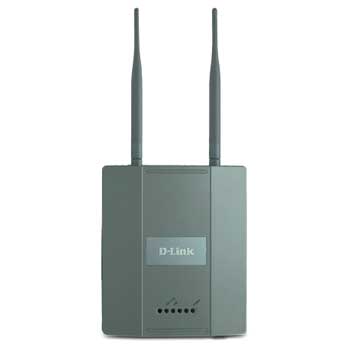
Dlink DWL-3500AP 108Mbps Load Balancing Wireless Access Point inc Managed Mode Via DWS-3024/3026
Scan code: LN37216
Manufacturer code: DWL-3500AP
End Of Life

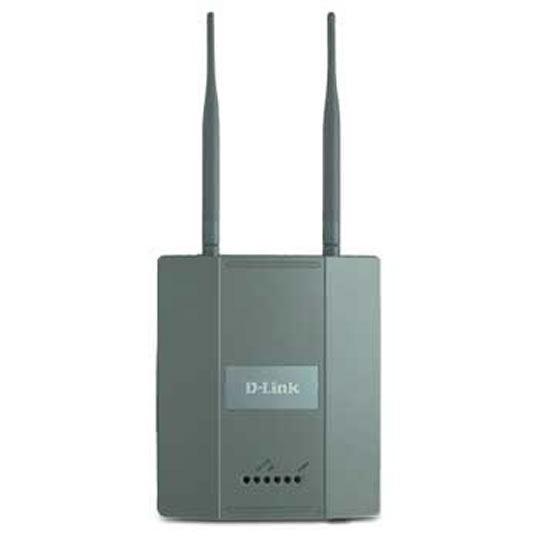

Dlink DWL-3500AP 108Mbps Load Balancing Wireless Access Point inc Managed Mode Via DWS-3024/3026
Dlink DWL-3500AP 108Mbps Load Balancing Wireless Access Point inc Managed Mode Via DWS-3024/3026
Scan code:
LN37216
Manufacturer code:
DWL-3500AP
This product is no longer available to purchase.
Email me when the availability or price changes
Product Overview
The DWL-3500AP Wireless Unified 108G Access Point is a high-performance wireless access device that provides up to 108Mbps transmission rates1. Versatile and powerful, this device can be flexibly deployed as a stand-alone "fit" wireless access point or as a "thin" managed access point (AP) manageable from a wireless switch.
Businesses can start with an intelligent DWL-3500AP that provides many advanced wireless LAN functions, then migrate to a centrally managed system anytime later by integrating the same DWL-3500AP to a D-Link unified wired/wireless switch.
Intelligent "Fit" Access Point
The DWL-3500AP has everything on-board that enables network administrators to set up a secure wireless network and to connect to any Ethernet-compliant switch and router. Advanced wireless functions that the DWL-3500AP supports include: WEP data encryption, WPA/WPA2 security, client MAC address filtering, AP load balancing, QoS/WMM (Wireless Multimedia), and Rouge AP Detection.
Security configuration settings can be locally stored in the DWL-3500AP itself. Wireless connections can easily be expanded by adding more DWL-3500AP or other 802.11g compliant APs to the site. Businesses without complicated network requirements can use the DWL-3500AP to get a wireless network set up and run without the need for any additional special hardware.
"Thin" AP Centrally Managed From Unified Wired
Alternatively, the DWL-3500AP can operate in conjunction with a D-Link DWS-3024 or DWS-3026 unified wired/wireless switch. In this mode, multiple DWL-3500AP access points can connect directly or indirectly to one of these switches to provide unparallel security and wireless mobility for wireless clients.
Each DWL-3500AP access point will be continually tuned by theses switches to provide optimal RF channels and transmission power for all mobile clients, giving them the best wireless signals and uninterrupted wireless connectivity.
Adaptable Wireless
The architecture of most current wireless LAN controllers require wireless traffic to return to the controller for centralized processing, providing unnecessary traffic delay. The DWL-3500AP – when operating with either a DWS-3024 or DWS-3026 switch – offers administrators extra options. Depending on the wireless application, wireless traffic can either be tunneled back to the switch for better security control, or locally forwarded at the access point for optimal performance.
This device offers administrators maximized flexibility with options to tunnel guest traffic to the switch for centralized security control, and forward VoIP traffic directly from the access point for optimal performance.
Sensitive Information Not Stored Locally
When operating in conjunction with a DWS-3024 or DWS-3026 switch, individual DWL-3500AP access points do not store any user data locally. The DWS-3024/3026 switch is the hardware that keeps network and user information. The DWL-3500AP thus can be installed in an unsecured area, and users do not have to worry about hackers stealing data directly from the access points.
Self Configuration and Easy Installation
When operating in conjunction with a DWS-3024 or DWS-3026 switch, the switch automatically configures every connected "thin" DWL-3500AP access point, so no configuration is necessary during installation. If a DWL-3500AP needs to be replaced, the replacement DWL-3500AP automatically inherits the same configuration, making the replacement process as simple as a child's game.
PoE Facilitates Wireless Deployment
For maximum coverage, the DWL-3500AP can be placed at out-of-the-way locations such as on a ceiling or a high wall, where AC outlets are inaccessible and providing power to these locations is difficult and expensive. The DWL-3500AP can easily obtain power from a DWS-3024/3026 switch located as far as 100 meters away through the existing network cable, doing away with the need to install separate power wiring. With industrystandard 802.3af PoE support, this wireless access point does not even require a PoE injector. Features Ideal for Business
+ Solid Die Cast Metal Housing Design for Indoor Deployment
High-Performance Connectivity
+ Up to *108Mbps (Turbo Mode)
+ Dual Detachable Dipole Antennas Ensure Maximum Coverage
+ Self-Tuning Features to Adjust & Optimize RF Settings
+ Load Balancing Among Neighbor AP
Trusted Security Features
+ 64/128/152-bit WEP Data Encryption
+ WPA/WPA2 Personal
+ WPA/WPA2 Enterprise
+ 802.1x User Authentication
+ 802.1Q VLAN Tagging for Network Segmentation
+ MAC Address Filtering
+ Rogue AP Detection
+ 8 SSID Per Frequency Band
Convenient Installation
+ 802.3af Power Over Ethernet to Facilitate Physical Setup
+ Zero-Configuration Installation
+ Supports Variety of External High-Gain Antennas
+ Locking Brackets Included
+ "Fit" (Stand-Alone) AP: Web-Based Management and CLI
+ "Thin" Managed AP: Via DWS-3024/3026 Unified Wired/Wireless Switch
Quality of Service
+ WMM (Wi-Fi Multimedia)
+ SVP (SpectraLnk Voice Priority)
*Maximum wireless signal rate 54Mbps based on IEEE standard 802.11g specifications. Actual data throughput will vary. 108Mbps Turbo speed when operating with otherD-Link 108G or 108AG products. Network conditions and environmental factors, including volume of network traffic,building materials and construction, and network overheadcan lower actual data throughput rate.
Businesses can start with an intelligent DWL-3500AP that provides many advanced wireless LAN functions, then migrate to a centrally managed system anytime later by integrating the same DWL-3500AP to a D-Link unified wired/wireless switch.
Intelligent "Fit" Access Point
The DWL-3500AP has everything on-board that enables network administrators to set up a secure wireless network and to connect to any Ethernet-compliant switch and router. Advanced wireless functions that the DWL-3500AP supports include: WEP data encryption, WPA/WPA2 security, client MAC address filtering, AP load balancing, QoS/WMM (Wireless Multimedia), and Rouge AP Detection.
Security configuration settings can be locally stored in the DWL-3500AP itself. Wireless connections can easily be expanded by adding more DWL-3500AP or other 802.11g compliant APs to the site. Businesses without complicated network requirements can use the DWL-3500AP to get a wireless network set up and run without the need for any additional special hardware.
"Thin" AP Centrally Managed From Unified Wired
Alternatively, the DWL-3500AP can operate in conjunction with a D-Link DWS-3024 or DWS-3026 unified wired/wireless switch. In this mode, multiple DWL-3500AP access points can connect directly or indirectly to one of these switches to provide unparallel security and wireless mobility for wireless clients.
Each DWL-3500AP access point will be continually tuned by theses switches to provide optimal RF channels and transmission power for all mobile clients, giving them the best wireless signals and uninterrupted wireless connectivity.
Adaptable Wireless
The architecture of most current wireless LAN controllers require wireless traffic to return to the controller for centralized processing, providing unnecessary traffic delay. The DWL-3500AP – when operating with either a DWS-3024 or DWS-3026 switch – offers administrators extra options. Depending on the wireless application, wireless traffic can either be tunneled back to the switch for better security control, or locally forwarded at the access point for optimal performance.
This device offers administrators maximized flexibility with options to tunnel guest traffic to the switch for centralized security control, and forward VoIP traffic directly from the access point for optimal performance.
Sensitive Information Not Stored Locally
When operating in conjunction with a DWS-3024 or DWS-3026 switch, individual DWL-3500AP access points do not store any user data locally. The DWS-3024/3026 switch is the hardware that keeps network and user information. The DWL-3500AP thus can be installed in an unsecured area, and users do not have to worry about hackers stealing data directly from the access points.
Self Configuration and Easy Installation
When operating in conjunction with a DWS-3024 or DWS-3026 switch, the switch automatically configures every connected "thin" DWL-3500AP access point, so no configuration is necessary during installation. If a DWL-3500AP needs to be replaced, the replacement DWL-3500AP automatically inherits the same configuration, making the replacement process as simple as a child's game.
PoE Facilitates Wireless Deployment
For maximum coverage, the DWL-3500AP can be placed at out-of-the-way locations such as on a ceiling or a high wall, where AC outlets are inaccessible and providing power to these locations is difficult and expensive. The DWL-3500AP can easily obtain power from a DWS-3024/3026 switch located as far as 100 meters away through the existing network cable, doing away with the need to install separate power wiring. With industrystandard 802.3af PoE support, this wireless access point does not even require a PoE injector. Features Ideal for Business
+ Solid Die Cast Metal Housing Design for Indoor Deployment
High-Performance Connectivity
+ Up to *108Mbps (Turbo Mode)
+ Dual Detachable Dipole Antennas Ensure Maximum Coverage
+ Self-Tuning Features to Adjust & Optimize RF Settings
+ Load Balancing Among Neighbor AP
Trusted Security Features
+ 64/128/152-bit WEP Data Encryption
+ WPA/WPA2 Personal
+ WPA/WPA2 Enterprise
+ 802.1x User Authentication
+ 802.1Q VLAN Tagging for Network Segmentation
+ MAC Address Filtering
+ Rogue AP Detection
+ 8 SSID Per Frequency Band
Convenient Installation
+ 802.3af Power Over Ethernet to Facilitate Physical Setup
+ Zero-Configuration Installation
+ Supports Variety of External High-Gain Antennas
+ Locking Brackets Included
+ "Fit" (Stand-Alone) AP: Web-Based Management and CLI
+ "Thin" Managed AP: Via DWS-3024/3026 Unified Wired/Wireless Switch
Quality of Service
+ WMM (Wi-Fi Multimedia)
+ SVP (SpectraLnk Voice Priority)
*Maximum wireless signal rate 54Mbps based on IEEE standard 802.11g specifications. Actual data throughput will vary. 108Mbps Turbo speed when operating with otherD-Link 108G or 108AG products. Network conditions and environmental factors, including volume of network traffic,building materials and construction, and network overheadcan lower actual data throughput rate.


