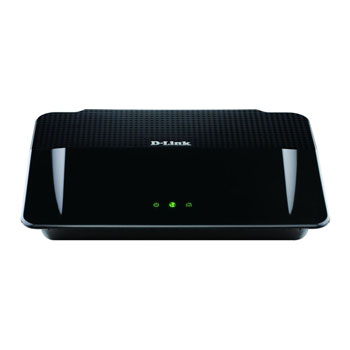
D-Link Wireless N Powerline Gigabit Router, 500Mbs
Scan code: LN43151
Manufacturer code: DHP-1565
End Of Life

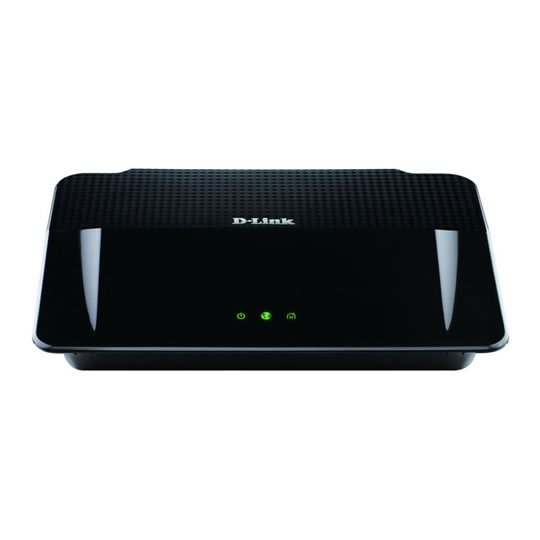

D-Link Wireless N Powerline Gigabit Router, 500Mbs
D-Link Wireless N Powerline Gigabit Router, 500Mbs, IEEE1901 compatible, 4 x Gigabit LAN. 1 x USB Port
Scan code:
LN43151
Manufacturer code:
DHP-1565
This product is no longer available to purchase.
Email me when the availability or price changes
Product Overview
Use your home’s electrical wiring as a high-speed network
The Wireless N PowerLine Gigabit Router uses your home’s electrical wiring to expand your network to every corner of your home, at speeds of up to 500 Mbps. Simply plug your DHP-1565 into any wall socket, and it will extend your network to any PowerLine adapter plugged into any other wall socket in your home. This allows you to extend your network to places where it is not possible to stretch new cables (such as your garage or shed) or where the wireless signal is not strong enough. Wireless N and PowerLine technologies complement each other to create a whole home solution so you can say goodbye to messy wires!
Ideal for bandwidth-intensive applications
The Wireless N PowerLine Gigabit Router is capable of delivering wired data transfer rates of up to 500 Mbps.This makes it ideal for bandwidth-intensive applications, guaranteeing smooth HD video streaming, VoIP calls, and lag-free online gaming experiences. Advanced technology built into this router makes it more resistant to electrical interference from other household appliances, so users can fully benefit from maximum transmission speeds. In addition, its Quality of Service (QoS) Engine prioritises Internet traffic, ensuring that multimedia applications do not experience glitches while web surfing and downloads are in progress. The DHP-1565 provides ample network bandwidth, enabling Digital Home consumers to tap into existing electrical wiring for high-quality multimedia streaming.
Functions as a Router or Access Point
The DHP-1565 can be used in either Router or Access Point mode at the flick of a switch on the back of the device. In Router mode, it connects to your cable or DSL modem to share your Internet connection via Wi-Fi, Ethernet, or through your electrical wiring, so you only need one additional PowerLine adapter to create a connection. In Access Point mode the DHP-1565 acts as a Wireless N PowerLine Adapter to extend your home network via another PowerLine adapter connected to your existing router. In this mode, you can connect up to 4 wired-only devices simultaneously to your home network wherever you are in your home, allowing you to extend your network further than ever before.
Compatibility
Based on the industry-leading PowerLine Alliance technology, the Wireless N PowerLine Gigabit Router is compatible with devices based on the IEEE 1901 standard, such as the PowerLine AV 500 Network Adapter and Starter Kit (DHP-500AV/-501AV), and the PowerLine Passthrough AV 500 Network Adapter and Starter Kit (DHP-P500AV/-P501AV). It is also compatible with devices implementing the former PowerLine AV standard, such as D-Link’s PowerLine AV Network Adapter and Starter Kit (DHP-306AV/-307AV), PowerLine AV Passthrough Network Adapter and Starter Kit (DHP-P306AV/-P307AV), and PowerLine AV Wireless N Extender and Starter Kit (DHP-W306AV/-W307AV).
IPv6 ready
This router is ready for the future of the Internet with support for the upcoming move from IPv4 to IPv6. It carries the IPv6 Ready Gold Logo, meaning that it not only supports the IPv6 protocol, but is also compatible with IPv6 equipment from other manufacturers. The DHP-1565 can handle routing for both IPv4 and IPv6 networks at the same time, so you can be assured that your router is forward and backward compatible.
Save Energy with D-Link Green
The Wireless N PowerLine Gigabit Router is part of D-Link Green, D-Link’s programme for providing eco-friendly alternatives without compromising performance. The DHP-1565 supports features such as a WLAN Scheduler, PowerLine stand-by, and Green Ethernet. The WLAN Scheduler allows you to set specific times when the wireless network will be powered off to save energy and enhance security. PowerLine stand-by shuts down the PowerLine connection when activity is not detected. Green Ethernet provides additional savings by putting the Ethernet ports in sleep mode and by automatically detecting the length of the Ethernet cables connected to its ports, to supply only the right amount of power.
Features Two products in one: Wireless N Gigabit router and PowerLine AV 500 adapter built-in
Wireless N technology: up to 300 Mbps wireless speeds
500 Mbps data transfer rates over existing electrical wiring
Push-button encryption to secure the network from intruders
Gigabit ports for the fastest wired speeds
AP mode to connect wireless and up to 4 wired-only devices to your network, so you can extend your network further than ever before
Quality of Service (QoS) engine for prioritisation of delay-sensitive applications (i.e. media streaming, videoconferencing)
Improved resistance to electrical interference
Interoperable: adheres to the IEEE 1901 standard
Backward compatible with PowerLine AV products
D-Link Green™: energy-saving design
The Wireless N PowerLine Gigabit Router uses your home’s electrical wiring to expand your network to every corner of your home, at speeds of up to 500 Mbps. Simply plug your DHP-1565 into any wall socket, and it will extend your network to any PowerLine adapter plugged into any other wall socket in your home. This allows you to extend your network to places where it is not possible to stretch new cables (such as your garage or shed) or where the wireless signal is not strong enough. Wireless N and PowerLine technologies complement each other to create a whole home solution so you can say goodbye to messy wires!
Ideal for bandwidth-intensive applications
The Wireless N PowerLine Gigabit Router is capable of delivering wired data transfer rates of up to 500 Mbps.This makes it ideal for bandwidth-intensive applications, guaranteeing smooth HD video streaming, VoIP calls, and lag-free online gaming experiences. Advanced technology built into this router makes it more resistant to electrical interference from other household appliances, so users can fully benefit from maximum transmission speeds. In addition, its Quality of Service (QoS) Engine prioritises Internet traffic, ensuring that multimedia applications do not experience glitches while web surfing and downloads are in progress. The DHP-1565 provides ample network bandwidth, enabling Digital Home consumers to tap into existing electrical wiring for high-quality multimedia streaming.
Functions as a Router or Access Point
The DHP-1565 can be used in either Router or Access Point mode at the flick of a switch on the back of the device. In Router mode, it connects to your cable or DSL modem to share your Internet connection via Wi-Fi, Ethernet, or through your electrical wiring, so you only need one additional PowerLine adapter to create a connection. In Access Point mode the DHP-1565 acts as a Wireless N PowerLine Adapter to extend your home network via another PowerLine adapter connected to your existing router. In this mode, you can connect up to 4 wired-only devices simultaneously to your home network wherever you are in your home, allowing you to extend your network further than ever before.
Compatibility
Based on the industry-leading PowerLine Alliance technology, the Wireless N PowerLine Gigabit Router is compatible with devices based on the IEEE 1901 standard, such as the PowerLine AV 500 Network Adapter and Starter Kit (DHP-500AV/-501AV), and the PowerLine Passthrough AV 500 Network Adapter and Starter Kit (DHP-P500AV/-P501AV). It is also compatible with devices implementing the former PowerLine AV standard, such as D-Link’s PowerLine AV Network Adapter and Starter Kit (DHP-306AV/-307AV), PowerLine AV Passthrough Network Adapter and Starter Kit (DHP-P306AV/-P307AV), and PowerLine AV Wireless N Extender and Starter Kit (DHP-W306AV/-W307AV).
IPv6 ready
This router is ready for the future of the Internet with support for the upcoming move from IPv4 to IPv6. It carries the IPv6 Ready Gold Logo, meaning that it not only supports the IPv6 protocol, but is also compatible with IPv6 equipment from other manufacturers. The DHP-1565 can handle routing for both IPv4 and IPv6 networks at the same time, so you can be assured that your router is forward and backward compatible.
Save Energy with D-Link Green
The Wireless N PowerLine Gigabit Router is part of D-Link Green, D-Link’s programme for providing eco-friendly alternatives without compromising performance. The DHP-1565 supports features such as a WLAN Scheduler, PowerLine stand-by, and Green Ethernet. The WLAN Scheduler allows you to set specific times when the wireless network will be powered off to save energy and enhance security. PowerLine stand-by shuts down the PowerLine connection when activity is not detected. Green Ethernet provides additional savings by putting the Ethernet ports in sleep mode and by automatically detecting the length of the Ethernet cables connected to its ports, to supply only the right amount of power.
Features Two products in one: Wireless N Gigabit router and PowerLine AV 500 adapter built-in
Wireless N technology: up to 300 Mbps wireless speeds
500 Mbps data transfer rates over existing electrical wiring
Push-button encryption to secure the network from intruders
Gigabit ports for the fastest wired speeds
AP mode to connect wireless and up to 4 wired-only devices to your network, so you can extend your network further than ever before
Quality of Service (QoS) engine for prioritisation of delay-sensitive applications (i.e. media streaming, videoconferencing)
Improved resistance to electrical interference
Interoperable: adheres to the IEEE 1901 standard
Backward compatible with PowerLine AV products
D-Link Green™: energy-saving design


D-Link Wireless N Powerline Gigabit Router, 500Mbs
![D-Link Wireless N Powerline Gigabit Router, 500Mbs]()