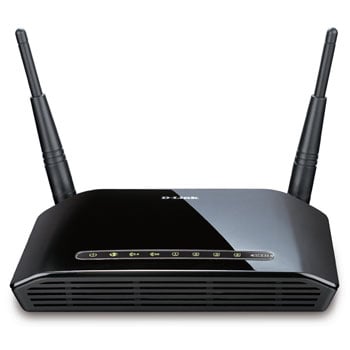
D-Link DIR-815/B Wireless N Quadband Cable/Broadband Router
Scan code: LN39877
Manufacturer code: DIR-815/B
End Of Life

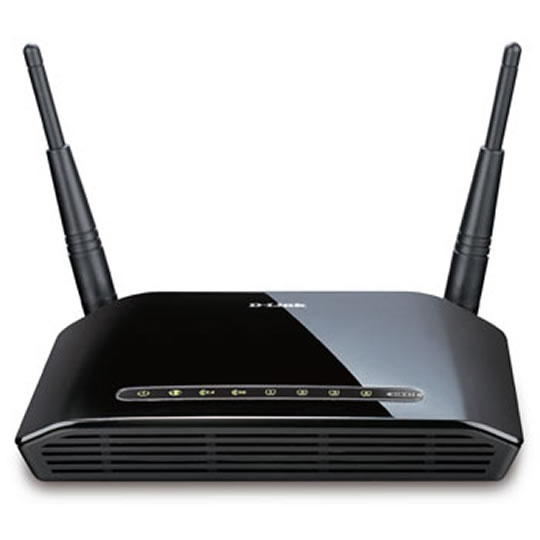

D-Link DIR-815/B Wireless N Quadband Cable/Broadband Router
D-Link DIR-815/B Wireless N Quadband 300Mbps Home Router IPV6 with 4 Port Switch
Scan code:
LN39877
Manufacturer code:
DIR-815/B
This product is no longer available to purchase.
Email me when the availability or price changes
Product Overview
EXCEPTIONAL PERFORMANCE
D-Link's DIR-815 Wireless N Home Router enables users to make the most of their Internet subscription by providing two simultaneous wireless networks. With QoS capabilities and eco-friendly design, this router is suitable for online gaming, media streaming or videoconferencing D-Link's DIR-815 Wireless N Home Router uses Quadband technology to support 2.4 GHz & 5.0 GHz wireless signals at the same time. This allows you to check e-mails and browse the Internet using the 2.4 GHz band while simultaneously streaming movies and other media on the 5.0 GHz band. The DIR-815 is designed for home users looking for a wireless connection that can handle video streaming throughout the house, while being backward compatible with existing 802.11g and 802.11a products. With some routers, all wired and wireless traffic, including Voice over IP (VoIP), video streaming, online gaming, and web browsing are mixed together into a single data stream. By handling data this way, applications such as streaming video may stutter or have an unstable connection. With the D-Link Smart QoS technology, wired and wireless traffic are analyzed and separated into multiple data streams. Different applications like voice, video, and data will be automatically detected and the transmission sequence will be automatically prioritised.
This router is ready for the future of the Internet with support for the upcoming move from IPv4 to IPv6. It carries the IPv6 Ready Gold Logo, meaning that it not only supports the IPv6 protocol, but is also compatible with IPv6 equipment from other manufacturers. Using a dual-stack architecture, this router can handle routing for both IPv4 and IPv6 networks at the same time, so you can be assured that your equipment is forward and backward compatible. The DIR-815 is part of D-Link Green, D-Link's programme for providing eco-friendly alternatives without compromising performance. The DIR-815 supports WLAN Scheduler, which switches off the wireless network when not needed, for example at nights or during working hours. Also the power consumption is further reduced with its Energy Start power supply.
Main Features:
4 LAN Fast Ethernet ports for wired connections
1 WAN Fast Ethernet port to connect to cable or ADSL modems
802.11n technology for the fastest wireless speeds
Two simultaneous wireless networks for the best gaming and media experience
Smart QoS (Quality of Service) Technology to guarantee bandwidth to delay-sensitive applications
WLAN scheduler to switch off the wireless when not needed
IPv6 ready: supports the future Internet
D-Link Green: energy-saving design
Features DUAL BAND ADVANTAGE
Dual Band is two Wi-Fi networks in one router. The dual band technology in the DIR-815 supports both 2.4GHz and 5GHz wireless signals simultaneously. You can check e-mail and browse the Internet using the 2.4GHz band while playing games and streaming HD movies on the clearer 5GHz band. This prevents both signals from getting overloaded and avoids interference and lag when you’re watching movies or gaming.
EASY TO SECURE
The DIR-815 supports the latest wireless security features to help prevent unauthorized access, be it from over a wireless network or from the Internet. Support for WPA™ and WPA2™ standards ensure that you will be able to use the best possible encryption, regardless of your client devices. In addition, the DIR-815 Router utilizes dual active firewalls (SPI and NAT) to prevent potential attacks from across the Internet.
WHY WIRELESS N IS BETTER
This DIR-815 uses powerful 802.11n technology with multiple intelligent antennas to maximize the speed and range of your wireless signal to significantly outperform previous-generation Wireless G MIMO devices*. The antennas on the DIR-815 make use of your home’s environment by bouncing multiple wireless signals off walls and ceilings to work around obstructions and help eliminate dead spots.
D-Link's DIR-815 Wireless N Home Router enables users to make the most of their Internet subscription by providing two simultaneous wireless networks. With QoS capabilities and eco-friendly design, this router is suitable for online gaming, media streaming or videoconferencing D-Link's DIR-815 Wireless N Home Router uses Quadband technology to support 2.4 GHz & 5.0 GHz wireless signals at the same time. This allows you to check e-mails and browse the Internet using the 2.4 GHz band while simultaneously streaming movies and other media on the 5.0 GHz band. The DIR-815 is designed for home users looking for a wireless connection that can handle video streaming throughout the house, while being backward compatible with existing 802.11g and 802.11a products. With some routers, all wired and wireless traffic, including Voice over IP (VoIP), video streaming, online gaming, and web browsing are mixed together into a single data stream. By handling data this way, applications such as streaming video may stutter or have an unstable connection. With the D-Link Smart QoS technology, wired and wireless traffic are analyzed and separated into multiple data streams. Different applications like voice, video, and data will be automatically detected and the transmission sequence will be automatically prioritised.
This router is ready for the future of the Internet with support for the upcoming move from IPv4 to IPv6. It carries the IPv6 Ready Gold Logo, meaning that it not only supports the IPv6 protocol, but is also compatible with IPv6 equipment from other manufacturers. Using a dual-stack architecture, this router can handle routing for both IPv4 and IPv6 networks at the same time, so you can be assured that your equipment is forward and backward compatible. The DIR-815 is part of D-Link Green, D-Link's programme for providing eco-friendly alternatives without compromising performance. The DIR-815 supports WLAN Scheduler, which switches off the wireless network when not needed, for example at nights or during working hours. Also the power consumption is further reduced with its Energy Start power supply.
Main Features:
4 LAN Fast Ethernet ports for wired connections
1 WAN Fast Ethernet port to connect to cable or ADSL modems
802.11n technology for the fastest wireless speeds
Two simultaneous wireless networks for the best gaming and media experience
Smart QoS (Quality of Service) Technology to guarantee bandwidth to delay-sensitive applications
WLAN scheduler to switch off the wireless when not needed
IPv6 ready: supports the future Internet
D-Link Green: energy-saving design
Features DUAL BAND ADVANTAGE
Dual Band is two Wi-Fi networks in one router. The dual band technology in the DIR-815 supports both 2.4GHz and 5GHz wireless signals simultaneously. You can check e-mail and browse the Internet using the 2.4GHz band while playing games and streaming HD movies on the clearer 5GHz band. This prevents both signals from getting overloaded and avoids interference and lag when you’re watching movies or gaming.
EASY TO SECURE
The DIR-815 supports the latest wireless security features to help prevent unauthorized access, be it from over a wireless network or from the Internet. Support for WPA™ and WPA2™ standards ensure that you will be able to use the best possible encryption, regardless of your client devices. In addition, the DIR-815 Router utilizes dual active firewalls (SPI and NAT) to prevent potential attacks from across the Internet.
WHY WIRELESS N IS BETTER
This DIR-815 uses powerful 802.11n technology with multiple intelligent antennas to maximize the speed and range of your wireless signal to significantly outperform previous-generation Wireless G MIMO devices*. The antennas on the DIR-815 make use of your home’s environment by bouncing multiple wireless signals off walls and ceilings to work around obstructions and help eliminate dead spots.


