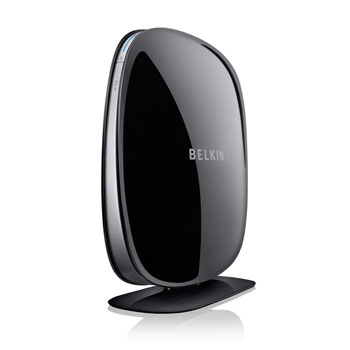
MultiBeam antenna Dual-Band Wireless Belkin F9K1103uk Router Broadband/Cable SDelf Healing
Scan code: LN44517
Manufacturer code: F9K1103uk
End Of Life

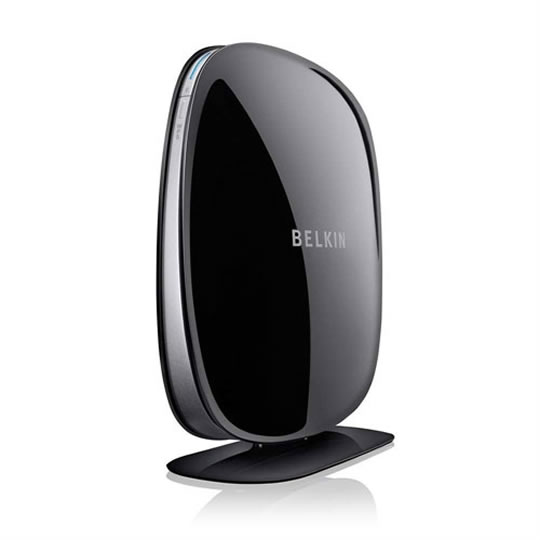

MultiBeam antenna Dual-Band Wireless Belkin F9K1103uk Router Broadband/Cable SDelf Healing
Belkin F9K1103uk PLAY N750 DB Wireless Dual-Band N+ Router Cable/Broadband Gigabit 4 Port Switch 2xUSB
Scan code:
LN44517
Manufacturer code:
F9K1103uk
This product is no longer available to purchase.
Email me when the availability or price changes
Product Overview
This is the Cable/Broadband Model for BT Infinity, Virgin Media etc. This is Not the ADSL Version.
MultiBeam Technology
Belkin’s exclusive MultiBeam antenna technology gives you maximum throughput while minimizing dead spots for optimized video streaming from multiple devices, virtually anywhere in your home.
Dual-Band Speed
Get the fastest dual-band speeds for video streaming and gaming—up to 300Mbps (2.4GHz) + 450Mbps (5GHz).*
2 USB Ports
Connect an external hard drive for easy sharing of photos and files, and connect a printer for wireless printing from any computer in your home.
Gigabit
Four gigabit ports let you connect multiple computers or devices for ultra-fast network speeds and file sharing.
Preset Security
WPS/WPA2 encryption standards and preset security settings get you up and running safely. One-touch Wi-Fi Protected Setup (WPS) securely connects multiple computers and devices with the push of a button.
Easy Setup
Get your secure wireless network up and running in minutes. Just three easy steps, and you’re you out of the box and onto the Web. Features • MultiBeam Technology
High-powered signal for multiple devices
• Dual-Band Speed
Up to 300Mbps (2.4GHz) + 450Mbps (5GHz)*
• 2 USB Ports
For wireless printing and storage
• 4 Gigabit Ports
For ultra-fast file sharing
• Easy Setup
EASY START gets you set up in 3 easy steps
• Preset Security
Security settings are preset to get you up and running safely
MultiBeam Technology
Belkin’s exclusive MultiBeam antenna technology gives you maximum throughput while minimizing dead spots for optimized video streaming from multiple devices, virtually anywhere in your home.
Dual-Band Speed
Get the fastest dual-band speeds for video streaming and gaming—up to 300Mbps (2.4GHz) + 450Mbps (5GHz).*
2 USB Ports
Connect an external hard drive for easy sharing of photos and files, and connect a printer for wireless printing from any computer in your home.
Gigabit
Four gigabit ports let you connect multiple computers or devices for ultra-fast network speeds and file sharing.
Preset Security
WPS/WPA2 encryption standards and preset security settings get you up and running safely. One-touch Wi-Fi Protected Setup (WPS) securely connects multiple computers and devices with the push of a button.
Easy Setup
Get your secure wireless network up and running in minutes. Just three easy steps, and you’re you out of the box and onto the Web. Features • MultiBeam Technology
High-powered signal for multiple devices
• Dual-Band Speed
Up to 300Mbps (2.4GHz) + 450Mbps (5GHz)*
• 2 USB Ports
For wireless printing and storage
• 4 Gigabit Ports
For ultra-fast file sharing
• Easy Setup
EASY START gets you set up in 3 easy steps
• Preset Security
Security settings are preset to get you up and running safely


MultiBeam antenna Dual-Band Wireless Belkin F9K1103uk Router Broadband/Cable SDelf Healing
![MultiBeam antenna Dual-Band Wireless Belkin F9K1103uk Router Broadband/Cable SDelf Healing]()