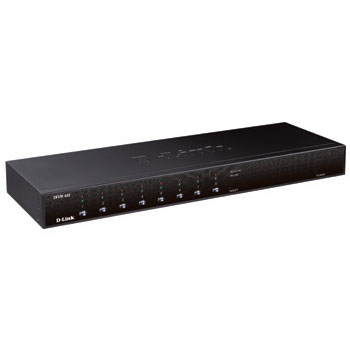
D-Link DKVM-440 8 Port KVM Switch
Scan code: LN39861
Manufacturer code: DKVM-440
End Of Life


Product Overview
The D-Link PS2/USB 8 Port Combo KVM Switch is a high-end local remote management solution which allows you to control up to 4096* PCs from a single console.
Versatile Management
Toggle between clients using the front panel buttons, keyboard hotkeys, or On-screen Display (OSD) menu. The on-screen menu allows you to label each channel with a descriptive name, providing clear and easy navigation. A convenient Auto-Scan function allows you to automatically toggle between multiple computers sequentially at preset intervals. The front panel LEDs assist with workstation/server status monitoring. Green LEDs indicate that systems are online, while separate red LEDs indicate when a particular system has been selected for management via console.
Convenient Installation
The sturdy metal chassis is mountable in a standard 19” rack. Daisy chain multiple KVM switches together up to three levels deep; cascaded units require no special configuration and automatically configure themselves as master or slave. Target workstations can be connected via keyboard/mouse or PS/2 using a custom combo cable. A PS/2 or USB keyboard is emulated on each terminal allowing all attached computers to successfully boot without keyboard errors. Hot-pluggable connections allow you to add devices to or remove them from the KVM switch without the need to shut it down.
Features • On-screen Display (OSD)
• Supports daisy chaining with up to 3 cascade levels. Cascaded units do not brequire a special configuration.
• Keyboard emulation prevents boot errors
• Supports hot-plugging: All devices connected to the KVM can be added or removed at any time without shutting down the KVM.
• Select a PC to switch to using one of 3 interfaces:
- Front Panel Button
- Hot-Keys on a PS/2 keyboard
- OSD Menu (On Screen Display)
• LED display for PC and/or server status monitoring
Versatile Management
Toggle between clients using the front panel buttons, keyboard hotkeys, or On-screen Display (OSD) menu. The on-screen menu allows you to label each channel with a descriptive name, providing clear and easy navigation. A convenient Auto-Scan function allows you to automatically toggle between multiple computers sequentially at preset intervals. The front panel LEDs assist with workstation/server status monitoring. Green LEDs indicate that systems are online, while separate red LEDs indicate when a particular system has been selected for management via console.
Convenient Installation
The sturdy metal chassis is mountable in a standard 19” rack. Daisy chain multiple KVM switches together up to three levels deep; cascaded units require no special configuration and automatically configure themselves as master or slave. Target workstations can be connected via keyboard/mouse or PS/2 using a custom combo cable. A PS/2 or USB keyboard is emulated on each terminal allowing all attached computers to successfully boot without keyboard errors. Hot-pluggable connections allow you to add devices to or remove them from the KVM switch without the need to shut it down.
Features • On-screen Display (OSD)
• Supports daisy chaining with up to 3 cascade levels. Cascaded units do not brequire a special configuration.
• Keyboard emulation prevents boot errors
• Supports hot-plugging: All devices connected to the KVM can be added or removed at any time without shutting down the KVM.
• Select a PC to switch to using one of 3 interfaces:
- Front Panel Button
- Hot-Keys on a PS/2 keyboard
- OSD Menu (On Screen Display)
• LED display for PC and/or server status monitoring