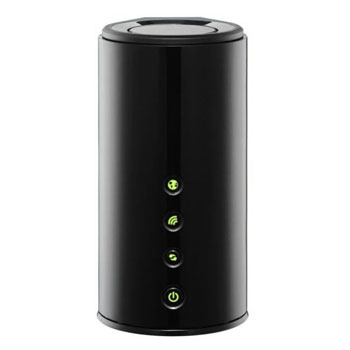
Dlink DIR-645 Wireless N 300Mbps Smartbeam Router with 4 Port Gigabit Switch
Scan code: LN41264
Manufacturer code: DIR-645/B
End Of Life

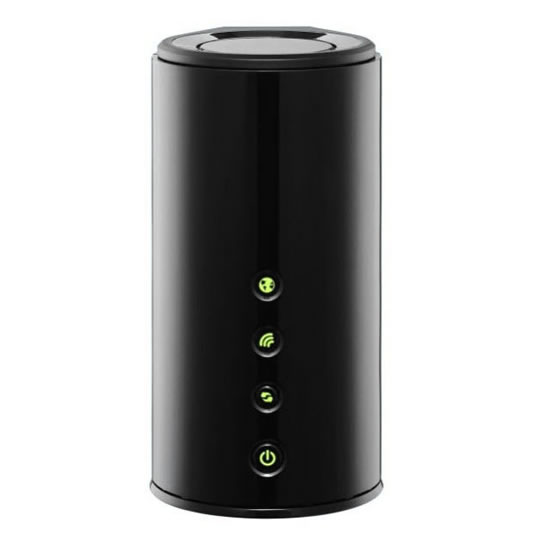

Dlink DIR-645 Wireless N 300Mbps Smartbeam Router with 4 Port Gigabit Switch
Dlink DIR-645 Whole Home Router 1000 Wireless 300Mbps with Smartbeam Technology Green
Scan code:
LN41264
Manufacturer code:
DIR-645/B
This product is no longer available to purchase.
Email me when the availability or price changes
- SCANPROTECT Protect against installation damage for 28 days.
Product Overview
D-Link’s Wireless N Home Router with SmartBeam™ technology extends the coverage of your wireless network, giving you a strong and stable Internet connection where concrete walls, successive floors in multi-storied buildings, or other architectural impediments can weaken a wireless signal. With Wireless N technology, this router gives you the very best in speed and coverage around your home.
Features
Revolutionary SmartBeam™ technology
Build a wireless home network capable of delivering the bandwidth to handle HD video streams, large media file downloads, and online gaming to multiple devices, simultaneously. SmartBeam uses 6 multi-directional antennas to find and track individual devices, then focus beams of bandwidth to those particular devices, ensuring a seamless connection anywhere in the home, even in corners where wireless access was previously not able to reach. Eliminate wireless dead spots and unleash comprehensive whole-home coverage on all your devices, all at once, providing you with uninterrupted connectivity to any device, anywhere in your home.
Share and stream your multimedia files
The DLNA-compatible Media Server built-into the Wireless N Home Router with SmartBeam™ technology allows you to stream media content directly onto computers, game consoles and media players like the Boxee Box by D-Link. You can even share any USB device (like a Printer or Hard Drive), courtesy of D-Link’s SharePort™ Plus technology.
IPv6 ready
This router is ready for the future of the Internet with support for the upcoming move from IPv4 to IPv6. It carries the IPv6 Ready Gold Logo, meaning that it not only supports the IPv6 protocol, but is also compatible with IPv6 equipment from other manufacturers. Using a dual stack architecture, this router can handle routing for both IPv4 and IPv6 networks at the same time, so you can be assured that your equipment is forward and backward compatible.
D-Link Green™
D-Link’s Wireless N Home Router with SmartBeam™ technology is part of D-Link GreenTM, D-Link’s programme for providing eco-friendly alternatives without compromising performance. The DIR-645 supports WLAN Scheduler, which switches off the wireless network when not needed, for example at night or during working hours. Also the power consumption is further reduced with its Energy StarTM power supply.
Build a wireless home network capable of delivering the bandwidth to handle HD video streams, large media file downloads, and online gaming to multiple devices, simultaneously. SmartBeam uses 6 multi-directional antennas to find and track individual devices, then focus beams of bandwidth to those particular devices, ensuring a seamless connection anywhere in the home, even in corners where wireless access was previously not able to reach. Eliminate wireless dead spots and unleash comprehensive whole-home coverage on all your devices, all at once, providing you with uninterrupted connectivity to any device, anywhere in your home.
Share and stream your multimedia files
The DLNA-compatible Media Server built-into the Wireless N Home Router with SmartBeam™ technology allows you to stream media content directly onto computers, game consoles and media players like the Boxee Box by D-Link. You can even share any USB device (like a Printer or Hard Drive), courtesy of D-Link’s SharePort™ Plus technology.
IPv6 ready
This router is ready for the future of the Internet with support for the upcoming move from IPv4 to IPv6. It carries the IPv6 Ready Gold Logo, meaning that it not only supports the IPv6 protocol, but is also compatible with IPv6 equipment from other manufacturers. Using a dual stack architecture, this router can handle routing for both IPv4 and IPv6 networks at the same time, so you can be assured that your equipment is forward and backward compatible.
D-Link Green™
D-Link’s Wireless N Home Router with SmartBeam™ technology is part of D-Link GreenTM, D-Link’s programme for providing eco-friendly alternatives without compromising performance. The DIR-645 supports WLAN Scheduler, which switches off the wireless network when not needed, for example at night or during working hours. Also the power consumption is further reduced with its Energy StarTM power supply.


Dlink DIR-645 Wireless N 300Mbps Smartbeam Router with 4 Port Gigabit Switch
![Dlink DIR-645 Wireless N 300Mbps Smartbeam Router with 4 Port Gigabit Switch]()