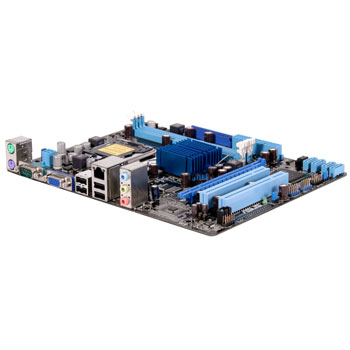
ASUS P5G41T-M LX2/GB/SI
Scan code: LN40870
Manufacturer code: P5G41T-M LX2/GB/SI
End Of Life

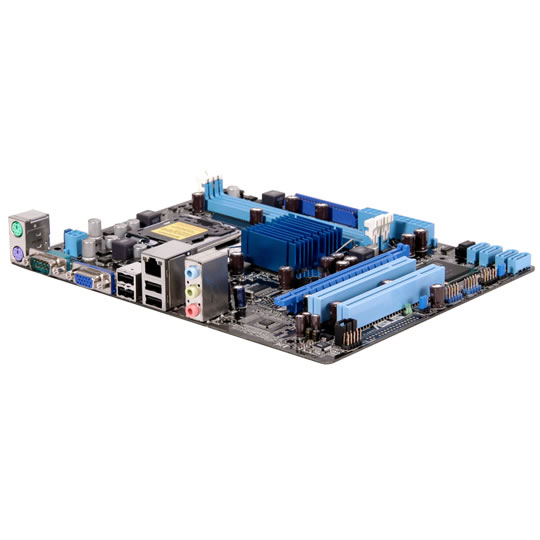
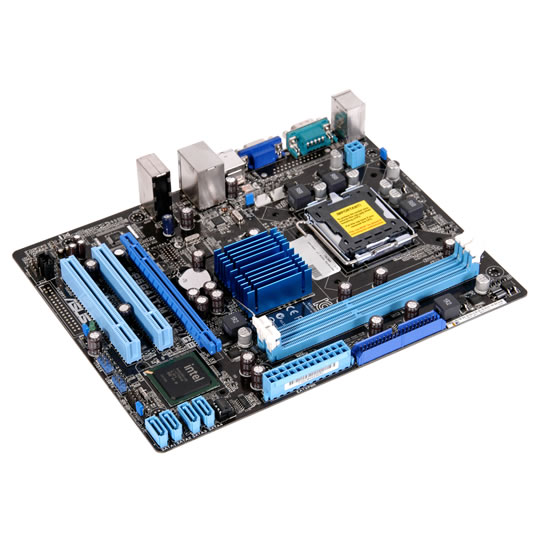


ASUS P5G41T-M LX2/GB/SI
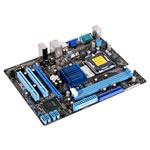
ASUS P5G41T-M LX2/GB/SI LGA775 microATX DDR3 SATA 3GB/s GbE 8Ch Audio
Scan code:
LN40870
Manufacturer code:
P5G41T-M LX2/GB/SI
This product is no longer available to purchase.
Email me when the availability or price changes
- 48HR REPLACEMENT If you need to return this item, your replacement will be dispatched within 2 working days of your product arriving back at Scan.
Product Overview
LGA775 Intel® Core™2 Processor Ready
This motherboard supports Intel® LGA775 Core™ 2 Extreme / Core2 Quad/ Core2 Duo processors, which are excellent for multitasking, multimedia, and enthusiastic gamers with 1333/ 1066/ 800 MHz FSB. This motherboard also supports Intel® CPUs in the 45nm manufacturing process.
Intel® G41 Chipset
The Intel® G41 Express Chipset is the latest chipset designed to support dual-channel DDR2 1066(O.C)/800 / 667 architecture, 1333 / 1066 / 800 FSB (Front Side Bus), and multi-core CPUs. It is embeded with the next-generation Intel® Graphics Media Acceleratior X4500. The Intel® G41 Express Chipset delivers optimized 3D graphics performance and support for Microsoft DirectX10. Shader Model 4.0 and OpenGL 2.1. It especially includes Intel® Fast Memory Access technology the significantly optimized the use of available memory bandwith and reduces the latency of the memory accesses.
Intel® IT Director Technology
Intel IT Director is a reactive software product that monitors security,data protection and health of a PC or network of PCs. It includes a centrally monitored dashboard for overseeing a network of wired or wireless PCs within a Local Area Network.
ASUS CrashFree BIOS 3
ASUS CrashFree BIOS 3 is an auto-recovery tool that allows you to restore a corrupted BIOS file using the bundled support DVD or USB disk that contains the latest BIOS file.
Turbo Key
ASUS Turbo Key allows you to turn the PC power button into an overclocking button. After you easy setup, Turbo Key boosts performances without interrupting ongoing work or games, simply through pressing the button.
EZ Flash 2
Simply update BIOS from a USB flash disk before entering the OS
ASUS EZ Flash 2 is a utility that allows you to update the BIOS without using an OS-based utility.
MyLogo 2
Personalize your system with customizable boot logo
You can convert your favorite photo into a 256-color boot logo for a more colorful and vivid image on your screen.
High Definition Audio
Enjoy high-end sound system on your PC!
The onboard 6-channel HD audio (High Definition Audio, previously codenamed Azalia) CODEC enables high-quality 192KHz/24-bit audio output, jack-sensing feature, retasking functions and multi-streaming technology that simultaneously sends different audio streams to different destinations. You can now talk to your partners on the headphone while playing a multi-channel network games. All of these are done on one computer.
ASUS Q-Fan
ASUS Q-Fan technology intelligently and automatically adjusts CPU fan speeds according to system load and temperature, enabling users to work in a distraction-free environment with minimal noise.
GreenASUS
The motherboard and its packaging comply with the European Union´s Restriction on the use of Hazardous Substances (RoHS). This is in line with the ASUS vision of creating environment-friendly and recyclable products and packaging to safeguard consumers´ health while minimizing the impact on the environment. Features
Features
Asus P5G41T-M LX2/GB/SI
Note: The specifications are subject to change without notice.
CPU
Intel® Socket 775 Core2 Quad/Core2 Extreme/Core2 Duo/Pentium® dual-core/Celeron® dual-core/Celeron® Processors
Support Intel next generation 45nm Multi-Core CPU
Intel Hyper-Threading Technology ready
Support Enhanced Intel SpeedStep Technology (EIST)
Chipset
Intel G41 / ICH7
System Bus
1333 / 1066 / 800 MHz
Memory
2 x DIMM, max. 4GB, DDR3 1066/800, non-ECC, un-buffered memory;
Dual channel memory architecture
* When installing total memory of 4GB capacity or more, Windows® 32-bit operation system may only recognize less than 3GB. Hence, a total installed memory of less than 3GB is recommended.
Expansion Slots
1 x PCIe x16 3.3v with latch
2 x PCI
VGA
Integrated Intel Graphics Media Accelerator (Intel® GMA4500)
max. shared memory Size: 1,759 MB
Supports Microsoft® DirectX 10
D-SUB Max. resolution : 2048 X 1536 X 32Bpp @75Hz
Storage
Southbridge Intel ICH7 supports
1 x UltraDMA 100/66
4 x SATA 3.0 Gb/s ports
LAN
Realtek RTL8112L Gigabit Ethernet PCIe controller
Audio
VIA VT1705 6-Ch. High Definition Audio CODEC
Support Multi-streaming
USB
8 x USB 2.0 ports (4 ports at mid-board, 4 ports at back panel)
ASUS Unique Features
ASUS CrashFree BIOS 3
ASUS EZ Flash 2
ASUS Q-Fan
ASUS AI NET 2
ASUS MyLogo 2
Back Panel I/O Ports
1 x PS/2 Keyboard
1 x PS/2 Mouse
1 x COM port
1 x D-Sub
1 x RJ45 port
4 x USB 2.0/1.1
6-channel Audio I/O
Internal Connectors
2 x USB connectors support additional 4 USB ports
4 x SATA connectors
1 x IDE connector
1 x CPU Fan connector
1 x Chassis Fan connector
1 x Front panel audio connector
1 x CD audio in header
1 x 24-pin ATX Power connector
1 x 4-pin ATX 12V Power connector
1 x System panel connector
BIOS
8 Mb Flash ROM, AMI BIOS, PnP, DMI v2.0, WfM2.0, SMBIOS v2.5, ACPI v2.0a
Manageability
WOL, PXE, PME Wake up, WOR by Ring
Accessories
1 x I/O shield
2 x SATA cable
1 x Support DVD
1 x UltraDMA 100/66/33 cable
1 x User Manual
Support DVD;
Drivers
ASUS PC Probe II
ASUS Update
Anti-virus software (OEM version)
Factor
uATX Form Factor 9.6" x 7.5" (24.4 cm x 19.1 cm)
This motherboard supports Intel® LGA775 Core™ 2 Extreme / Core2 Quad/ Core2 Duo processors, which are excellent for multitasking, multimedia, and enthusiastic gamers with 1333/ 1066/ 800 MHz FSB. This motherboard also supports Intel® CPUs in the 45nm manufacturing process.
Intel® G41 Chipset
The Intel® G41 Express Chipset is the latest chipset designed to support dual-channel DDR2 1066(O.C)/800 / 667 architecture, 1333 / 1066 / 800 FSB (Front Side Bus), and multi-core CPUs. It is embeded with the next-generation Intel® Graphics Media Acceleratior X4500. The Intel® G41 Express Chipset delivers optimized 3D graphics performance and support for Microsoft DirectX10. Shader Model 4.0 and OpenGL 2.1. It especially includes Intel® Fast Memory Access technology the significantly optimized the use of available memory bandwith and reduces the latency of the memory accesses.
Intel® IT Director Technology
Intel IT Director is a reactive software product that monitors security,data protection and health of a PC or network of PCs. It includes a centrally monitored dashboard for overseeing a network of wired or wireless PCs within a Local Area Network.
ASUS CrashFree BIOS 3
ASUS CrashFree BIOS 3 is an auto-recovery tool that allows you to restore a corrupted BIOS file using the bundled support DVD or USB disk that contains the latest BIOS file.
Turbo Key
ASUS Turbo Key allows you to turn the PC power button into an overclocking button. After you easy setup, Turbo Key boosts performances without interrupting ongoing work or games, simply through pressing the button.
EZ Flash 2
Simply update BIOS from a USB flash disk before entering the OS
ASUS EZ Flash 2 is a utility that allows you to update the BIOS without using an OS-based utility.
MyLogo 2
Personalize your system with customizable boot logo
You can convert your favorite photo into a 256-color boot logo for a more colorful and vivid image on your screen.
High Definition Audio
Enjoy high-end sound system on your PC!
The onboard 6-channel HD audio (High Definition Audio, previously codenamed Azalia) CODEC enables high-quality 192KHz/24-bit audio output, jack-sensing feature, retasking functions and multi-streaming technology that simultaneously sends different audio streams to different destinations. You can now talk to your partners on the headphone while playing a multi-channel network games. All of these are done on one computer.
ASUS Q-Fan
ASUS Q-Fan technology intelligently and automatically adjusts CPU fan speeds according to system load and temperature, enabling users to work in a distraction-free environment with minimal noise.
GreenASUS
The motherboard and its packaging comply with the European Union´s Restriction on the use of Hazardous Substances (RoHS). This is in line with the ASUS vision of creating environment-friendly and recyclable products and packaging to safeguard consumers´ health while minimizing the impact on the environment. Features
Features
Asus P5G41T-M LX2/GB/SI
Note: The specifications are subject to change without notice.
CPU
Intel® Socket 775 Core2 Quad/Core2 Extreme/Core2 Duo/Pentium® dual-core/Celeron® dual-core/Celeron® Processors
Support Intel next generation 45nm Multi-Core CPU
Intel Hyper-Threading Technology ready
Support Enhanced Intel SpeedStep Technology (EIST)
Chipset
Intel G41 / ICH7
System Bus
1333 / 1066 / 800 MHz
Memory
2 x DIMM, max. 4GB, DDR3 1066/800, non-ECC, un-buffered memory;
Dual channel memory architecture
* When installing total memory of 4GB capacity or more, Windows® 32-bit operation system may only recognize less than 3GB. Hence, a total installed memory of less than 3GB is recommended.
Expansion Slots
1 x PCIe x16 3.3v with latch
2 x PCI
VGA
Integrated Intel Graphics Media Accelerator (Intel® GMA4500)
max. shared memory Size: 1,759 MB
Supports Microsoft® DirectX 10
D-SUB Max. resolution : 2048 X 1536 X 32Bpp @75Hz
Storage
Southbridge Intel ICH7 supports
1 x UltraDMA 100/66
4 x SATA 3.0 Gb/s ports
LAN
Realtek RTL8112L Gigabit Ethernet PCIe controller
Audio
VIA VT1705 6-Ch. High Definition Audio CODEC
Support Multi-streaming
USB
8 x USB 2.0 ports (4 ports at mid-board, 4 ports at back panel)
ASUS Unique Features
ASUS CrashFree BIOS 3
ASUS EZ Flash 2
ASUS Q-Fan
ASUS AI NET 2
ASUS MyLogo 2
Back Panel I/O Ports
1 x PS/2 Keyboard
1 x PS/2 Mouse
1 x COM port
1 x D-Sub
1 x RJ45 port
4 x USB 2.0/1.1
6-channel Audio I/O
Internal Connectors
2 x USB connectors support additional 4 USB ports
4 x SATA connectors
1 x IDE connector
1 x CPU Fan connector
1 x Chassis Fan connector
1 x Front panel audio connector
1 x CD audio in header
1 x 24-pin ATX Power connector
1 x 4-pin ATX 12V Power connector
1 x System panel connector
BIOS
8 Mb Flash ROM, AMI BIOS, PnP, DMI v2.0, WfM2.0, SMBIOS v2.5, ACPI v2.0a
Manageability
WOL, PXE, PME Wake up, WOR by Ring
Accessories
1 x I/O shield
2 x SATA cable
1 x Support DVD
1 x UltraDMA 100/66/33 cable
1 x User Manual
Support DVD;
Drivers
ASUS PC Probe II
ASUS Update
Anti-virus software (OEM version)
Factor
uATX Form Factor 9.6" x 7.5" (24.4 cm x 19.1 cm)


ASUS P5G41T-M LX2/GB/SI
![ASUS P5G41T-M LX2/GB/SI]()