Kworld DV/AV 883 Video Editing Card
End Of LifeSale
Kworld DV/AV 883 Video Editing Card
Scan code: LN14855 Manufacturer code: VS-883DV-Pro
End Of Life
End Of LifeSale

Kworld DV/AV 883 Video Editing Card

Kworld DV/AV 883 Video Editing Card SVideo/Video In/Audio In/Audio Out/ 1394a Firewire

Scan code: LN14855 Manufacturer code: VS-883DV-Pro
End of life
This product is no longer available to purchase.

Email me when the availability or price changes

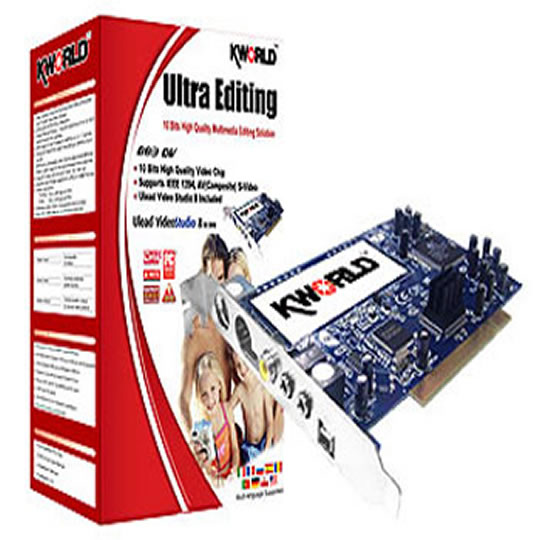
Product Overview High-Definition Video Quality! Integrated with Conxant 883 high quality 10bit video decoder chip with higher video display resolution.

DV/AV 883 Editing Card can capture any digital / analog videos from IEEE 1394 or AV/ S-Video input
Features - Integrated DV and Analog video interface

- High Quality 10-Bits NTSC/PAL/SECAM video decoder chip

- IEEE 1394-1995 Compliant and Compatible with Proposal 1394A
Provide Bus Master function Interface (OHCI) Specification
Supports Serial Bus Data Rates of 100, 200,and 400 Mbits/s
Both Asynchronous and Isochronous data transfers are supported
DV Format
NTSC: 720 x 480(CCIR601), YUV 4:1:1, 30fps,

- 5:1 DV CODEC, 3.6MB/sec
PAL: 720 x 576(CCIR601), YUV 4:2:0, 25fps, 5:1 DV

- CODEC, 3.6MB/sec
Capture video source from VHS, V8, Hi8, DV, D8.etc

- Composite/S-Video and Digital DV Input for connecting other

- video sources such as DV / DVD Player/ VCD/ VHS/ Camcorder

- One stop editing solution -- Ulead Video Studio
Capture
Edit
Author
Burn
Warranty

Please note your statutory rights are not affected.

For further information regarding Scan's warranty procedure please see our terms and conditions

Details
Duration:
12 months
Type:
Return to base
DOA Period:
28 days
RTB Period:
12 months
Manufacturer Contact Details
Manufacturer:
Scan
Telephone:
01204-474747

Additional Notes:
1 year warranty, return to Scan subject to manufacturer's warranty.


This Warranty does not cover any damage due to abnormal use or conditions, misuse, neglect, abuse, accident, improper handling or storage, exposure to moisture, unauthorized modifications, alterations, or repairs, improper installation, improper use of any electrical source, undue physical or electrical stress, operator error, non-compliance with instructions.

Buying Guide
System Buses & Bandwidth
Date Issued: 21st Oct 2008

In computing terms, system buses are used to connect various components to the motherboard’s core logic and, often, to each other. Modern PCs run with a multitude of high-speed buses ranging from the interconnects between, say, the chipset and the CPU, graphics card, memory, and peripherals.

Read More

Video Editing
Video Editing
Date Issued: 20th Oct 2008

You’d be right to think that it’s possible to carry out basic video editing on any modern PC running Windows XP - straight out of the box. XP includes the Windows Movie Maker video-editing program and, although it lacks frills, it does what it does quite well.

Read More

PCI Express
PCI Express
Date Issued: 20th Oct 2008

A motherboard’s main job is to act as a conduit between the various hardware elements that make up a PC. It needs to be able to link the desired CPU(s), system memory, graphics card, hard drive(s), and add-in cards and enable them to work in harmony.

Read More

Multi-GPUs
Multi-GPUs
Date Issued: 20th Oct 2008

If you’re the least bit interested in graphics cards, we’re sure that you’ve heard the terms SLI and CrossFire bandied about recently. Touted as a means of achieving maximum 3D performance by, effectively, using two or more graphics cards in tandem, multi-GPU technology is here to stay. With that in mind, let’s take a closer look SLI and CrossFire; the two competing multi-GPU solutions from NVIDIA and ATI Technologies, respectively.

Read More

GPU
GPU
Date Issued: 20th Oct 2008

Explaining how a modern GPU works in completeness would take a book. Or two. Per class of chip. Per vendor. They’re extraordinarily complex pieces of engineering and production, and the end result contains more transistors than multiple modern x86 processors.

Read More

Updating Drivers
Updating Drivers
Date Issued: 25th Jun 2008

Updating drivers can sometimes be a bit of a gamble. Will the drivers come with an installer? Will you need to uninstall the old drivers first? Many drivers these days do come with an installer, which simplifies the process dramatically.

Read More