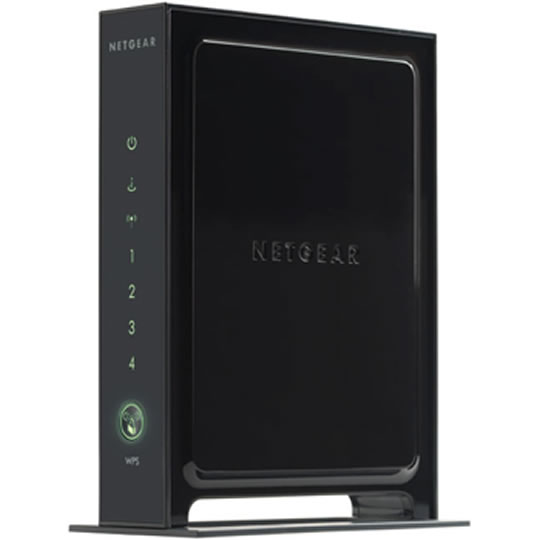
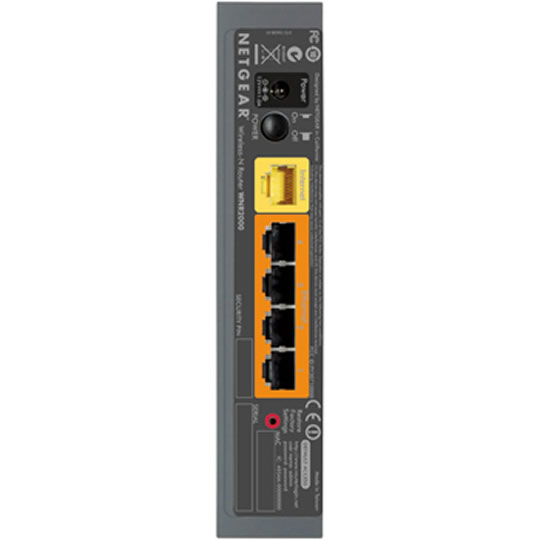
Netgear WNR2000 Black N 300Mbps DSL/Cable Router, 4 Port Switch, Firewall, VPN
End Of Life
Netgear WNR2000 Black N 300Mbps DSL/Cable Router, 4 Port Switch, Firewall, VPN
Scan code: LN24236 Manufacturer code: WNR2000-100UKS
End Of Life

Netgear WNR2000 Black N 300Mbps DSL/Cable Router, 4 Port Switch, Firewall, VPN : image 1
Netgear WNR2000 Black N 300Mbps DSL/Cable Router, 4 Port Switch, Firewall, VPN : image 2
  • Thumbnail 1 : Netgear WNR2000 Black N 300Mbps DSL/Cable Router, 4 Port Switch, Firewall, VPN
  • Thumbnail 2 : Netgear WNR2000 Black N 300Mbps DSL/Cable Router, 4 Port Switch, Firewall, VPN
End Of Life

Netgear WNR2000 Black N 300Mbps DSL/Cable Router, 4 Port Switch, Firewall, VPN

Netgear WNR2000 Black N 300Mbps DSL/Cable Router, 4 Port Switch, Firewall, VPN

Scan code: LN24236 Manufacturer code: WNR2000-100UKS
End of life
This product is no longer available to purchase.

Email me when the availability or price changes

  • SCANPROTECT Protect against installation damage for 28 days.
Product Overview New Wireless-N technology delivers exceptional range and speed

Easy setup with Smart Wizard® installation CD

Automatically checks for, downloads and installs firmware revisions to keep you operating at optimal levels Features * Simple and secure way to share your high-speed Internet connection
* Works with older Wireless-G devices and new Wireless-N devices
* Push ‘N’ Connect securely connects at the touch of a button
* Use with a RangeMax Wireless-N Adapters and boost your performance and range

Features

* New Wireless-N technology delivers exceptional range and speed
* Easy setup with Smart Wizard® Installation CD
* Push ‘N’ Connect using Wi-Fi Protected SetupTM (WPS) allows you to add computers to the network quickly and securely
o No need to remember your network password
o Requires the use of NETGEAR wireless adapters supporting this feature (WN111, WNDA3100, WG111)
* Automatically checks and upgrades to latest software for optimal performance
* Internal antennas deliver maximum performance and range
Warranty

Please note your statutory rights are not affected.

For further information regarding Scan's warranty procedure please see our terms and conditions

Details
Duration:
24 months
Type:
Direct
DOA Period:
7 days
Manufacturer Contact Details
Telephone:
0134 445 8200

Additional Notes:
"Manufacturer's warranty is reprinted here for your information only. Warranty terms subject to change without notice"

We recommend that you retain your retail packaging within the first 28 days of purchase.

Subject to 2 years manufacturer's warranty, direct with Netgear.

Please follow the RMA procedure on link,
http://www.netgear.co.uk/rma_procedure.php

To log a new online support query or to reply to an existing case, please do the following:

1. Go to http://my.netgear.com
2. Fill in our online support web form
3. Follow the on screen instructions

24 x 7 pre- or post-sales technical assistance can be obtained from our European Support Team on 0844 875 4000.

Please contact Netgear only on 0844 875 4000 for your full 2 years warranty.

This Warranty does not cover any damage due to abnormal use or conditions, misuse, neglect, abuse, accident, improper handling or storage, serial number altered, defaced or removed; or has had the warranty seal on the system altered, defaced or removed, exposure to moisture, unauthorized modifications, alterations, or repairs, improper installation, improper use of any electrical source, undue physical or electrical stress, operator error, non-compliance with instructions.

Buying Guide
Need help? Read our Home Broadband Buying Guide
Wi-Fi
Wi-Fi
Date Issued: 20th Oct 2008

Home networking let’s you do great things that aren’t possible with standalone PCs. Printers can be shared between PC, so there’s no need to buy one for each machine.

Read More

Port Forwarding
Port Forwarding
Date Issued: 20th Oct 2008

Port forwarding is a technique you’ll need to use to enable certain services if you’re using a router. If you don’t really care how it works, you can skip this section and just find out how to do it.

Read More

Broadband ADSL vs Cable
Date Issued: 20th Oct 2008

On the surface we’re asking a relatively simple question here: "What do I need to get my broadband Internet working?" Of course, it’s not quite as simple as that. Worry not, however, for this TekSpek covers both the differences between the two popular kinds of broadband and what you’ll need to get your home computer(s) connected up.

Read More

Wi-Fi Security
Wi-Fi Security
Date Issued: 19th Jun 2008

WiFi is a wonderful thing. You can take your laptop anywhere in your house and access the Internet, or access your network from the garden. However, it does introduce the grim possibility of somebody else doing exactly the same, without you ever knowing. This guide seeks to make you aware of various security terms and ideas associated with wireless networking and what you should consider when setting up a wireless network.

Read More

Home Networking
Home Networking
Date Issued: 26th Oct 2006

As a growing number of homes contain more than one computer, their users must find ways to network them. The primary purpose for creating a home network tends to be to provide Internet access to all computers within the house. There are other good reasons, however. These include enabling LAN gaming, data backups from one machine to another and the sharing of music within the home.

Read More