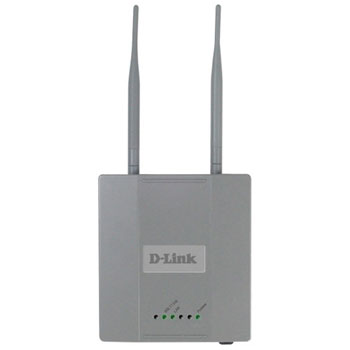
DWL-3200AP/B 108Mbps Wireless Access Point with PoE 802.11b/g & 11/54/108Mbps
Scan code: LN17031
Manufacturer code: DWL-3200AP/B
End Of Life

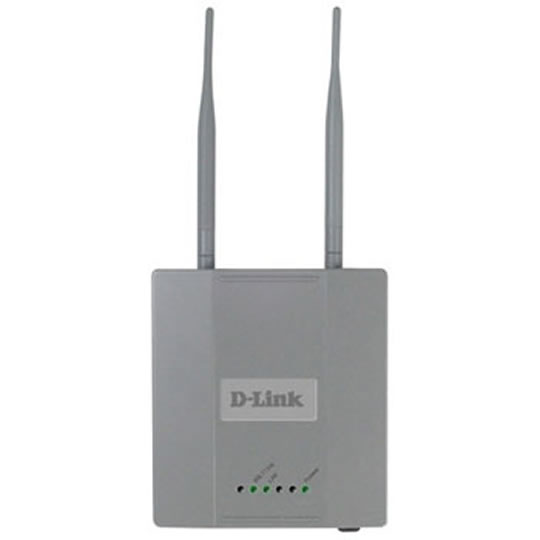

DWL-3200AP/B 108Mbps Wireless Access Point with PoE 802.11b/g & 11/54/108Mbps
Dlink DWL-3200AP 108Mbps Wireless Access Point with PoE (802.11b/g & 11/54/108Mbps)
Scan code:
LN17031
Manufacturer code:
DWL-3200AP/B
This product is no longer available to purchase.
Email me when the availability or price changes
Product Overview
For Business-Class Environments
The D-Link AirPremier DWL-3200AP is a powerful and reliable wireless access point for business-class enterprise environments. Designed for indoor installation, this access point provides secure options for network administrators to deploy a highly manageable and extremely robust wireless network. This access point supports Power over Ethernet (PoE) and provides two high-gain antennas for optimal wireless coverage.
PoE Support
Enclosed in a plenum metal chassis, the DWL-3200AP adheres to strict fire codes and ensures complete safety. For advanced installations, this high- speed access point has an integrated 802.3af Power over Ethernet (PoE) support to allow installation in areas where power outlets are not readily available.
Up to 108Mbps Wireless Speed
The DWL-3200AP delivers extremely reliable wireless performance with standard 802.11g wireless throughput rates of up to 54Mbps. It has the added capability of reaching maximum wireless signal rates of up to 108Mbps (Turbo mode) powered by D-Link 108G technology. At the same time, the DWL- 3200AP remains fully compatible with the IEEE 802.11b and 802.11g standards.
Advanced Wireless Security
Since wireless security remains a strong concern among businesses, the DWL-3200AP provides the latest wireless security technologies by supporting both WPA Enterprise and 802.1x to ensure complete network protection. In addition, the DWL-3200AP currently comes 802.11i-ready to fully support industrial grade wireless security.
Advanced Network Management
Network administrators can manage all the DWL-3200AP's settings via its web-based configuration utility or with Telnet. For advanced network management, the administrators can use D-Link's AP Manager or D-View SNMP management module to configure and manage multiple access points from a single location. In addition to a streamlined management process, network administrators can also verify and conduct regular maintenance checks without wasting resources by sending personnel out to physically verify proper operation.
WDS (Wireless Distribution System) Support
To maximize total return on investment, the DWL-3200AP can be configured to operate as an access point (AP mode), a point-to-point bridge or a point-to-multipoint bridge (WDS mode). In the WDS mode, the DWL-3200AP communicates only with wireless bridges, without allowing for wireless clients or stations to access them.
Increased Network Flexibility and Efficiency
The DWL-3200AP supports multiple SSIDs, allowing you to separate applications based on security and performance requirements. You can enable encryption and authentication on one SSID to protect private applications and no security on another SSID to maximize open connectivity for public usage. Multiple SSIDs means you can mix and match the broadcasting of SSIDs. For public Internet access applications, you can broadcast the SSID to enable user radio cards to automatically find available access points. For private applications, you can disable SSID broadcast to prevent intruders from identifying your network. You can set the number of users that can associate via a particular SSID to control usage of particular applications. This can help provide a somewhat limited form of bandwidth control for particular applications.
Cost Saving and Mobile Applications
By supporting multiple SSIDs, the DWL-3200AP allows you to logically divide your access point into several virtual access points all within a single hardware platform. Rather than having two separate WLANs, you can deploy one access point to support more than one application, such as public Internet access and internal network control to increase flexibility and keep costs down.
Features * 108Mbps SuperG managed wireless access point
* Plenum metal chassis which can be safely secured to the wall
* IEEE 802.11g
* 10/100Mbps Ethernet port with 802.3af PoE support
* Can be used as Access Point, Point-to-Point (PtP) bridge with another DWL-3200AP, or Point-to-Multipoint (PtMP) bridge
* WDS (Wireless Distribution System)
* Multiple SSID and 802.1Q VLAN support
* WiFi Protected Access (WPA/WPA2)
* WEP encryption 64/128 bits
* Detachable 5dBi antennas for connecting external antenna (Reverse SMA-connector, female)
* Web based or Telnet configuration
* AP Manager (free download!) or D-View management module support
The D-Link AirPremier DWL-3200AP is a powerful and reliable wireless access point for business-class enterprise environments. Designed for indoor installation, this access point provides secure options for network administrators to deploy a highly manageable and extremely robust wireless network. This access point supports Power over Ethernet (PoE) and provides two high-gain antennas for optimal wireless coverage.
PoE Support
Enclosed in a plenum metal chassis, the DWL-3200AP adheres to strict fire codes and ensures complete safety. For advanced installations, this high- speed access point has an integrated 802.3af Power over Ethernet (PoE) support to allow installation in areas where power outlets are not readily available.
Up to 108Mbps Wireless Speed
The DWL-3200AP delivers extremely reliable wireless performance with standard 802.11g wireless throughput rates of up to 54Mbps. It has the added capability of reaching maximum wireless signal rates of up to 108Mbps (Turbo mode) powered by D-Link 108G technology. At the same time, the DWL- 3200AP remains fully compatible with the IEEE 802.11b and 802.11g standards.
Advanced Wireless Security
Since wireless security remains a strong concern among businesses, the DWL-3200AP provides the latest wireless security technologies by supporting both WPA Enterprise and 802.1x to ensure complete network protection. In addition, the DWL-3200AP currently comes 802.11i-ready to fully support industrial grade wireless security.
Advanced Network Management
Network administrators can manage all the DWL-3200AP's settings via its web-based configuration utility or with Telnet. For advanced network management, the administrators can use D-Link's AP Manager or D-View SNMP management module to configure and manage multiple access points from a single location. In addition to a streamlined management process, network administrators can also verify and conduct regular maintenance checks without wasting resources by sending personnel out to physically verify proper operation.
WDS (Wireless Distribution System) Support
To maximize total return on investment, the DWL-3200AP can be configured to operate as an access point (AP mode), a point-to-point bridge or a point-to-multipoint bridge (WDS mode). In the WDS mode, the DWL-3200AP communicates only with wireless bridges, without allowing for wireless clients or stations to access them.
Increased Network Flexibility and Efficiency
The DWL-3200AP supports multiple SSIDs, allowing you to separate applications based on security and performance requirements. You can enable encryption and authentication on one SSID to protect private applications and no security on another SSID to maximize open connectivity for public usage. Multiple SSIDs means you can mix and match the broadcasting of SSIDs. For public Internet access applications, you can broadcast the SSID to enable user radio cards to automatically find available access points. For private applications, you can disable SSID broadcast to prevent intruders from identifying your network. You can set the number of users that can associate via a particular SSID to control usage of particular applications. This can help provide a somewhat limited form of bandwidth control for particular applications.
Cost Saving and Mobile Applications
By supporting multiple SSIDs, the DWL-3200AP allows you to logically divide your access point into several virtual access points all within a single hardware platform. Rather than having two separate WLANs, you can deploy one access point to support more than one application, such as public Internet access and internal network control to increase flexibility and keep costs down.
Features * 108Mbps SuperG managed wireless access point
* Plenum metal chassis which can be safely secured to the wall
* IEEE 802.11g
* 10/100Mbps Ethernet port with 802.3af PoE support
* Can be used as Access Point, Point-to-Point (PtP) bridge with another DWL-3200AP, or Point-to-Multipoint (PtMP) bridge
* WDS (Wireless Distribution System)
* Multiple SSID and 802.1Q VLAN support
* WiFi Protected Access (WPA/WPA2)
* WEP encryption 64/128 bits
* Detachable 5dBi antennas for connecting external antenna (Reverse SMA-connector, female)
* Web based or Telnet configuration
* AP Manager (free download!) or D-View management module support


